For Business of All Sizes: A Solid Way for Business Data Backup
Businesses are vulnerable to hacking and cyber attacks, which can compromise their confidential data and lead to financial losses, as seen in some cases where companies have suffered significant revenue loss due to hacking.
Cyber attacks can severely harm businesses by compromising valuable data, leading to significant losses. To mitigate this risk, businesses should prioritize data backup using a reliable backup and recovery tool, ensuring they don't lose customers or opportunities due to data loss.
Having a business data backup can save you from the destruction of a cyber attack, allowing your business to survive such invasions.
Why Is Backup Important for Business?
Businesses are indeed required to back up their data, as they are vulnerable to hacking, viruses, spyware, and malware, posing significant risks to their operations and security. This is especially true in today's digital landscape where cyber threats are becoming increasingly sophisticated and prevalent. Regular data backups can help mitigate these risks and ensure business continuity in the event of a cyber attack or data loss. Therefore, it is crucial for businesses to implement robust data backup and security measures to protect their sensitive information and maintain a secure online presence.
Many businesses fall victim to cyber threats, losing revenue and reputation, and even customer trust, ultimately leading to financial losses and business closure.
Having a business data backup is crucial to prevent financial loss and ensure a quick recovery in case of a cyber attack, which can be mitigated with the help of anti-virus software, but hackers have become increasingly sophisticated, making backup a necessary safeguard.
Best Backup Plan for Business
To protect your business against data loss, we recommend following the 3-2-1 Backup Rule: keep three copies of your data, on two different types of media, and one offsite copy. This ensures that your business has a foolproof backup plan in place, even in the event of a disaster or data loss. By following this rule, you can ensure that your business data is always safe and accessible.
What Is the 3-2-1 Backup Rule?
The 3-2-1 backup rule is a simple yet effective guideline for businesses to ensure their data is protected. It involves having three copies of your data, two of which are local (e.g., on-site backups), and one is offsite (e.g.
The 3-2-1 rule requires creating three copies of your data, with one primary copy and two backup copies, one of which is stored on a different type of storage media, and the other in the cloud.
Having multiple backups of your data is a solid way to ensure business continuity. This rule allows you to have a backup plan in case one backup fails, and also enables you to utilize different platforms for creating backups, which is a wise approach to data security. By following this rule, you can have peace of mind knowing that your data is safe and can be recovered in case of an emergency.
Having multiple backups allows you to not only recover from a cyber-attack, but also from physical disasters like a fire in your office, ensuring your business can survive and thrive even in the face of significant setbacks.
A Reliable Tool to Cater to All Your Backup Needs
If your business is in need of a reliable tool to back up its data, look no further than the Qiling Backup Enterprise, a highly trustworthy solution that every business should consider.
This solution addresses all the mentioned problems, offering unbeatable features and backup options. It also comes with a range of handy tools, making it a comprehensive solution.
The Qiling Backup Enterprise is a must-have tool for every business, offering a comprehensive list of features that cater to all imaginable needs.
Let us walk you through its features:
- It can create a backup to the network drive.
- This tool allows you to back up your data to the cloud, specifically to services like Google Drive or Dropbox.
- Full/Incremental/differential backup is offered by this tool.
- This software allows for disk cloning, migrating the operating system to a solid state drive (SSD) or hard disk drive (HDD), providing a convenient and efficient way to upgrade or replace computer hardware.
- It has a mind-The Smart Backup feature enables users to create an automatic backup, ensuring their data is safely stored and easily recoverable in case of any system issues or file corruption. This feature is particularly useful for users who frequently update or modify important files, as it provides an added layer of protection against potential data loss.
- You also get SQL/Exchange Backup and Restore with this tool.
- Various options like System/File/Disk/Outlook Email Backup and restore are available.
- Another good feature is Disk/Partition Backup and restore.
- Qiling Backup Center provides centralized management for this tool.
- It has an Image-Reserve Strategy.
- It offers Universal Restore.
Backup Options you get:
- For enhanced security, it offers password protection.
- It notifies you through email about all the happenings.
- Pre/Post Command is another great option given by this tool.
Tools that come with the software:
- OEM Rebrand Service
- PXE Server
- P2V/Command Line
- Mount/Unmount image
- Check Image
- WinPE Bootable CD
How to Backup with Qiling Backup Enterprise
Download the software from idiskhome.com, launch it on your computer, and follow the self-explanatory instructions for a hassle-free experience. You can find all the necessary information on their website.
Qiling Backup Enterprise offers comprehensive security features for businesses to manage their machine OS and data. A crucial preparation is creating an emergency boot disk, which allows you to boot a failed machine or revive a dead operating system and restore valuable data.
Here's how you can create an Qiling emergency disk:
Step 1. Connect a USB drive to your PC and ensure it has enough space to be written and read.
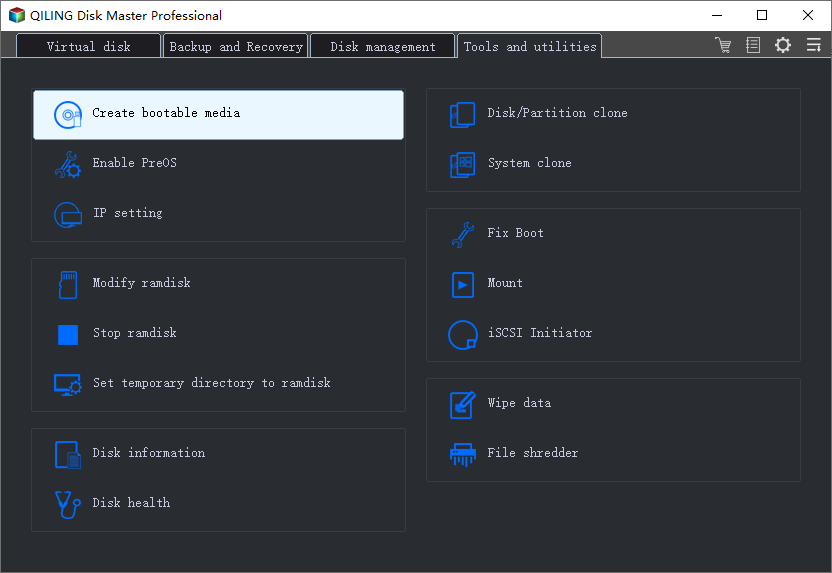
Step 2. Run Qiling Backup, and click "Tools > Create bootable media".
Step 3. To extend your desktop to another display, you can go to the "Settings" app, then to "System" > "Display" > "Multiple displays" and toggle the switch next to "Extend desktop to this display" to turn it on. Alternatively, you can press the Windows key + P on your keyboard to open the Projector window and click on the "Extend" button, or press the Windows key + I to open the Settings app and follow the same steps.
To create a USB emergency disk, select the option to create a USB rescue media. This will allow you to create a bootable USB drive that can be used to boot up your system in case of an emergency, and then restore your system to a previous state from a backup. You can also create a CD/DVD emergency disk and ISO file, but selecting the USB option will provide a more convenient and portable way to access your system's rescue media.
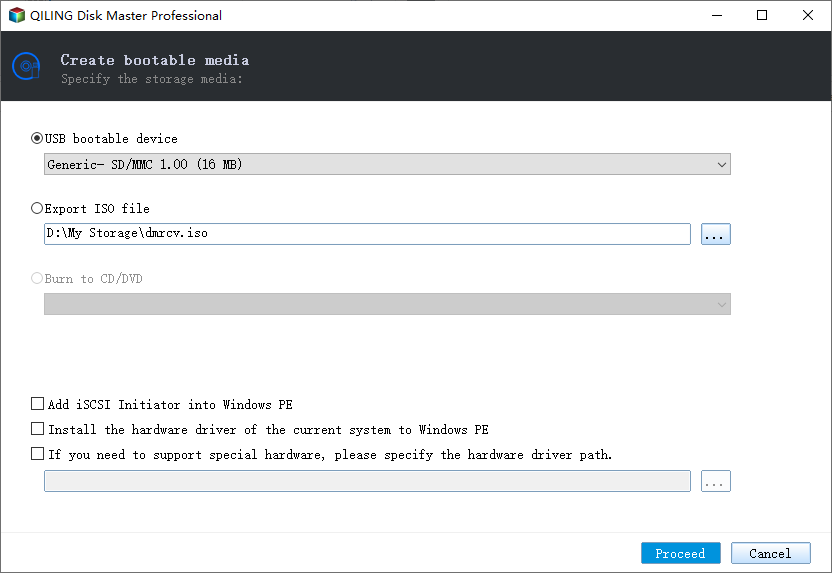
To add a driver for your bootable disk, select the "Add Driver" option and click "Add" to add the desired driver, such as disk, RAID, or network card drivers, to ensure Qiling Backup can recognize your hard disk or network drive in the WinPE environment.
Step 4. Click "Proceed" to create a bootable USB drive.
You'll be surprised to find that this product can be used not only for regular business data and system backup, but also as a disk/server cloning software. Additionally, it allows you to back up RAID hard drives, making it a versatile tool for various backup and cloning needs.
Conclusion
Business data backup is essential for all companies, regardless of size, to ensure continuity in the event of a cyber crisis. The Qiling Backup Enterprise is a reliable tool that can meet all backup needs with a simple click, making it a convenient solution for businesses. By using this tool, backing up data can be a hassle-free process, allowing businesses to stay prepared and powered through any potential issues.
Related Articles
- 6 Solutions for Windows 10 Can't Create Recovery Drive
- How to Install Windows 11 on VirtualBox (Never Forget BACKUP!)
- ISO Is Corrupted| How to Fix a Corrupted ISO Files in Windows 11/10
- How to Recover Deleted Files from PS4 Easily
Are you looking for an easy way to recover deleted files from PS4? Refer to this article and learn how to use three efficient ways to help you restore these files. - How to Recover Permanently Deleted Pictures from Laptop Easily
Deleted your pictures/photos permanently from laptop and want to retrieve them? Learn efficient solutions to recover permanently deleted pictures/photos from this page.
Products
Articles & Tutorials
- Data Recovery
- Data Backup
- File Recovery
- File Backup
- System Backup and Restore
- Disk and Partition Clone
- Technical articles
- Mobile articles
- Disk Master Help
- Windows Data Recovery Tutorials
- Windows Secure Delete Tutorials
- Windows Partition Management Tutorials
- Windows File Backup and Restore Tutorials
- Windows System Backup and Restore Tutorials
- Windows Disk Backup and Restore Tutorials
- Windows Clone Tutorials