[Tutorial 2023] Configure FAST Cache best practices and limitations
Caching is to improve the read and write performance of the system, the higher the hit rate of the cache, the better the cache effect. The local cache is generally limited by the size of the local memory, and the full dataset generally cannot be stored. Based on this scenario, on the one hand, the more cached data, the higher the hit rate will theoretically be; on the other hand, if all data cannot be saved, then find a way to use limited memory to store frequently accessed data. Fast Cache measures the frequency and time of each accessed data block, eliminates unwanted data blocks through the optimal algorithm, and retains frequently accessed data blocks.
Fast Cache provides storage systems with Flash drive-level performance, increasing IOPS processing power while only placing hot data in memory or Flash disks, reducing costs. Fast Cache absorbs bursty I/O from applications, reducing the workload of HDD disks. While Fast Cache has many advantages, it is not suitable for all applications, such as continuous and large I/O. This article provides best practices and limitations for configuring Fast Cache.
Before deciding to use Fast Cache, carefully analyze the I/O pattern of your application. Fast Cache is not available for all I/O types. For example, continuous streams of large I/O data may not cause data to be promoted to Fast Cache at all, because these I/Os do not access the same 64KB block multiple times. The key to maximizing Fast Cache performance is the I/O reference to the data location. Applications that frequently access a small area of data will benefit most from Fast Cache, such as database indexes and reference tables.
Types of applications suitable for Fast Cache:
- Small block, random I/O with high location (high location can be understood as the proximity of data reference location or frequent access to data in a certain area)
- Data Hit - Highly frequent access to the same piece of data
- At present, system performance is limited by HDD capabilities, not SP capabilities
If you have a large amount of running memory, you can select part of the running memory for caching. If high-speed disk drives, such as SSDs, M2, you can select these high-speed drives to do caching. It is recommended to use the remaining running memory for caching, but leave enough running memory for the system and other programs. You have the flexibility to select the logical drives that need to be optimized to optimize the access performance of the selected disks.
In the current situation where the bottleneck is disk, Fast Cache can improve the performance of the entire system, but bursty IOPS will also put pressure on the SP CPU. Therefore, when designing the system, ensure that the bursty I/O introduced by Fast Cache does not cause the SP CPU utilization to > 70%.
Random, small I/O is suitable for Fast Cache, avoid enabling Fast Cache for sequential I/O applications such as database logs, loopback logs, and VNX File SavVol LUNs.
If possible, try to use careful consideration when determining the size of the Fast Cache. Leave enough running memory for the system and other programs, otherwise system performance will freeze. If you need to expand or reduce the capacity of Fast Cache in the future, you must destroy it and then rebuild it.
How to use the Windows Fast Cache utility
Use the following procedure to set up the cache
Step 1Download Fast Cache and install it
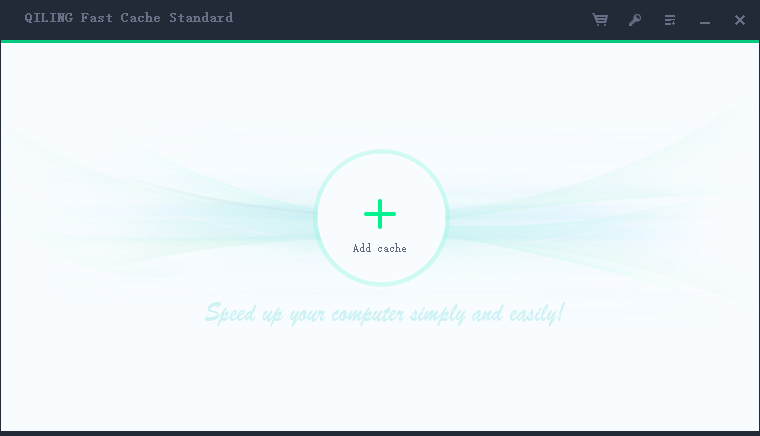
Step 2Run Fast Cache and click "+" to set the cache information
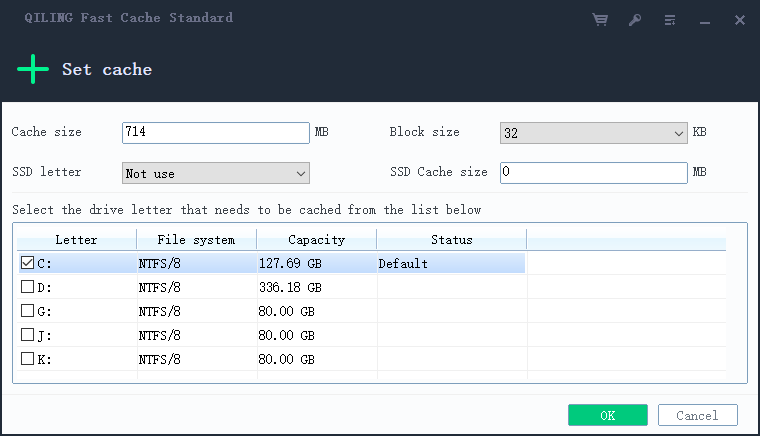
Step 3Set the cache size and the logical drive that requires caching
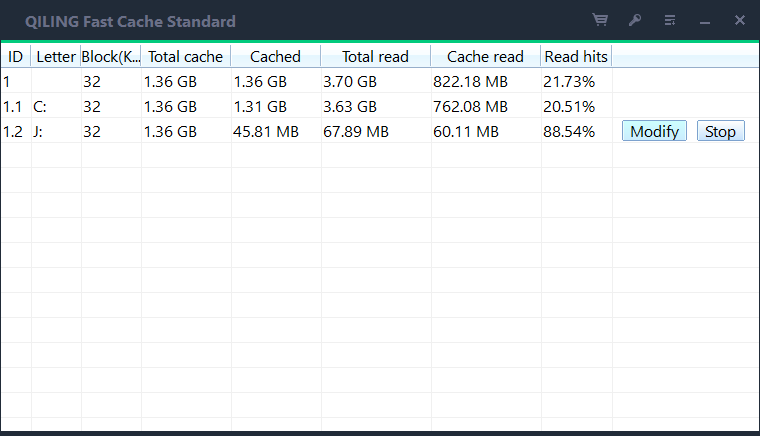
Step 4Displays cached data information
Cache settings examples
Case 1
The physical memory in the computer is 8GB, 4.6GB is used, and 3.4GB can be freely applied. The recommended cache is 1.3GB, and the maximum cache is 3GB.
Case 2
The physical memory in the computer is 8GB, 4.6GB is used, and 3.4GB can be freely applied. The system also has a high-speed M2 drive with a logic drive letter of D, a D drive size of 128GB, and a free space of 100GB. It is recommended to use the cache as 1.0GB, select D for SSD, and set the size of the cache in the SSD disk to 60GB.
Conclusion
This page introduces the principle of Fast Cache caching, usage scenarios, and how to use it. If you want to improve the efficiency of your computer, try Fast Cache.
Related Articles
- Unlocking Lightning-Fast Performance: Boosting Your Read Times with Fast Cache
- 2024 Faster Gameplay with Fast Cache, Enhancing Your Gaming Experience
- How to use M.2 disk for cache data
- The Power of Fast Cache, boost Your PC's Performance
In this article, we'll delve into what makes Fast Cache so effective and how it can transform your computing experience. - Windows Update Cache: Why It Grows and How to Clear It Safely
- SSD Cache Block Size Explained: Does It Affect Performance?
Products
Articles & Tutorials
- Data Recovery
- Data Backup
- File Recovery
- File Backup
- System Backup and Restore
- Disk and Partition Clone
- Technical articles
- Mobile articles
- Disk Master Help
- Windows Data Recovery Tutorials
- Windows Secure Delete Tutorials
- Windows Partition Management Tutorials
- Windows File Backup and Restore Tutorials
- Windows System Backup and Restore Tutorials
- Windows Disk Backup and Restore Tutorials
- Windows Clone Tutorials