Transfer Data from One SSD to Another in Windows
Moving data between SSDs can mean copying documents or replacing the Windows system drive. Decide which result you need before selecting a tool.
Connect and identify both SSDs
- Check whether each SSD is SATA or NVMe and use matching internal slots or enclosures.
- In Disk Management, identify source and target by model, capacity, and existing partitions.
- Back up irreplaceable files separately and inspect the destination for anything cloning would erase.
For ordinary data
Use File Explorer or a carefully configured copy tool to move folders. Verify the target files before deleting the source. Keep enough free space on both drives so Windows and applications can operate normally.
Clone the Disk with Qiling Disk Master
For a bootable SSD replacement, select the old SSD as source and the new SSD as destination. Use file copy instead when only documents need moving.
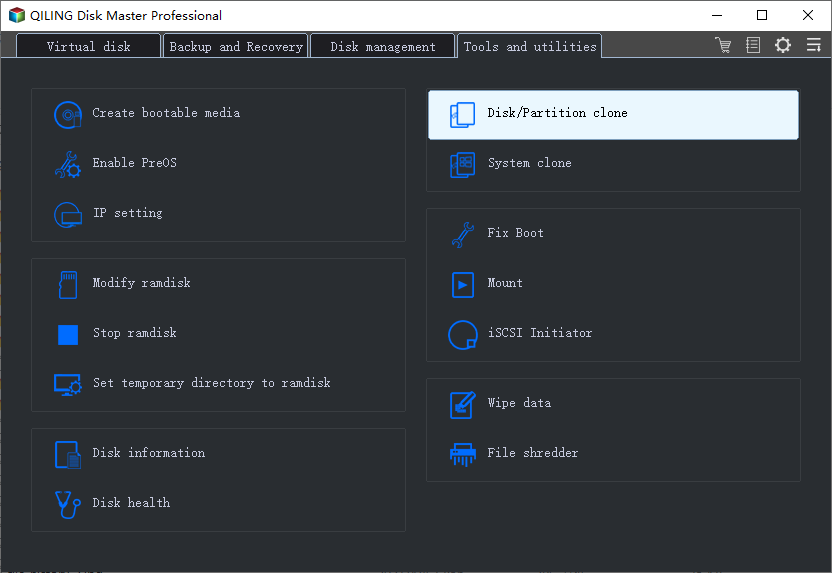
Step 1. Connect the new destination drive. In Qiling Disk Master open Tools and utilities and choose Disk/Partition clone. For a Windows boot-drive replacement, select the whole disk rather than just C:.
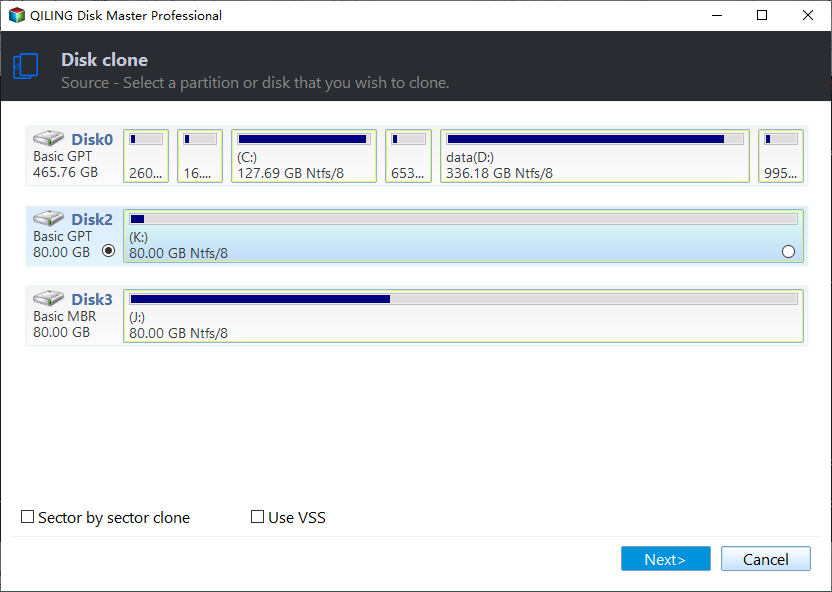
Step 2. Select the original disk as the source. Confirm its model, size, and partition map, including any boot and recovery partitions. Click Next.
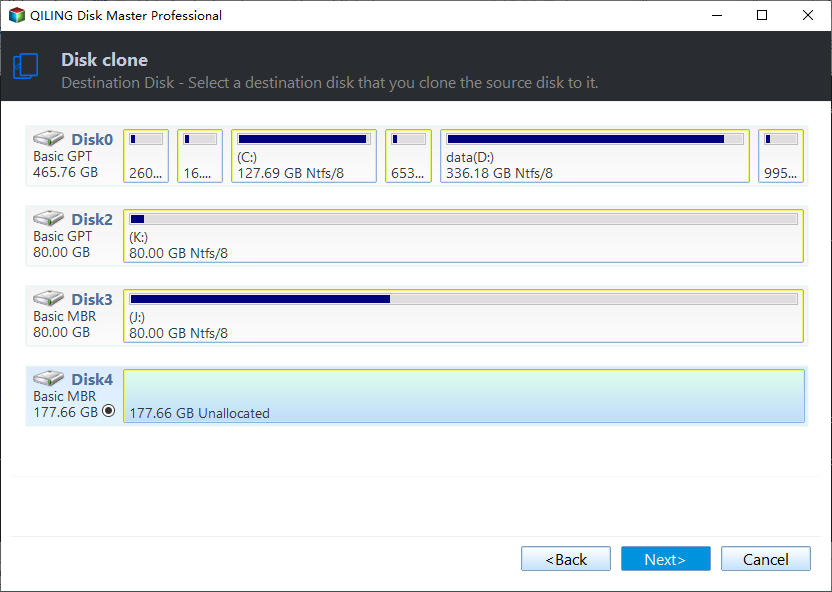
Step 3. Select the replacement drive as the destination by model and capacity, then click Next. All data already on that destination can be overwritten.
Step 4. Review the direction and partition layout. Check that required partitions fit on the destination; enable Optimize for SSD if it is an SSD and the option is available. The illustrated preview shows the controls; check the full layout on your own PC.
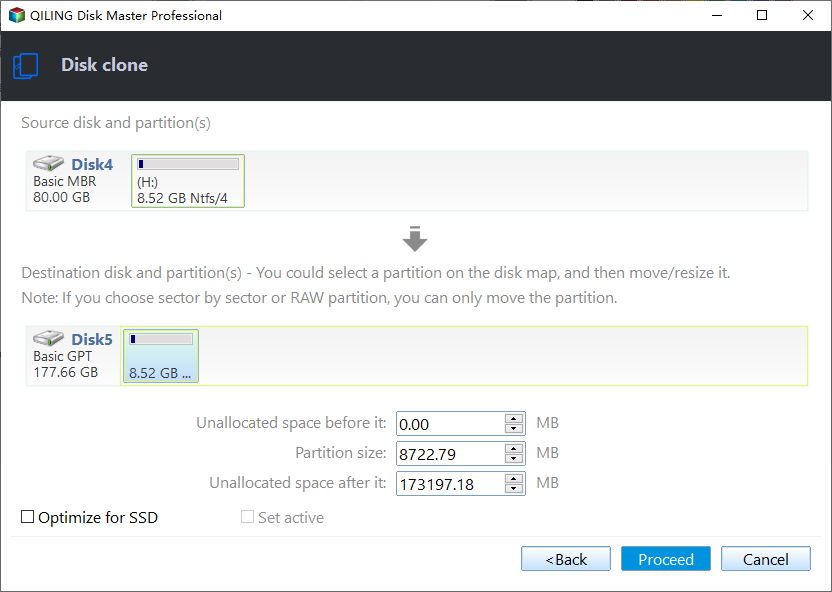
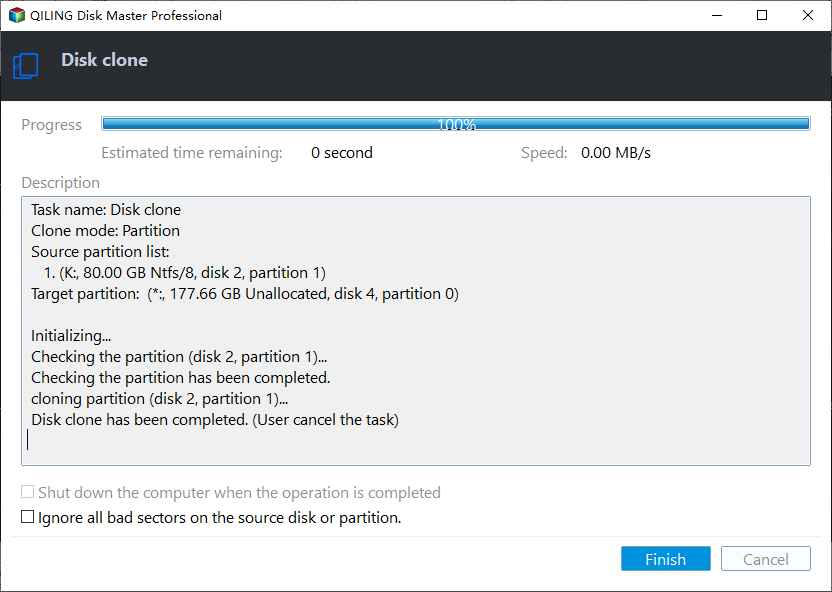
Step 5. Click Proceed. Confirm the overwrite warning only after verifying the destination. Keep both drives connected while the progress screen runs; after completion, boot-test the new drive before erasing the original.
For a system-drive replacement
Clone the entire source SSD, including boot and recovery partitions. A smaller target must still fit the used data. Boot the PC from the target after cloning; the presence of files alone does not prove bootability.
Post-transfer checks
- Open several copied documents or start Windows from the cloned SSD.
- Check the new drive's available capacity and whether any space is unallocated.
- If both SSDs remain installed, verify the firmware boot entry points to the desired disk.
- Keep the old SSD intact until the new one works reliably.
Frequently Asked Questions
Can I transfer from SATA SSD to NVMe? Yes if the system supports the NVMe drive and, for Windows migration, can boot from it.
Must I format the new SSD first? Not for a whole-disk clone; the destination will be overwritten.
Conclusion
Choose file copy or a whole-disk clone based on whether the new SSD needs to boot Windows. Verify the result before deleting the old SSD.
Related Articles
- Windows Cloning Tutorials
Review system disk and HDD-to-SSD cloning guides. - Windows Disk Backup and Restore Tutorials
Find disk image backup and recovery workflows for Windows drives. - Windows System Backup and Restore Tutorials
Explore system image, recovery, and restore guides for Windows.
Products
Articles & Tutorials
- Data Recovery
- Data Backup
- File Recovery
- File Backup
- System Backup and Restore
- Disk and Partition Clone
- Technical articles
- Mobile articles
- Disk Master Help
- Windows Data Recovery Tutorials
- Windows Secure Delete Tutorials
- Windows Partition Management Tutorials
- Windows File Backup and Restore Tutorials
- Windows System Backup and Restore Tutorials
- Windows Disk Backup and Restore Tutorials
- Windows Clone Tutorials