Eraser vs Qiling File Shredder for Windows Files
Eraser and Qiling File Shredder are designed to make selected Windows files harder to recover than they would be after an ordinary delete. They are not data-recovery tools. File shredding is irreversible for the selected data, so this comparison emphasizes target selection, storage type, and verification rather than encouraging an immediate erase.
Compare the products
| Need | Eraser | Qiling File Shredder |
|---|---|---|
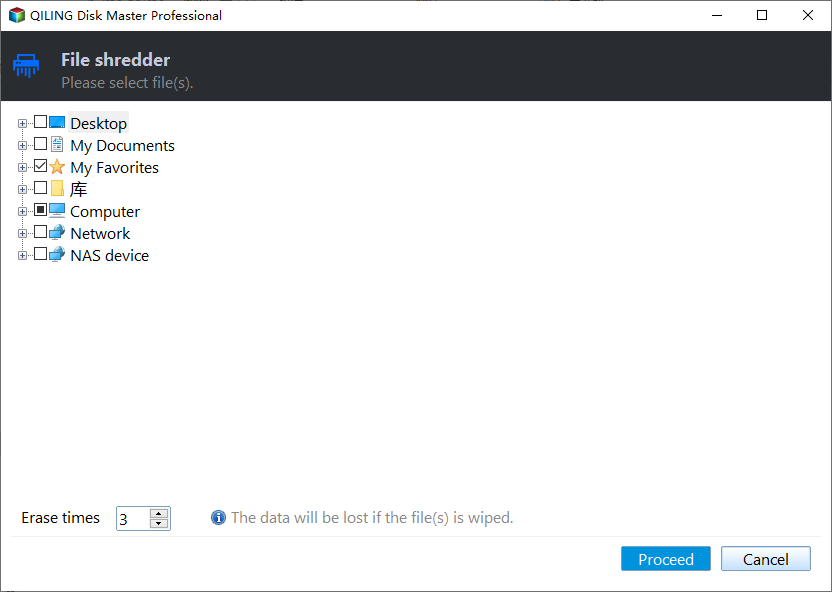
| Select individual files or folders | Yes, including Explorer integration. | Yes, through Disk Master's File Shredder selection screen. |
| Scheduled work | Eraser documents a customizable scheduler. | Check the specific Qiling edition and task controls; do not assume the same scheduler. |
| Cost model | Free, open-source software. | Part of the Qiling product offering; check current edition terms. |
| Whole-device disposal | File overwriting alone is not the same as a verified device sanitization process. | File shredding alone is not the same as a verified device sanitization process. |
A comparison of overwrite passes is not a useful promise of privacy by itself. The result depends on file-system behavior, storage hardware, copies elsewhere, and how completion is verified.
HDD, SSD, and extra copies
On a traditional HDD, overwriting a file's addressable sectors can reduce ordinary recovery prospects. On an SSD or other flash device, wear leveling and unmapped physical areas mean that overwriting one logical file may not reach every old copy. For device disposal, follow the drive manufacturer's supported sanitize process and an appropriate media-sanitization policy rather than relying on a file shredder alone.
Also check Recycle Bin, backups, cloud synchronization, email attachments, and shared folders. Shredding a local copy does not erase independent copies or versions held elsewhere.
What to verify before deleting anything
Step 1. Write down the exact file or folder path you intend to remove. Confirm whether similarly named files in another directory must be retained.
Step 2. Check whether the selected path contains a Windows system folder, application data, or files used by someone else. Do not choose a whole drive when only a document is sensitive.
Step 3. Keep a separate, access-controlled copy of anything you may need for legal, business, or personal reasons. Confirm that your backup is readable before considering permanent removal.
Step 4. If the device is an SSD or is leaving your possession, decide whether file-level removal is sufficient. For stronger assurance, use an approved whole-device process and verify completion.
The Qiling selection screen below illustrates why the exact path matters. It is not an instruction to confirm or execute the deletion.
Which should you choose?
Eraser is attractive when you want an open-source Windows utility with Explorer and scheduled-task workflows. Qiling File Shredder is convenient if you already use Qiling Disk Master and need a single tool for selected files. For SSD disposal, neither product's file-level overwrite should be treated as a guaranteed whole-device purge.
Related Articles
- File Shredder for Windows
Review file-shredding tools and precautions for Windows. - Shred vs Delete
Understand what ordinary deletion leaves behind.
Products
Articles & Tutorials
- Data Recovery
- Data Backup
- File Recovery
- File Backup
- System Backup and Restore
- Disk and Partition Clone
- Technical articles
- Mobile articles
- Disk Master Help
- Windows Data Recovery Tutorials
- Windows Secure Delete Tutorials
- Windows Partition Management Tutorials
- Windows File Backup and Restore Tutorials
- Windows System Backup and Restore Tutorials
- Windows Disk Backup and Restore Tutorials
- Windows Clone Tutorials