eSATA External Hard Drive: Everything You Should Know
The hard drive market offers three main interface types: PATA (IDE), SATA, and SCSI. eSATA external hard drives are a type of SATA interface hard drive that has gained popularity in recent years.
This article provides an overview of the advantages and disadvantages of eSATA external hard drives and recommends the best ones to use.
What Is eSATA External Hard Drive
eSATA is an external hard drive interface that enables high-speed data transfer between a computer and an external storage device, such as a hard drive or optical drive.
It uses a specialized eSATA connector and can be connected directly to a computer or DVR, providing a fast signal connection for external storage devices.
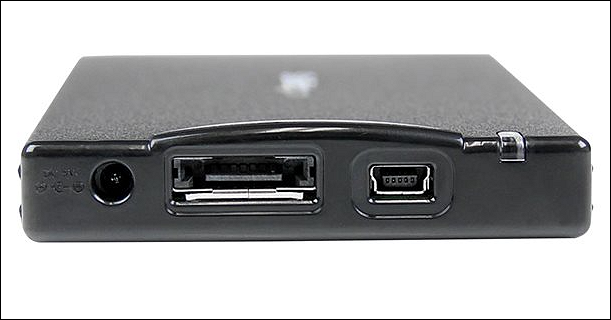
- Tip
- eSATA, part of the SATA interface, uses a different physical connector than SATA, but must support the same features to function properly. In some cases, early SATA controllers didn't support hot-swapping, leading to non-interchangeability between the two cable types.
Pros and Cons of eSATA External Hard Drive
The impact of eSATA interfaces on external hard drives can vary depending on your needs. Understanding eSATA usage scenarios requires weighing the pros and cons.
On the one hand, eSATA offers fast data transfer rates and provides a convenient way to connect external hard drives to a computer, efficiently expanding your storage capacity.
Advantages:
- An eSATA external hard drive can save and transfer large amounts of data, with transfer speeds of up to 600MB/s, bypassing USB limitations by using the computer's internal hard drive channel.
- Traditional SATA hard drives can be converted to eSATA portable drives with special eSATA enclosures, which serve as portable enclosures for standard SATA hard drives.
- The eSATA port can also benefit flash memory, allowing thumb drives with USB and eSATA interfaces, such as the Kanguru e-Flash, to be used with a high-speed eSATA port or a standard USB port if no eSATA port is available.
Disadvantages:
- eSATA hard drive enclosures are expensive due to the requirement of a separate power cable, making them nearly twice as pricey as most older USB enclosures, which can draw power directly from the USB bus.
- The eSATA cable has limitations, being restricted to a maximum distance of 2 meters, whereas USB cables can reach up to 5 meters.
- SATA technology may not be compatible with older computers. You need to consider compatibility: it supports Windows 2000 Pro or later, and Mac OS X or higher.
Best eSATA External Hard Drive Recommend
If you're looking for an efficient backup solution, consider an eSATA external hard drive, which is a great choice. The best eSATA external hard drives in 2023 have been handpicked for your convenience, allowing you to choose the one that suits your needs.
1. Fantom Drives FD External Hard Drive
This storage device offers a range of capacity options from 2TB to 16TB, making it suitable for users who need to store large amounts of data. It supports both eSATA and USB 3.0/2.0 interfaces, and is ideal for saving files such as movies, photos, and videos.
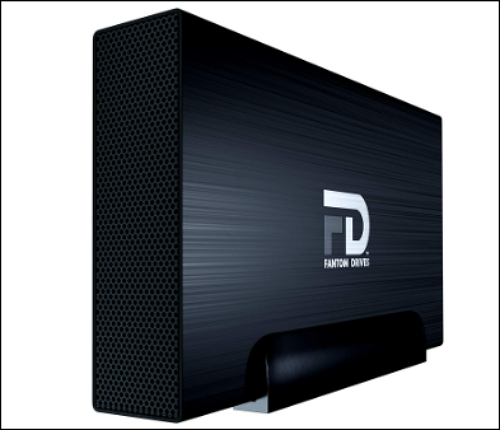
- Capacity: 2TB - 16TB
- Interfaces: USB 3.0 and eSATA
- Hard drive speed: 5400
- Price: Amazon $129.95
- Purchase link: Fantom Drives
2. Oyen Digital MiniPro 4TB External eSATA
Oyen Digital offers a portable hard drive with 5400 rpm speeds, designed for small business use and compatible with both Windows and Mac computers, prioritizing performance and reliability.
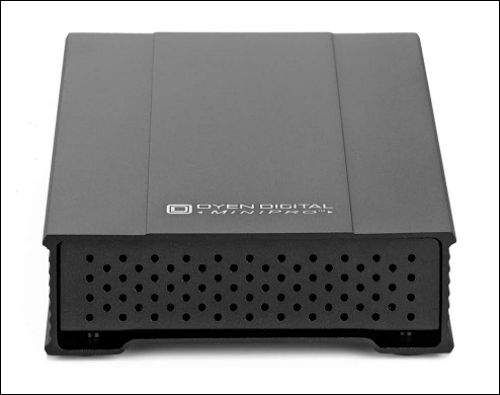
- Capacity: 4TB
- Interface: USB-C (USB 3.1 Gen2) / eSATA 6G
- Transfer Speed: 100 MB/s
- Price: Amazon $521.24
- Purchase link: MiniPro 4TB External
3. FD MY DVR Extender eSATA External Hard Drive
This external hard drive has excellent fan cooling to avoid overheating, and its 7200 RPM spin speed enables fast data transfer speeds.
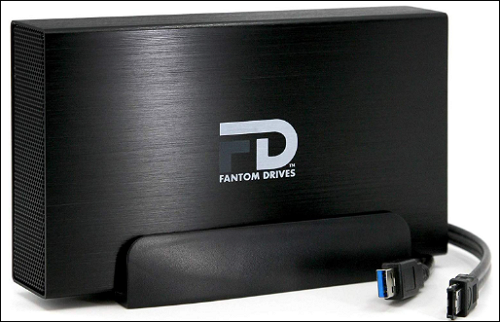
- Capacity: 4TB
- Interface: USB 3.0 and eSATA
- Transfer Speed: 3 GB/s
- Price: Amazon $134.95
- Purchase link: D MY DVR Extender
4. ioSafe SoloPRO Fireproof External Hard Drive
This external hard drive has top-notch disaster protection, withstanding extreme temperatures of 843.3 degrees Celsius and preventing data loss, as well as withstanding being submerged to a depth of 10 feet for over 3 days without data loss.

- Capacity: 2TB
- Interface: USB 3.0 and eSATA
- Transfer speed: 100 MB/s
- Price: Amazon 396.74 USD
- Purchase link: ioSafe SoloPRO drive
Bonus Tip: Is eSATA Better Than USB for External Hard Drive?
In addition to eSATA, there are various other port types, including USB 3.0, which is a data transfer protocol initiated by Intel and other companies, and is compatible with USB 1.1 and USB 2.0.
Here is a brief comparison of eSATA and USB 3.0 ports for hard drives:
| 🆚Comparison | 1️⃣eSATA hard drive | 2️⃣USB Hard Drive |
| 🔗Speed | Up to 600MB/s (6Gbps) | No more than 500MB/s |
| 💿Hard Drive Construction | Simple | Complex, including PCB adapter |
| 🔋Power Supply | Requires a power connection | Supports power supply |
| 🧑🤝🧑Prevalence | Not so popular | The large number of PCs support USB 3.0 |
| 🧑💻Suitable Users | Enterprise users | Personal and business users |
eSATA is faster than USB 3.0, but less compatible, making USB 3.0 a better choice for transferring data between computers, while eSATA is suitable for storing data on a PC with multiple devices.
To convert eSATA to USB, simply connect your eSATA drive caddy to an adapter and plug the adapter into your computer's USB 3.0 port.
Conclusion
In this article, we discussed the pros and cons of eSATA external hard drives and recommended some top picks. We also clarified the difference between USB and eSATA drives and provided simple tips for choosing the right one.
To get the most out of your eSATA drive, consider using Qiling Disk Master to manage its partitioning effectively. If you found this article helpful, feel free to share it with others.
Related Articles
- PCIe 3.0 VS 2.0: What are the differences and similarities?
- What Is C-Band in 5G and How to Get It?[ 2023 Complete Understanding ]
- What Is NFS and How Does It Work? [This Might Help You]
- Check Out the Best Budget Portable SSDs of 2023
- How to Open RAR Files on Windows
If you're having trouble opening RAR files on Windows 10, this post shows you four ways to extract and open them, including both free and paid options. - (Answered!) How to Reinstall Windows 10 from BIOS🔥
You are facing software issues or want to upgrade your PC for better performance. A Windows 10 reinstallation does the job for you. In this post, we will see two methods for how to reinstall Windows 10 from BIOS.
Products
Articles & Tutorials
- Data Recovery
- Data Backup
- File Recovery
- File Backup
- System Backup and Restore
- Disk and Partition Clone
- Technical articles
- Mobile articles
- Disk Master Help
- Windows Data Recovery Tutorials
- Windows Secure Delete Tutorials
- Windows Partition Management Tutorials
- Windows File Backup and Restore Tutorials
- Windows System Backup and Restore Tutorials
- Windows Disk Backup and Restore Tutorials
- Windows Clone Tutorials