How to Bypass Disabled iPhone 5/6/7/8/X in 3 Simple Ways
Your iPhone or iPad may be disabled due to a forgotten passcode, a broken screen, or other reasons. Don't worry, we're here to help you regain control of your device. This guide offers several solutions to bypass a disabled iPhone, including options to recover your device. Check out the solutions below.
| Workable Solutions | Step-by-step Troubleshooting |
|---|---|
| Solution 1. Qiling MobiUnlock | Launch MobiUnlock on the PC > Connect your device to the PC...Full steps |
| Solution 2. iTunes | Launch iTunes on your computer > Connect the iPhone to the PC...Full steps |
| Solution 3. Find My iPhone | Go to iCloud.com and log into with your Apple ID and password...Full steps |
Solution 1. How to Bypass a Disabled iPhone via Qiling MobiUnlock
Compared to other solutions, Qiling MobiUnlock stands out for its flexibility in unlocking a disabled iPhone. With its powerful unlock tool, you can bypass various barriers such as forgotten iPad/iPhone passcodes, disabled iPhones/iPads, and broken screens, among others. Its numerous features make it a standout option.
- It gives you access to a disabled iPhone, iPad, or iPod touch by erasing everything, including the passcode from your device.
- You can reset your device without an Apple ID password by going to Settings, then General, then Reset, and finally selecting "Erase All Content and Settings".
- The process is safe and 100% green.
- The success rate of bypassing is high, even if the device is broken or unresponsive.
You can download Qiling MobiUnlock on your computer and start the process of bypassing your disabled iPhone.
Step 1. Connect your iPhone, iPad, or iPod to your PC with a USB cable and run Qiling MobiUnlock. Select "Unlock Screen Passcode" from the home page of Qiling MobiUnlock.
Step 2. Click "Start" to continue.
Step 3. Click "Next" to download an available firmware for your device, or click "Select" to manually select a firmware package you have downloaded on your computer.
Step 4. After completing the firmware verification, click "Unlock Now" and a warning window will appear. Enter the required information in the box and click "Unlock" again to bypass the locked or disabled iPhone, iPad, or iPod.
Step 5. Wait patiently for the tool to bypass your locked device. When it has done, set up your iPhone, iPad, iPod and create a new password.
Solution 2. How to Unlock Disabled iPhone with iTunes
iTunes is the official way offered by Apple to unlock a locked iPhone, but it will erase all information and reset it to factory settings, requiring a backup to avoid losing data.
To use this method, you'll need to prepare:
- A computer, either a Mac or PC.
- A USB cable.
- An available backup you've previously made with iTunes.
Step 1. Launch the latest version of iTunes on your computer.
Step 2. Connect your iPhone to the computer.
Step 3. Open iTunes (Ignore this step if it has been opened).
Step 4. Then, iTunes will start to synchronize with your device and create a copy of your device.
Step 5. When the process completes, click on your iPhone icon on the iTunes screen.
Step 6. From the right panel, choose the "Restore iPhone" option.
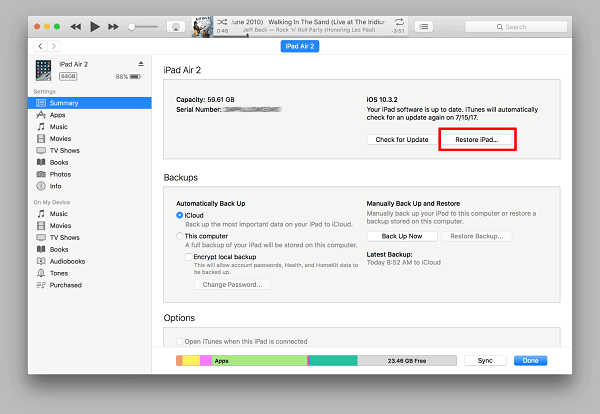
Step 7. To restore your iPhone without a passcode, select the most recent backup file from the available options, which will allow you to regain access to your device.
Solution 3. How to Erase Device with Apple's Find My iPhone Feature
To use this method, enable Find My iPhone on your device, which will erase all data and reset it to its original state. This web-based solution doesn't require a USB connection, making it easy to remotely erase data if your iPhone is lost or stolen, but be sure to back up your data first.
Step 1. Go to iCloud.com on a computer.
Step 2. To access your iCloud account, you need to enter your Apple ID and passcode. This will allow you to log in and view your stored data, including contacts, calendar events, and more.
Step 3. From the screen, choose the "Find My iPhone" option.
Step 4. After a short while, you will come to a map that displays the location of your device on it.
Step 5. Choose "All Devices" from the top of the screen.
Step 6. Choose the iOS device you'd like to erase.
Step 7. To erase your iPhone, click on "Erase iPhone" to completely wipe out all data, including your passcode, from your device.
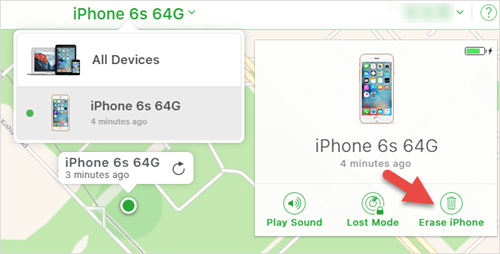
Step 8. Erasing your iPhone will reset it to factory settings, allowing you to set it up as a new device.
The Bottom Line
Here are all possible solutions to bypass the passcode. You can try them one by one to see if they work, but that may be very time-consuming. Solution 1 is suggested as it has a higher success rate compared with the other two methods.
Related Articles
- Top 2 Ways to Create Incremental Backup in Windows Server 2008 (R2)
You can definitely create an incremental backup in Windows Server 2008 (R2), if you have any problems, click on this article and here are two ways for you. - Perform Windows Server 2019 Incremental Backup Easily (2 Ways)
If you have a problem creating Windows Server 2019 incremental backup, please continue to see below and follow the stepwise guide carefully. - (Fixed)Windows Server Backup Keep Only One Copy
Windows Server Backup delete old backups seems to be the most obvious cause of Windows Server Backup keep only one copy, but is this really the case? Get all the answer in this article. - 7 Easy Ways to Perform Windows Server C Drive Cleanup
The article is a full collection of how to perform Windows Server C drive cleanup in 7 ways and offers one upgrade offer of C drive for users.
Products
Articles & Tutorials
- Data Recovery
- Data Backup
- File Recovery
- File Backup
- System Backup and Restore
- Disk and Partition Clone
- Technical articles
- Mobile articles
- Disk Master Help
- Windows Data Recovery Tutorials
- Windows Secure Delete Tutorials
- Windows Partition Management Tutorials
- Windows File Backup and Restore Tutorials
- Windows System Backup and Restore Tutorials
- Windows Disk Backup and Restore Tutorials
- Windows Clone Tutorials