How to Fix Android Error 'Process system isn't responding'
Quick Navigation:
- How to fix "Process system isn't responding" without losing data?
- Guide: recover data from unresponsive Android
- Guide: four solutions to remove the "Process system isn't responding" error
Summary
If your Android phone's screen has frozen due to a "process system isn't responding" error, you're not alone. This issue can be frustrating, but there are possible fixes to try and recover your device. Additionally, if you're unable to access your data, Qiling MobiSaver for Android can help you recover your files from the unresponsive phone.
Who report "Process system isn't responding" error the most
Android phone and tablet users of Samsung Galaxy Note 5, Note 8, S8, Sony Xperia, Redmi Note 3, and Android emulator are affected by a serious system bug that causes the "Process system isn't responding" issue, resulting in an unresponsive screen.
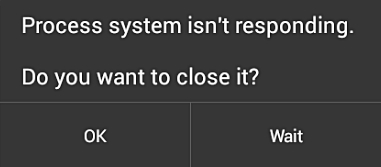
What causes the "Process system isn't responding" error
The "Process system isn't responding" error on Android is often triggered by a new OS update, device restart, or installing a new app. It can also occur due to insufficient storage on the Android device's memory.
How to fix "Process system isn't responding" without losing data?
If you're experiencing the dreaded "dead phone" warning, don't panic - it's time to find solutions to restore your device. No matter how you got this warning, the consequences are clear: you can no longer access your phone data, use instant messaging apps, or play games as usual. It's time to take action and revive your phone.
Guide: recover data from unresponsive Android
Must-read tips
1. For Android phones/tablets that have been rooted only.
2. To access Android data on a PC, you can use a USB cable to connect your phone to the computer, then use a file manager app like MTP or ADB to view and transfer files. Alternatively, you can use cloud services like Google Drive or Dropbox to sync your phone's data with your PC.
Step 1. Install Qiling MobiSaver on your Android device, then connect your device to your PC using a USB cable. Enable USB debugging mode on your device to allow Qiling MobiSaver to detect your device. Once connected, you can use Qiling MobiSaver to recover deleted data from your Android device.
Step 2. After the software recognizes your device, click the Scan button.
Step 3. The software scans the entire device, identifying and recovering both existing and deleted data, providing a comprehensive view of the device's contents.
Step 4. Select the target files you want to rescue and click the Recover button to export them to a safe location.
Guide: four solutions to remove the "Process system isn't responding" error
Solution 1. Force restart the Android to clear the freezing error
To force restart your phone, press and hold the Volume Up, Volume Down, and Power buttons at the same time for a few seconds. This will shut down your phone and then automatically restart it.
Solution 2. Leave enough internal memory
The system update may be consuming your phone's memory, causing it to malfunction. Ensure your device has at least 500MB of free internal memory and sufficient RAM to function normally. You can transfer large files, such as photos or apps, to your PC to free up space.
Solution 3. Uninstall all the suspicious apps and restart the device
Did you download apps out of Google Play Store? Apps from unknown sources could result in system malfunctioning and generating the error "Process system isn't responding".
Solution 4. Repair corrupted SD card
If you're using extension storage on your device, be cautious as SD card corruption issues can occur, causing your Android system to malfunction. To resolve this, safely remove the card and repair the corrupted SD card on your computer.
To address SD card errors, you can use the Windows built-in check and repair utility or a free third-party SD card repair tool, which can automatically correct corruption with minimal effort.
Related Articles
- Recover Contacts from Android after Factory Reset
- How to Recover Deleted Text Messages on Android
- How to Recover Deleted APK Files from Android
- Fix Stuck on Android System Recovery 3e Screen Without Losing Data
Products
Articles & Tutorials
- Data Recovery
- Data Backup
- File Recovery
- File Backup
- System Backup and Restore
- Disk and Partition Clone
- Technical articles
- Mobile articles
- Disk Master Help
- Windows Data Recovery Tutorials
- Windows Secure Delete Tutorials
- Windows Partition Management Tutorials
- Windows File Backup and Restore Tutorials
- Windows System Backup and Restore Tutorials
- Windows Disk Backup and Restore Tutorials
- Windows Clone Tutorials