How to Recover Deleted Voicemail from Android and iPhone
Summary
If you've accidentally deleted important voicemails from your Android or iPhone, don't worry - this guide offers several methods to help you recover them with ease.
Here are some reasons why your voicemail might be deleted:
- Accidental deletion of voicemail
- System upgrade failure
- Device is damaged
- Factory reset your device without a backup
If you're experiencing issues that result in losing voicemails from your Android or iOS device, don't worry - you can recover valuable voicemails using the methods outlined in this post. Whether you're an iPhone or Android user, this guide will provide you with several possible ways to retrieve your lost voicemails.
- Part 1. How to Recover Deleted Voicemail on Android Device
- Part 2. How to Recover Deleted Voicemail on iPhone
Part 1. How to Recover Deleted Voicemail on Android Device
For Android users, recovering deleted voicemail is possible through two methods. By trying them one by one, you can potentially retrieve all lost voicemail.
1. Recover Deleted Voicemail from Android Device via Voicemail App
Normally the voicemails you delete from Android won't disappear immediately. Before they are gone permanently, you still have the chance to get them back from the Voicemail app itself. Here are the steps.
Step 1. Open the Voicemail app on your device.
Step 2. Tap on the "Menu" option.
Step 3. Tap on "Delete Voicemails."
Step 4. You will be shown a list of voicemails that can be recovered. Simply press the one you want to recover.
Step 5. Depending on your phone model, either a contextual menu will open or a checkmark will be added. Tap "Save" to remove it from the deleted voicemails folder.
2. Directly Recover Deleted Voicemail with a Third-party Software
If deleted voicemails can't be recovered with the above methods, try using a third-party recovery program like Qiling MobiSaver for Android, which has an intuitive interface and can recover contacts, messages, photos, and other Android data.
You can download Qiling MobiSaver for Android on your computer and start the recovery process.
Step 1. Run Qiling MobiSaver for Android and let it scan the phone's memory and external SD card to recover lost data.
Step 2. Select the voice messages in the voicemail that you want and click "Recover" to recover them back from Android devices.
Part 2. How to Recover Deleted Voicemail on iPhone
To recover deleted voicemail from an iPhone, you can either directly recover from the Voicemail app or use a recovery tool to recover from your iPhone without a backup. Both methods are guided by the following steps, which will help you navigate the process.
1. Recover deleted voicemail from Voicemail app
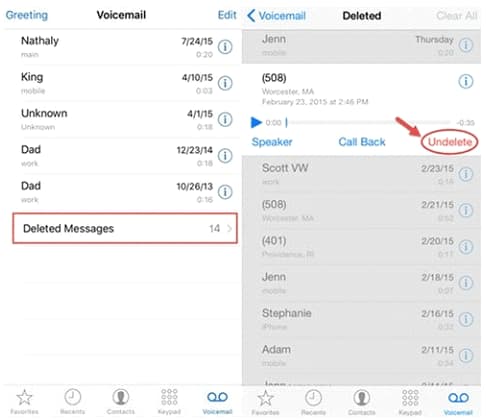
Step 1. Open the Phone app and tap the Voicemail section.
Step 2. To find deleted voicemails, scroll down and tap the "Deleted Messages" option, which will open and display the deleted voicemails.
Step 3. To recover deleted voicemails on an iPhone, select the voicemails you want to recover and tap on the "Undelete" button. This will retrieve your iPhone's voicemail messages.
2. Recover deleted voicemail with Qiling MobiSaver for iOS
If the above method doesn't work, you can try using Qiling MobiSaver for iOS, a reliable data recovery tool that can help you recover lost voicemail, as well as other data like contacts, messages, and photos, within minutes.
You can recover deleted iPhone data with the help of a software that provides three recovery modes, allowing you to recover data with or without a backup. Simply download the software on your computer and start the recovery process.
Step 1. Connect your iPhone to the computer, then launch Qiling MobiSaver. If you've backed up your device with iTunes or iCloud, select the relevant mode; otherwise, choose the "Recover from iOS Device" option.
Step 2. Scan your iPhone to find the lost data
Step 3. Select the voice messages in the voicemail that you want and click "Recover" to recover them back from iPhone/iPad/iPod Touch.
The Bottom Line
If you've accidentally deleted voicemails from your Android or iPhone device, don't worry! Our guide provides a step-by-step solution to retrieve them. By following the methods outlined, you can recover lost voicemails from both Android and iPhone devices, and get back the important messages you thought were gone forever.
Related Articles
- Android File Recovery Tool
- How to Recover Deleted Text Messages from Samsung Cell Phone
- Steps to Do Android Contacts Recovery
- How to Backup/Transfer Contacts from Android SIM Card to PC?
Products
Articles & Tutorials
- Data Recovery
- Data Backup
- File Recovery
- File Backup
- System Backup and Restore
- Disk and Partition Clone
- Technical articles
- Mobile articles
- Disk Master Help
- Windows Data Recovery Tutorials
- Windows Secure Delete Tutorials
- Windows Partition Management Tutorials
- Windows File Backup and Restore Tutorials
- Windows System Backup and Restore Tutorials
- Windows Disk Backup and Restore Tutorials
- Windows Clone Tutorials