Fix Cluster Size Wrong Please Format Error
Fix cluster size wrong please format error on USB, SD card, or hard drive. Recover files first, then repair or format safely in Windows.
What the Error Means
The file system metadata may be damaged, or the device was formatted with a cluster size that Windows cannot read correctly. It can happen after unsafe removal, interrupted formatting, bad sectors, or cross-device use.
Do This Before Formatting
- Stop writing new data to the device.
- Try another port, cable, or card reader.
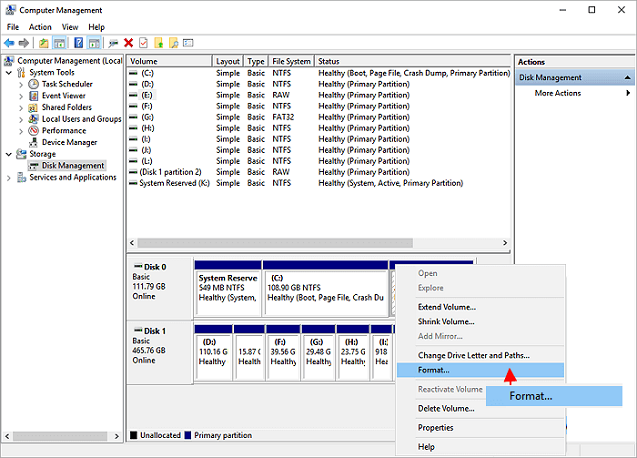
- Check the device in Disk Management.
- Recover files to another disk if the data matters.
- Format only after recovery is complete.
Use Qiling Deep Data Recovery When Windows Tools Are Not Enough
Qiling tools give you a visual way to review the disk state, protect files, and confirm risky operations before Windows repair, formatting, resizing, or cloning changes are applied.
Step 1. Stop using the device that shows the cluster size error. Do not format it before recovering needed files.
Step 2. Open Qiling Deep Data Recovery and choose Fast Scan first. Use a deeper scan if the file system is RAW, the folder tree is missing, or Fast Scan finds too little.

Step 3. Select the affected USB, SD card, or hard drive by capacity and drive letter, then start scanning.

Step 4. Preview found files and filter by file type if the original folders are damaged.
Step 5. Recover files to another healthy disk. Never save recovered files back to the device with the cluster size error.

Step 6. After recovery, return to Disk Management or a partition tool to format the device with a standard file system and cluster size.
Conclusion
Start with the Windows checks that match your symptom, protect important data before formatting or repartitioning, and use the Qiling workflow when you need a clearer, safer way to repair the disk or move data.
Related Articles
Products
Articles & Tutorials
- Data Recovery
- Data Backup
- File Recovery
- File Backup
- System Backup and Restore
- Disk and Partition Clone
- Technical articles
- Mobile articles
- Disk Master Help
- Windows Data Recovery Tutorials
- Windows Secure Delete Tutorials
- Windows Partition Management Tutorials
- Windows File Backup and Restore Tutorials
- Windows System Backup and Restore Tutorials
- Windows Disk Backup and Restore Tutorials
- Windows Clone Tutorials