Best PC/Computer Backup Software for 2021
Quick Navigation:
- Best computer backup software – QILING Disk Master
- Step-by-step guide for how to use QILING Disk Master to backup data on a computer
- Part 2. Other Six PC Backup Software Tools
- 1. Acronis True Image
- 2. StorageCraft ShadowProtect
- 3. NovaBackup PC
- 4. Paragon Backup & Recovery 16
- 5. Genie Timeline Home
- 6. NTI Backup Now 6
Computer backup software is an essential tool in the current age. Given the different scenarios and the type of users using a computer, the chances of losing data are high. Furthermore, the changes in the technology are advancing at a fast pace that it is making it impossible for novices to stay up to date with the trends that help in protecting the content from virus attacks and cyber threats. It is here that a pc backup software helps, as a user can quickly retrieve the stolen or corrupted data with ease.
Best computer backup software – QILING Disk Master
QILING Disk Master is the best computer backup software and assists you in retrieving data from a system lost due to different reasons. The reason it stands out from the rest is the simple procedure that you would be performing in backup and restore data. Furthermore, it is the algorithm that mainly helps in getting back complete data, which other programs fail to implement thoroughly.
QILING Disk Master is a powerful computer backup software that simplifies the process of backing up your data. Its user-friendly interface and efficient algorithms make it easy to use, even for those who are not tech-savvy. Here are some of the key features and benefits of QILING Disk Master:
Your Safe & Reliable PC Backup Software
- It has multiple backup modes, which helps you to choose the one according to the need. It has the schedule backup feature, through which you can set the preferred time to create the backup that runs in the background.
- The other benefit associated with the software is the standalone backup feature, where you can choose the selected folders or files from your hard disk for creating a backup.
- The software also has the cloning option, which allows you to back up your computer to an external hard drive or move data to a new hard disk in a few simple steps.
- With the help of the program, you can create a file backup, drive backup, and system backup as you need.
Step-by-step guide for how to use QILING Disk Master to backup data on a computer
QILING Disk Master is a powerful computer backup software that simplifies the process of backing up your data. Its user-friendly interface and efficient algorithms make it easy to use, even for those who are not tech-savvy. Here are some of the key features and benefits of QILING Disk Master:
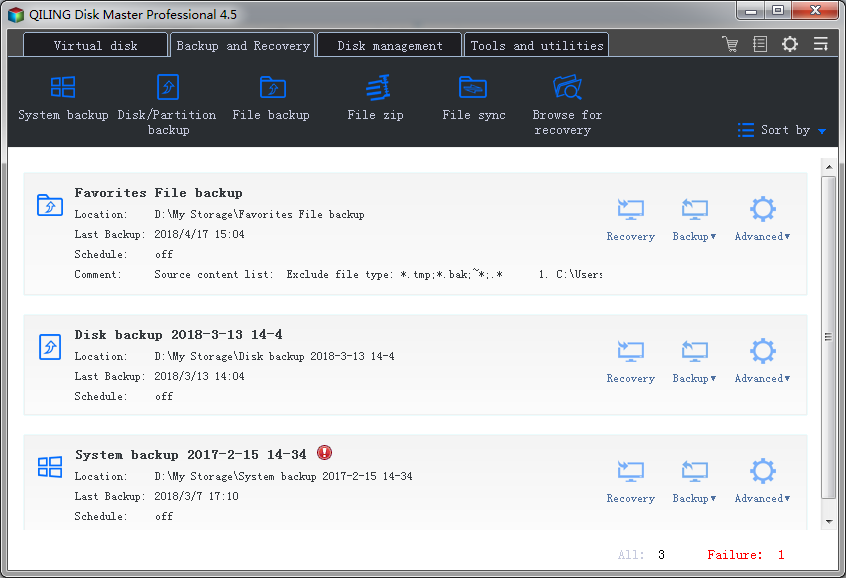
1. After installation of the trial version, click the icon to launch the program. Choose "File Backup" as the option from the screen.
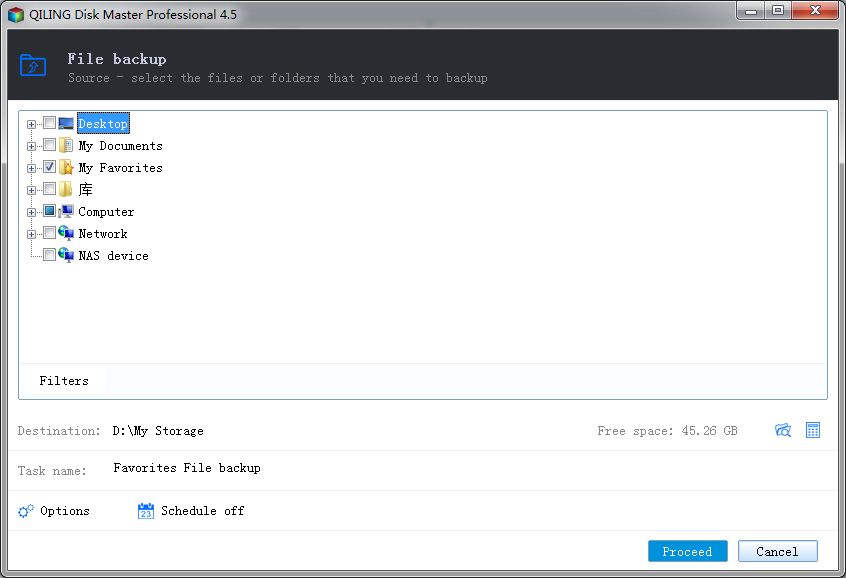
2. Clicking the option will open the directory that displays all the partitions of the hard drive along with external storage devices. From the list, choose the file or folder that you wish to backup, and press the "Proceed" button. You can select the storage location, the file name of the backup, and whether you want to opt for the automatic backup feature.
3. You will notice the following screen after QILING Disk Master completes the backup computer to external hard drive or built-in disk process.
After selecting the backup destination and files, you can proceed to customize the backup settings for your SD card backup. This step allows you to tailor the backup process to your specific needs and preferences.
Part 2. Other Six PC Backup Software Tools
1. Acronis True Image
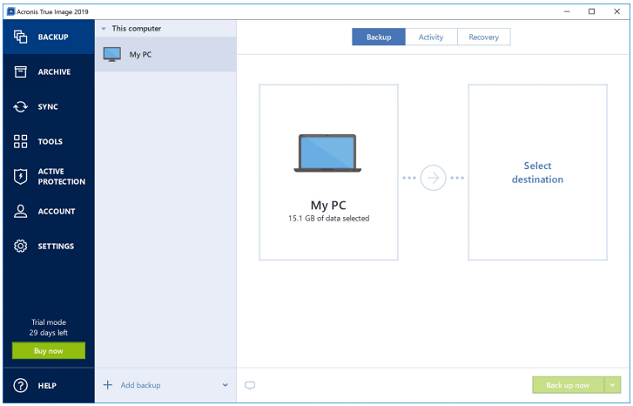
The computer backup software is a powerful tool that offers a wide range of features to safeguard your digital life. With its intuitive interface and expert-level options, you can explore the depths of this software and unlock its full potential.
Pros:
- Clean interface
- Fast operation
- Mobile and Facebook backup
- Numerous disk tool options
Cons:
- Runs plenty of processes in the background
- Does not restore directly to Facebook
2. StorageCraft ShadowProtect
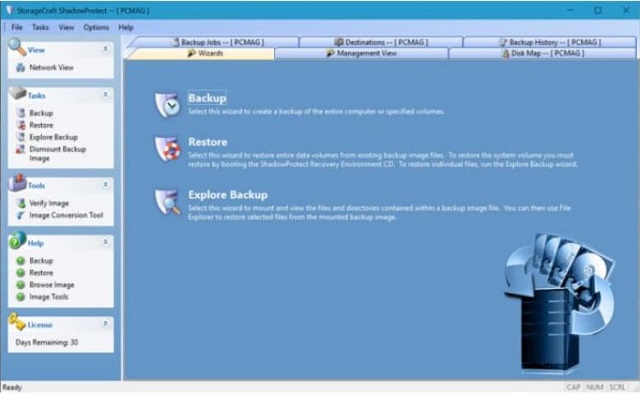
The consumer version of the enterprise-level backup software is a reliable and user-friendly backup solution that provides a range of features to safeguard your digital life.
Pros:
- Image-style backup of partitions
- Enterprise-level reliability
- Multiple options to restore and view files
Cons:
- Outdated interface
- Expensive
3. NovaBackup PC
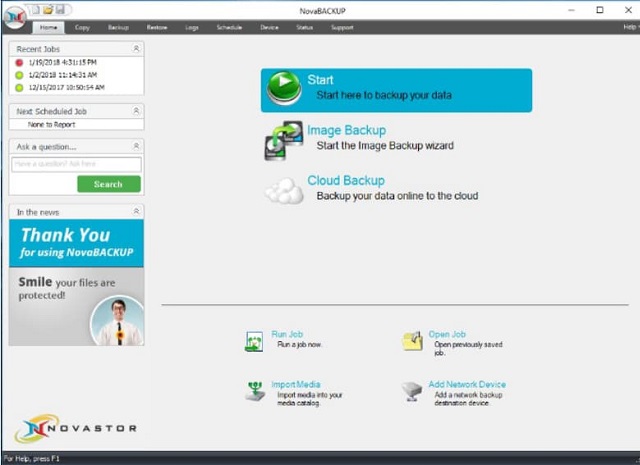
NovaBackup is a robust and user-friendly backup software that offers a wide range of features to safeguard your digital life. With its intuitive interface and customizable settings, NovaBackup makes it easy to create a backup of your critical files and folders.
Pros:
- High-security features
- Numerous customization features
- Quick backup file creation
- Creates disk images
Cons:
- NovaBackup is a comprehensive PC backup solution that offers a plethora of features to safeguard your digital life. While its cluttered interface can be overwhelming, with the right guidance, you can navigate through the options with ease.
- Comes with an annual subscription model
- This computer backup software does not support Mac
- Does not have File Explorer feature
4. Paragon Backup & Recovery 16
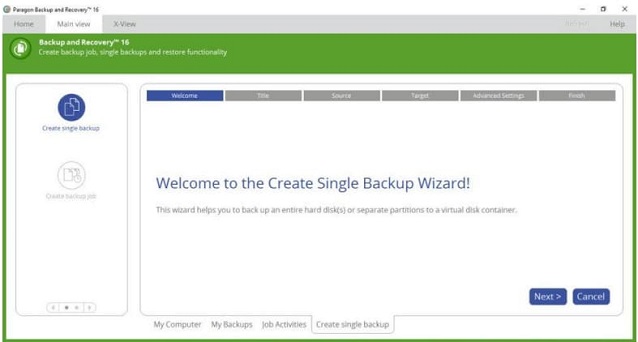
Paragon Backup & Recovery, a comprehensive backup and recovery solution, has undergone significant improvements over the years. The latest version, 16, marks a significant shift in focus towards home users, providing them with a user-friendly and efficient way to create backups and recover from existing files.
Pros:
- Simple and friendly interface
- Plenty of advanced options at disposal for use
- Comes with Paragon's powerful disk-management features
Cons:
- Absence of continuous backup feature for folders is a letdown
- Not possible to create a mobile backup
5. Genie Timeline Home
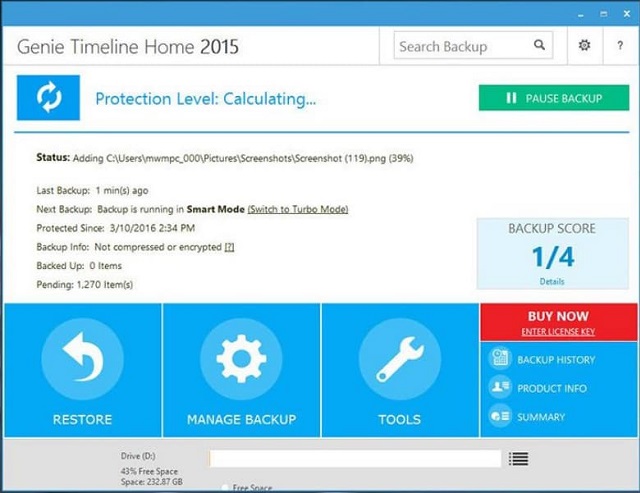
Genie Timeline, a user-friendly PC backup software, offers a simple and efficient way to create backups and recover from previous versions of folders and files. With its intuitive interface and automatic backup options, Genie Timeline makes it easy for users to protect their important data and recover from data loss.
Pros:
- Simple and clear interface without clutter
- Simple to set up a backup
- Contains useful backup options and features
- Free trial available and it can save file versions
Cons:
- Does not have an encrypted backup feature
- Requires improvement to mobile app
6. NTI Backup Now 6
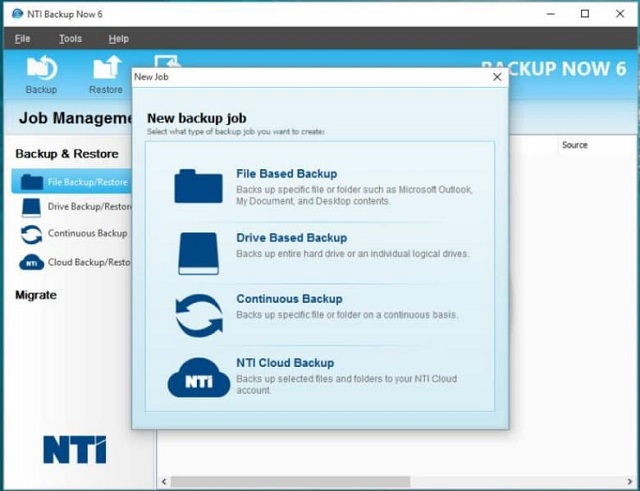
NTI Backup Now, a user-friendly PC backup software, offers a simple and efficient way to create backups and protect files. With its improved interface and automatic backup options, NTI Backup Now makes it easy for users to safeguard their important data and recover from data loss.
Pros:
- User-friendly interface
- Continuous backup option
- Drive migration
- Creates rescue discs and USB drives
Cons:
- Expensive
- Full disk image backup is slow
Related Articles
- Top 6 Best SD Card Data Recovery Software in 2021
- Top 10 Free Data Recovery Software for Windows 10
- Top 5 Best Free Data Recovery Software for Windows
- Safe Disk Tutorials
Read this guide to learn Safe Disk Tutorials with clear steps, practical tips, and safer troubleshooting methods. - QILING Fast Cache Tutorials
QILING Fast Cache can improve overall system performance. - System backup and System restore Tutorials
Looking for complete system backup and restore solutions? Browse in-depth tutorials for Windows file backup, drive clone, OS backup, and NAS backup to keep your data safe with Qiling tools. - How to Recover PowerPoint Files Not Saved | Free PowerPoint Files Recovery Methods
You can recover a PowerPoint presentation you didn't save by trying two manual methods or using a free recovery software.
Products
Articles & Tutorials
- Data Recovery
- Data Backup
- File Recovery
- File Backup
- System Backup and Restore
- Disk and Partition Clone
- Technical articles
- Mobile articles
- Disk Master Help
- Windows Data Recovery Tutorials
- Windows Secure Delete Tutorials
- Windows Partition Management Tutorials
- Windows File Backup and Restore Tutorials
- Windows System Backup and Restore Tutorials
- Windows Disk Backup and Restore Tutorials
- Windows Clone Tutorials