How to Get Your Account Back on TikTok
TikTok is a social media platform where users create, share, and discover short videos, with a massive following of millions across all age groups, but particularly popular among young people who express themselves through various forms like dancing, singing, comedy, and lip-syncing.
Quick Navigation: How to Recover TikTok Account
If your TikTok account has been locked or banned, or you've forgotten your login credentials and want to recover it, there are several solutions available. Multiple reasons can cause a TikTok account to be locked, but there are effective ways to regain access to your account. Whether you're dealing with a locked account or trying to recover a deleted one, the methods below can help.
| Workable Solutions | Step-by-step Troubleshooting |
|---|---|
| 1. Recover a Forgotten Password | Opening the TikTok account will direct you toward the registration process or sign up...Full steps |
| 2. Recover Deleted TikTok Account | Open the TikTok account on your device and go to the home screen. On the bottom right-hand...Full steps |
| 3. Recover a Banned Account | Open the TikTok app and go to your profile. Once after entering your TikTok profile, you will...Full steps |
Locked Out of TikTok, Please Help
If you're unable to log in to your TikTok account, it can be frustrating, especially if you have a lot of videos and followers. This issue can occur due to various reasons, but one common cause is engaging in activities that violate TikTok's terms and conditions, which can result in a suspension or permanent ban. This includes abusive behavior, which may lead to your account being locked.
Users must be aware that engaging in activities such as using bots to enhance their views or likes, logging in from different IP addresses, posting offensive content, spamming, and using a username that violates the rules is against the law and terms of use on TikTok. Before signing up, users should thoroughly familiarize themselves with the terms of use and other rules.

How to Get Your Account Back on TikTok
If you're having issues with your TikTok account, recovering it is a relatively straightforward process. You can try following these steps to resolve your problem: simply visit the app's "Me" section, tap on the three dots, and select "Account" to check if it's been suspended or banned. If so, you can appeal the decision by following the in-app prompts. Alternatively, if you've forgotten your login credentials, you can reset your password by tapping on "Forgot Password" and following the instructions.
Method 1. Recover a Forgotten Password on TikTok
To recover your account, follow the steps:
Step 1. Open the TikTok app
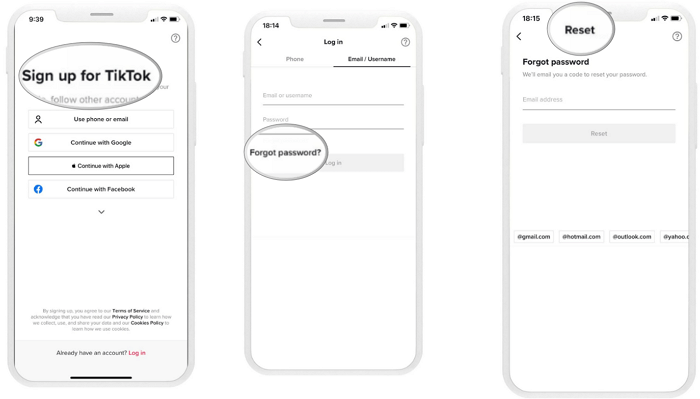
To sign up for TikTok, you can choose from various registration options, including using a phone or email, or continuing with Google, Apple, or Facebook. Alternatively, if you already have an account, you can click on the "Log in" option at the bottom of the screen.
Step 2. Tap on "Forgot password?"
The next step will ask you for your username and password. If you've forgotten your password, click on the "Forgot password" option to reset it.
Step 3. Enter a registered phone number or email address
After clicking on "Forgot password", you can enter your registered phone number or email address to receive a confirmation code via text message or email. You'll then be prompted to enter a new password, and once confirmed, your access to the TikTok account will be restored.
When you registered with another social account
If you signed up for TikTok through another social media app like Facebook or Twitter, it's easier to reactivate your account by logging in to that social media account, which will automatically reopen your TikTok account.
Method 2. Recover TikTok Account You Deleted
If you've accidentally or intentionally deleted your TikTok account and want to recover it, recovering a deleted TikTok account is possible within 30 days of deletion. To help you get your account back, follow these steps:
If you deleted your TikTok account but want to log back in or recover it within 30 days, you can follow these steps to get back your deleted account.
Step 1. Open the TikTok app.
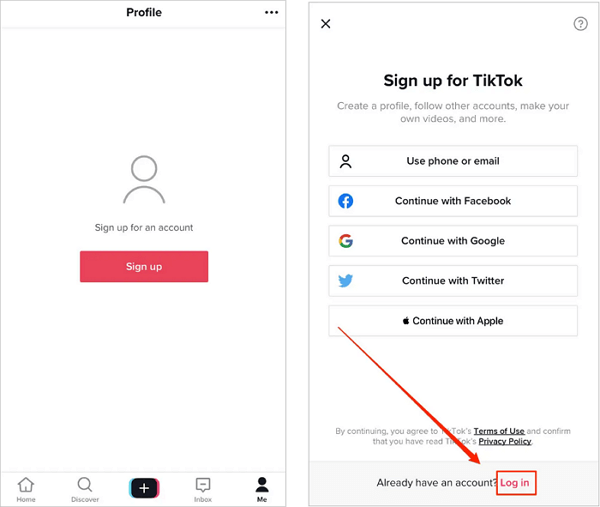
To sign up for a TikTok account, go to the home screen, tap the profile icon in the bottom right corner, and select "sign up".
Step 2. Log Into TikTok.
On the sign-up page, you will find the option "Already have an account? Login." Click on the login button or link.
Step 3. Choose the login option.
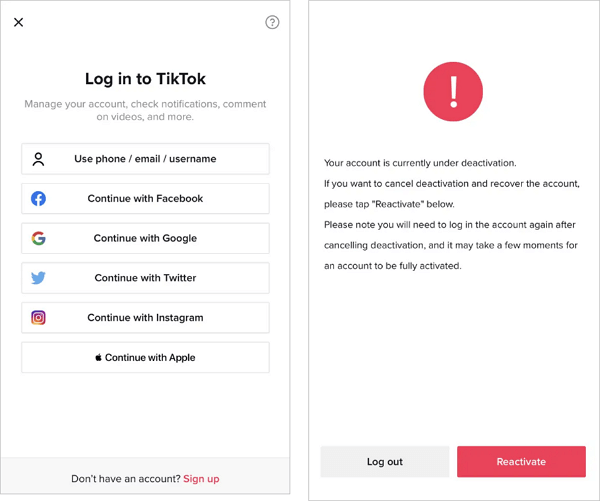
The login page offers various options, including phone/email/username login and social media integration with Facebook, Google, Twitter, Instagram, and Apple. If you've forgotten your password, you can select your login method and follow the recovery process for a password reset. This allows you to regain access to your account.
Step 4. Reactivate your account
Once you have chosen your login method, if your TikTok account was previously suspended, you will be directed to the account reactivate page. To reactivate your account, simply click on the reactivate button, and your TikTok account will be reactivated. You will then have the option to log in with the same credentials in the future.
Method 3. Recover a Banned Account
If your TikTok account is temporarily blocked or suspended, you'll receive an email from TikTok. You can wait 48 hours to see if your account is automatically resumed, or contact TikTok's customer support to report the issue. To reach support, you can follow their provided steps.
Step 1. Open your TikTok profile
To delete your TikTok account, go to your profile, tap the three lines in the top right corner, and select "Manage account" from the menu. From there, you can scroll down to the bottom and tap "Delete account".

Step 2. Recover a banned account from TikTok
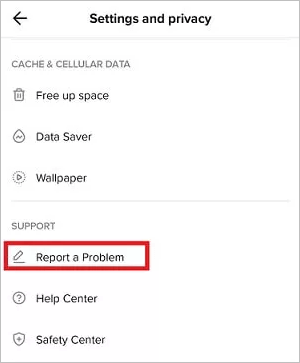
To report a problem on TikTok, go to the settings and privacy option, then click on Report a Problem, and add an email to describe the issue. You may receive a response from TikTok customer support within 7-9 hours.
How to Recover Deleted TikTok Videos
When creating or posting a video on TikTok, the editor asks if you want to save it to an album. If you choose to save to an album, your videos are saved in the draft folder, but if you don't, they may be lost. If you're facing this issue, there is a free data recovery software called Deep Data Recovery that can help you recover lost files, including videos, audio, images, documents, emails, and more. The sooner you use the software, the higher the chances of getting your videos back.
Step 1.Launch Deep Data Recovery on your PC. Select file types and click "Fast Scan" to initiate the recovery process.

Note: You can choose different search modes based on where and why the data was lost.
Step 2. To recover lost or deleted videos, select the location or device where they were lost or deleted. Click the "Scan" button to initiate the search for the missing videos. This process may take a few minutes, depending on the size of the device or location being scanned.

Step 3. After the scan, select "Videos" in the left panel, go to "Lost" or "All" to find the desired videos, select them, and click "Preview" to view.

Step 4. Select the video files you want to restore and click "Recover" to save them to a secure location.
Conclusion
If you're experiencing issues on TikTok, such as accidentally blocking your account or deleting it, or engaging in activity that violates community guidelines and terms of use, this guide can help. It provides a concise and easy-to-follow solution to these problems, allowing you to recover your account or resolve the issue at hand.
Related Articles
- Fix Stuck at Windows Is Loading Files Loop
- Fix Command Cannot Be Performed Because a Dialog Box is Open
- What to Do When SD Card Photos Not Showing Up in Gallery
- Hard Drive Not Showing Up or Detected in Windows? Learn How to Fix
- How to Find Adobe Premiere Product Key? 8 Full Solutions
To install, reinstall, or activate Adobe Premiere or other versions, you need a product key. If you've lost or can't find your product key, follow these easy steps to locate it. - How to Find Autodesk Civil 3D Serial Number and Product Key
Learn how to find Autodesk Civil 3D serial number and product key with 3 proven methods. Step-by-step guide using Orca MSI tool, Windows Registry, and Qiling Key Finder software.
Products
Articles & Tutorials
- Data Recovery
- Data Backup
- File Recovery
- File Backup
- System Backup and Restore
- Disk and Partition Clone
- Technical articles
- Mobile articles
- Disk Master Help
- Windows Data Recovery Tutorials
- Windows Secure Delete Tutorials
- Windows Partition Management Tutorials
- Windows File Backup and Restore Tutorials
- Windows System Backup and Restore Tutorials
- Windows Disk Backup and Restore Tutorials
- Windows Clone Tutorials