MS-DOS Commands [Everything You Need to Know]
Introduction
MS-DOS commands are used to interact with the operating system and other line-based commands software, but many users have moved away from using MS-DOS, opting for the Windows command line instead.
You can use MS-DOS commands such as DIR to list all files and subdirectories in a directory, CD to change the current directory, MD to create a new directory, RD to remove a directory, and DEL to delete a file. You can also use COPY to copy a file from one location to another, MOVE to move a file from one location to another, and REN to rename a file. Additionally, you can use TYPE to display the contents of a file, DATE to display or set the current date, and TIME to display or set the current time. These commands can help you manage your files and directories, and perform various operations on your PC.
MS-DOS (Microsoft Disk Operating System): What Is It?
MS-DOS, or Microsoft Disk Operating System, was the first operating system introduced by Microsoft, widely installed on personal computers.
In 1981, Microsoft licensed its operating system to IBM, which released it as PC-DOS for IBM PCs. Microsoft also released its own version, MS-DOS, for x86 computers. It went through eight major versions before its active support ended in 2006.
The Disk Operating System, commonly referred to as DOS, was a widely used operating system for personal computers.
MS-DOS is not a graphical OS driven by commands and oriented by lines. It has a tidy and easy-to-use user interface, with a prompt like C: > where users can enter commands.
Unlike Windows, MS-DOS is navigated using text commands, allowing users to access and manage files in a more direct way. For example, instead of double-clicking on a folder to open it in Windows, in MS-DOS you would use the "cd" command to change to the desired folder and then use the "dir" command to list the files within it. This approach requires a more hands-on method of file management compared to the graphical interface of Windows.
The Microsoft Disk Operating System (MS-DOS) has several key features, including the ability to run multiple programs simultaneously, support for various file systems and disk formats, and the ability to read and write data to floppy disks and hard drives. Additionally, MS-DOS provides a command-line interface for users to interact with the operating system, allowing them to execute commands and navigate the file system using a series of text-based commands.
- It is a 16-bit operating system.
- The device cannot be operated with a mouse, instead, input is provided through basic system commands.
- The maximum space available is 2 GB.
- It is a free OS.
- It uses a text-based interface and requires text and codes to operate.
- It does not support a graphical interface.
List of MS-DOS Commands
MS-DOS Commands are instructions that allow Windows users to perform tasks on files and folders. A file is a container for collecting information or data, and a directory is a collection of files, with MS-DOS Commands serving as a way to interact with these digital entities.
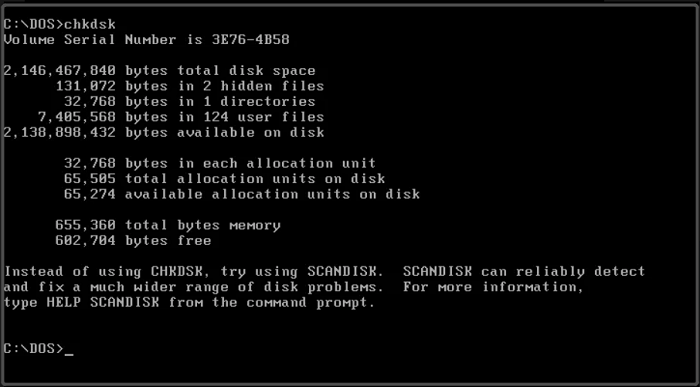
Here are common MS-DOS commands and their descriptions:
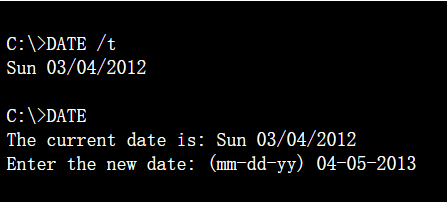
Date Command: This command is used to change or display the current system date.
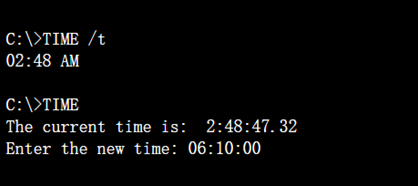
TIME Command: The Command is used to change or display the current system time.
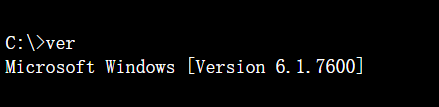
VER Command: This Command aims to display the Window's version.
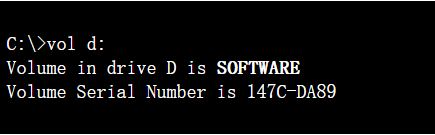
VOL Command: This Command displays the disk volume level or serial number.
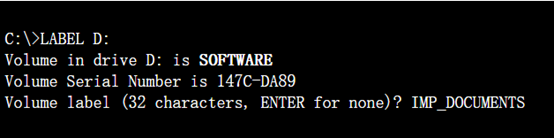
LABEL Command: This command can create, update and delete the serial number of a particular disk.
ECHO Command: The ECHO command is used to display messages on the screen and to turn command-echoing on or off.
PROMPT Command: This Command is used in changing the command prompt.
TITLE Command: This Command can change the title of the MS-DOS screen.
MKDIR/MD Command: MKDIR/MD command creates the directory in a particular drive.
CHDIR/CD Command: CHDIR/CD command is used to change the current working directory.
CD.. and CD\ Command:
The CD.. command is used to move up one level from the current working directory.
The CD\ command is used to go directly to the root directory of the current drive.
COPY CON: COPY CON command is used to create a text file.
TYPE Command: The TYPE command is used to display the file.
EDIT Command: The EDIT command opens the DOS Editor, a text editor, to create, view, and edit files.
DIR Command: The DIR command is used to display a list of files and subdirectories in a directory.
TREE Command: This Command displays files and subdirectories of a particular directory.
DEL/ERASE Command: The DEL/ERASE command is used to delete one or more files at the same time.
RM/RMDIR Command: This Command is used to remove (delete) a directory (folder).
SHUTDOWN Command: The shutdown command is used to shut down the Windows operating system.
Final Verdict
MS-DOS is a non-graphical command line operating system that originated from 86-DOS, built for IBM-compatible computers. It primarily runs on personal computers from companies like Compaq, IBM, and HP. Familiarizing yourself with the MS-DOS commands we've shown you will make it easier to create instructions and interact with your PC.
Related Articles
- Copy vs. Xcopy vs. Robocopy | What Is the Difference Between Them
- [Bad Sector Explained in 2022] What Is Bad Sector?
- Xprotectservice Explained: Apple's Built-in Antivirus Software
- Incremental Backup Advantages and Disadvantages [2022 Thorough Reviews]
- What Is the Best LG TV USB Format & How to Set It? [Step-by-Step Guide]
This guide will hely you to choose the suitable format for LG TV USB. And you will also be familiar with the three simplest ways to set the best LG TV USB format. - Fix Mark Partition as Active Greyed Out in Disk Management in Windows 10/11
Fix Mark Partition as Active greyed out in Windows. Learn why the option is unavailable and how to repair boot partition settings.
Products
Articles & Tutorials
- Data Recovery
- Data Backup
- File Recovery
- File Backup
- System Backup and Restore
- Disk and Partition Clone
- Technical articles
- Mobile articles
- Disk Master Help
- Windows Data Recovery Tutorials
- Windows Secure Delete Tutorials
- Windows Partition Management Tutorials
- Windows File Backup and Restore Tutorials
- Windows System Backup and Restore Tutorials
- Windows Disk Backup and Restore Tutorials
- Windows Clone Tutorials