Complete Guide of SATA Cable[Definition, Types, Usage & Differences]
What is SATA & SATA Cable
SATA, SATA (Serial Advanced Technology Attachment) is a computer bus interface that connects a host computer to storage devices such as hard disk drives, optical drives, and SATA hard drives. Developed and introduced by Intel in 2003, SATA has become the standard interface for connecting hard drives to desktop and laptop computers, and is widely used for most consumer-grade hard drives.
SATA cable The cable is a special type of wire that facilitates the connection between a host bus adapter, such as a motherboard, and a massive storage device. It enables hot plugging, allowing the operating system to recognize the device without requiring a system restart.
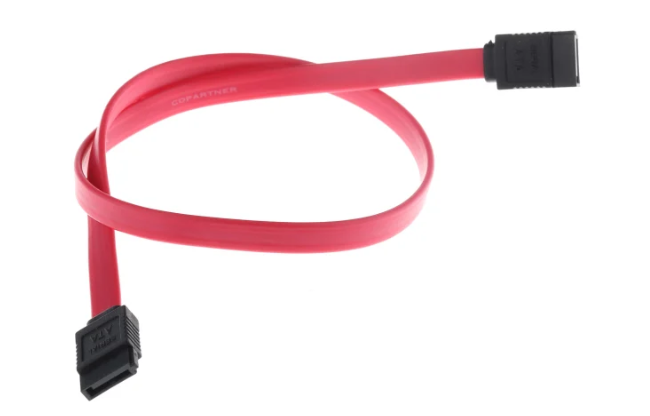
(image source:https://hkcn.rs-online.com/web/p/sata-cables/7581553)
Different Types of SATA Cable
The SATA cable has undergone three generations: SATA-1, SATA-2, and SATA-3. While they share the same fundamental characteristics, they differ in terms of transfer speed and specific specifications. A comparison chart can provide further details on the differences between these generations.
| SATA-1 | SATA-2 | SATA-3 | |
| Released Date | January 2003 | April 2004 | July 2008 |
| Transfer Rate | 1.5 Gbit/s | 3 Gbit/s | 6 Gbit/s |
| Bandwidth Throughput | 150 MB/s | 300 MB/s | 600 MB/s |
| Interface | Serial ATA-150 | Serial ATA-300 | Serial ATA-600 |
SATA cables come in two main types: the SATA data cable and the SATA power cable. These cables serve different purposes, with the data cable transmitting data between devices and the power cable supplying power to them.
The data cable is used to transfer data between a PC and a hard drive, connecting to the PC's SATA interface and the hard drive with its 7-pin connector. It typically uses a flat cable design to enable fast data transfer speeds.
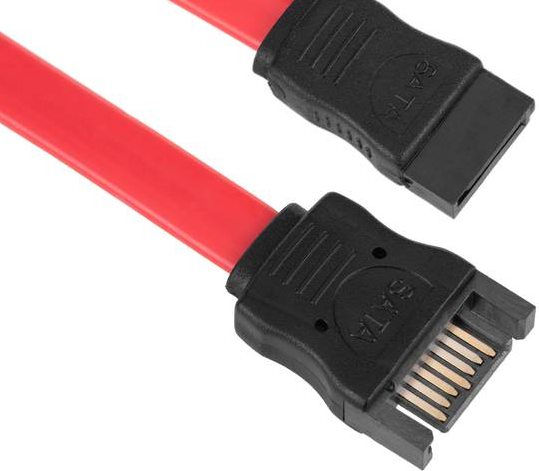
(image source: https://media.cablematic.com/)
SATA power cables are larger than data cables because they have a 15-pin interface, which is used to supply power to storage devices and optical drives that require it.
A SATA power adapter typically has 1-4 connectors that can power multiple devices at the same time.
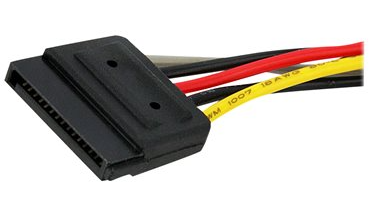
(image source: https://cdn.cnetcontent.com/)
Apart from the standard SATA and mSATA connectors, other types are available, such as e-SATA, micro SATA, and SATA to USB connectors. Low profile SATA connectors are also available. For a comprehensive list of SATA types and their characteristics, read the wiki page, which provides detailed information on all aspects of SATA connectors.
How to Use SATA Cable
Using a SATA adapter is a straightforward process. Simply prepare the correct adapter and ensure each connector is securely connected to the corresponding end, making it easy to achieve your operational purpose.
Here is a step-by-step guide to connect a SATA drive to a PC using a USB to SATA adapter. Start by plugging the adapter into a free USB port on your computer. Next, locate the SATA connector on the adapter and connect the SATA drive to it, ensuring the drive's SATA power cable is securely connected to the adapter's power input. Then, plug the other end of the adapter into a power source, such as a wall adapter or a USB port, to power the drive.
Step 1. Connect the SATA power cable to the power supply to power your SATA drive.
Step 2. Check the drive to ensure it is operable.
Step 3. Connect the SATA drive to the USB to SATA adapter.
Step 4. Finally, connect your USB to SATA adapter to your PC.
Differences Between SATA vs. PATA
SATA (Serial Advanced Technology Attachment) is the upgraded version of PATA (Parallel Advanced Technology Attachment), which has largely replaced PATA in modern systems. The key differences between SATA and PATA lie in their data transfer methods: SATA uses a serial interface to transfer data one bit at a time, whereas PATA uses a parallel interface to transfer multiple bits simultaneously. This results in faster data transfer rates for SATA, making it a popular choice for applications requiring high-speed data transfer, such as storage devices and peripherals.
SATA (Serial Advanced Technology Attachment) has several advantages over PATA (Parallel Advanced Technology Attachment). Specifically, SATA is smaller in size, more cost-effective, and capable of transmitting signals at a higher rate, resulting in faster data transfer speeds.
PATA is larger and has a 40-pin connector, whereas SATA is smaller with a 7-pin or 15-pin connector, saving space and power, and is also more cost-effective.
One key difference between PATA and SATA is their transfer speed. Due to PATA's support for multitasking in parallel, it tends to be slower than SATA, which achieves faster, more stable, and larger-size data transfer through continuous technical improvement.
Conclusion
The article provides a comprehensive introduction to SATA, covering its four aspects, which enables a thorough understanding of the SATA cable. A SATA adapter plays a crucial role in connecting PCs and other storage devices, while its various types cater to diverse needs of data transfer and power supply.
Related Articles
- Top 10 Most Basic SQL Commands To Know
- Windows 11 Is Not Activated: How to Activate Windows 11 OS for Free
- CMR vs. SMR Hard Drive: Which One is Better to be Choosen?
- What Is the CTF Loader and How to Fix CTF Loader Issues on Windows 10
- Qiling Disk Drives Stats 1 (Size/Brands/Type) for 2024
Choosing hard drive type, brand, and capacity has always been a dilemma for users. To better answer these questions for you, we surveyed 207,797 users and 754,142 hard drives over the past three months, including 346,477 SSDs, 200,818 HDDs, and 206,847 USB drives. - Qiling Disk Drives Stats 2 (Disk Number/Disk Types/C Drive Size) for 2024
Qiling conducted user research in 2024 to summarize the hard drive usage habits of users, including the number and capacity of hard drives, type of disk, size of the C partition, and status of their hard drive operating system.
Products
Articles & Tutorials
- Data Recovery
- Data Backup
- File Recovery
- File Backup
- System Backup and Restore
- Disk and Partition Clone
- Technical articles
- Mobile articles
- Disk Master Help
- Windows Data Recovery Tutorials
- Windows Secure Delete Tutorials
- Windows Partition Management Tutorials
- Windows File Backup and Restore Tutorials
- Windows System Backup and Restore Tutorials
- Windows Disk Backup and Restore Tutorials
- Windows Clone Tutorials