Backup Task Still Uses an Old Windows User Profile Path
After a Windows reinstall, account rename, or profile repair, a scheduled backup may still point to C:\Users\OldName while new work is stored under another profile. The task can finish successfully without capturing current Documents or Desktop files. Do not delete the old profile until its unique data has been copied and checked.
Compare the current and saved paths
Step 1. In File Explorer, open Documents and use the address bar or Properties > Location to record its actual path. Check Desktop and Pictures too; OneDrive folder backup can move these known folders under a OneDrive path.
Step 2. Open the existing Qiling file-backup task and review the source content list. Compare the full folder path, not just a familiar display name or the account name shown on the Start menu.
Step 3. Browse the last backup point for a file created recently in the current profile. If it is absent, treat the backup as incomplete even if the task says Success.
Select the current profile in Qiling
Step 1. Open Backup and Recovery > File backup and expand the source tree to the current C:\Users\... folder or its redirected OneDrive location. Select the exact folders you need; do not look for an Add Source button.
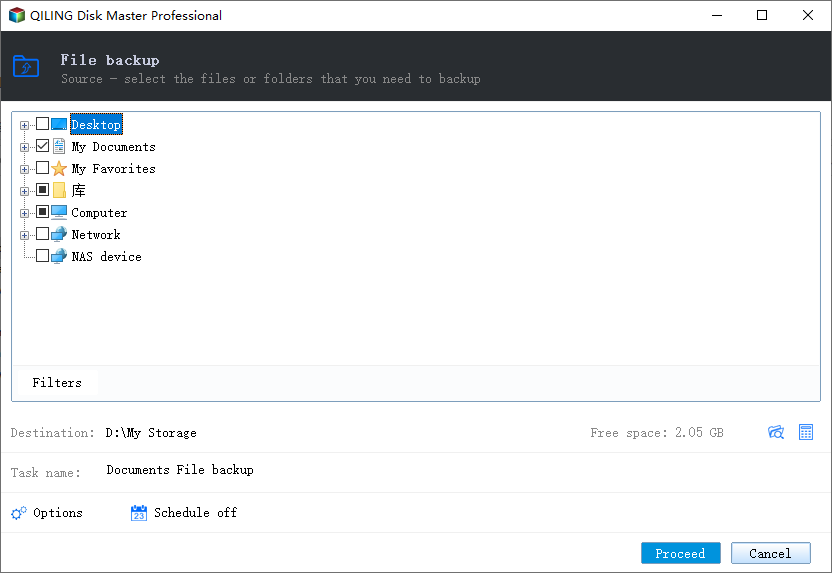
Step 2. Review Filters, schedule, and the destination. Keep the previous backup task and image until you have verified the new one, because the old profile may contain files that were not migrated.
Step 3. Click Proceed. When the backup finishes, browse the new point for the recently created test file and restore it to a separate location.
Prevent another silent gap
After a future account move or OneDrive redirection, inspect the task's source list again. A stable destination and a Success status do not guarantee the source path still follows your files.
Related Articles
- Back Up a Windows User Profile
Decide which profile folders need protection. - Completed Backup Missing Files
Verify source paths and inspect backup points.
Products
Articles & Tutorials
- Data Recovery
- Data Backup
- File Recovery
- File Backup
- System Backup and Restore
- Disk and Partition Clone
- Technical articles
- Mobile articles
- Disk Master Help
- Windows Data Recovery Tutorials
- Windows Secure Delete Tutorials
- Windows Partition Management Tutorials
- Windows File Backup and Restore Tutorials
- Windows System Backup and Restore Tutorials
- Windows Disk Backup and Restore Tutorials
- Windows Clone Tutorials