File Sync Created Duplicate Folders After a Source Rename
Renaming a source folder can make an older sync task point to the former path while a new task copies the renamed folder as a separate directory. The two destination folders may each contain unique edits. Do not delete the older one simply because its name looks outdated.
Map every source and destination
Step 1. Record the original folder name, new folder name, each task's source path, and the full destination paths. Compare actual contents and modification times rather than relying on folder names.
Step 2. Pause automatic sync. Copy both destination folders to a separate backup location, then identify files unique to each copy. If the source lives in OneDrive or another cloud folder, check whether its local path changed too.
Build a task for the current folder
Step 1. In Backup and Recovery > File sync, select the renamed folder directly in the source tree. Check the Path shown below the tree; there is no separate Add Source button in this interface.
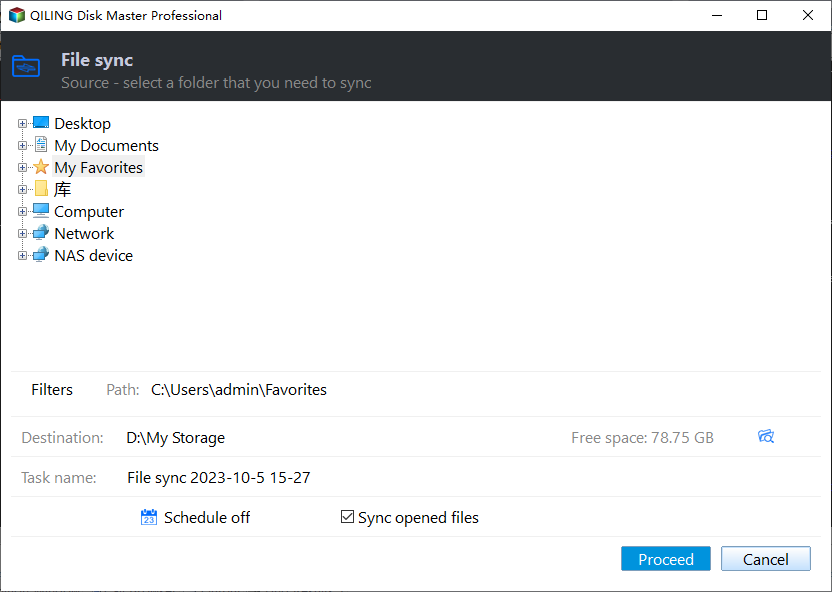
Step 2. Open Destination and choose a fresh, empty test folder rather than either existing duplicate. Verify the displayed path, Filters, and Schedule before running.
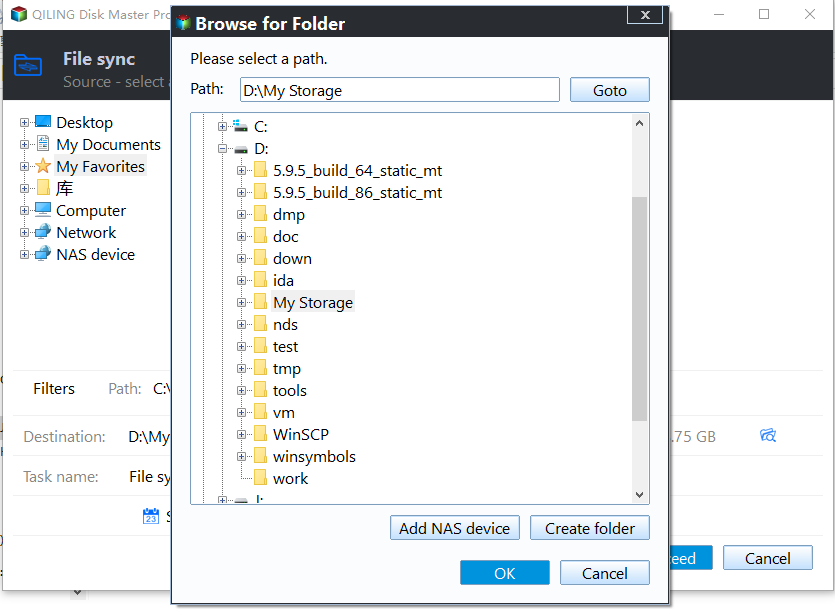
Step 3. Click Proceed. Confirm that the test destination has one expected folder and that several files open correctly. Only then decide which production task and destination path to keep.
Retire duplicates deliberately
Merge unique files into the chosen authoritative folder after comparing both copies and a separate backup. Disable the obsolete task before deleting its destination folder. Watch one scheduled run to confirm it does not recreate the old name. A file backup with restore points is safer than a sync task as the only record of earlier versions.
Related Articles
- Sync Task Destination Unchanged
Verify the exact path when a task reports success. - Windows File Sync Options
Choose sync or a versioned file backup for different needs.
Products
Articles & Tutorials
- Data Recovery
- Data Backup
- File Recovery
- File Backup
- System Backup and Restore
- Disk and Partition Clone
- Technical articles
- Mobile articles
- Disk Master Help
- Windows Data Recovery Tutorials
- Windows Secure Delete Tutorials
- Windows Partition Management Tutorials
- Windows File Backup and Restore Tutorials
- Windows System Backup and Restore Tutorials
- Windows Disk Backup and Restore Tutorials
- Windows Clone Tutorials