How to Solve Hard Disk Error 303 and 305
What does hard disk error 303 and 305 Mean
Hard drive disk errors 303 and 305 are diagnostic codes that indicate a hard drive failure. The specific error messages "Hard Disk 1 Quick 303" or "Hard Disk 1 Full 305" signal that the hard drive has failed and needs to be replaced immediately.
If you're experiencing errors on your PC with specific details, back up your failing hard drive and consider upgrading to a new HDD or SSD to resolve the issue.
"Start up test failed
Hard disk smart 301
Hard disk 1 Quick 303"
How to back up data on hard disk with 303 or 305 error
When a hard drive shows a 303 or 305 error, its lifespan is ending, and a new drive is the only solution. However, to create a backup of the data using backup and recovery software, you often need to boot from a recovery disc due to the hard drive's inability to boot with the system on it.
If you don't have a recovery CD, you can troubleshoot the issue using Qiling Backup utility. Simply remove the failed hard drive, connect it to another computer, download Qiling data backup software, and create a bootable rescue media. This will help you recover your data in an emergency situation.
To make a bootable disk of Qiling Backup, follow the instruction carefully.
Step 1. Prepare a USB drive which can be written and read.
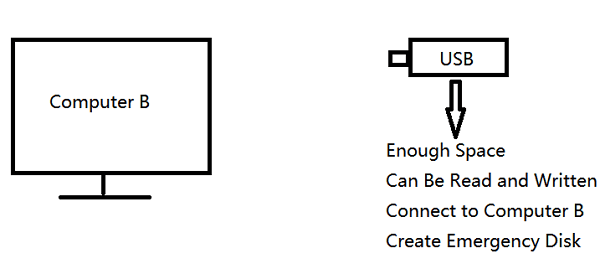
Step 2. Launch and install Qiling Backup on the Computer B.
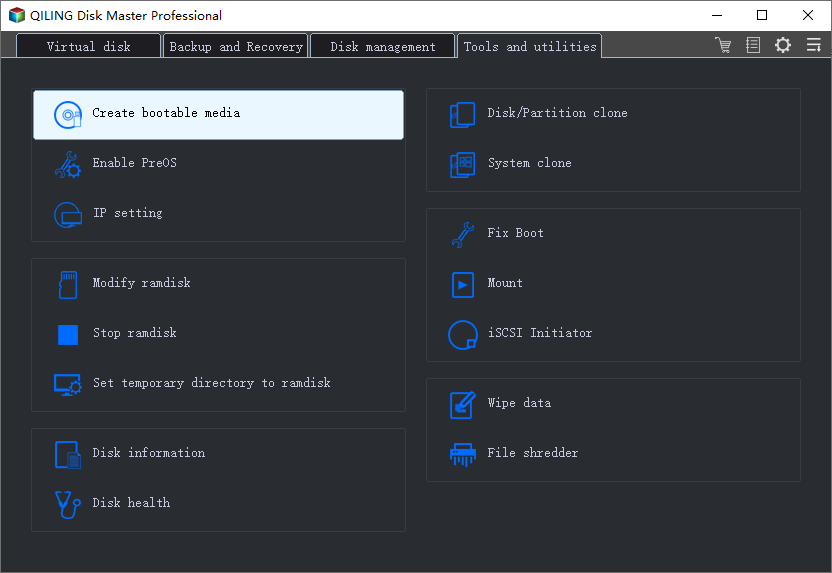
Step 3. Find and click "Tools" and choose "Create bootable media".
Step 4. Choose the location where you want to save the boot disk, which can be an ISO file, a bootable USB, or a CD/DVD disc.
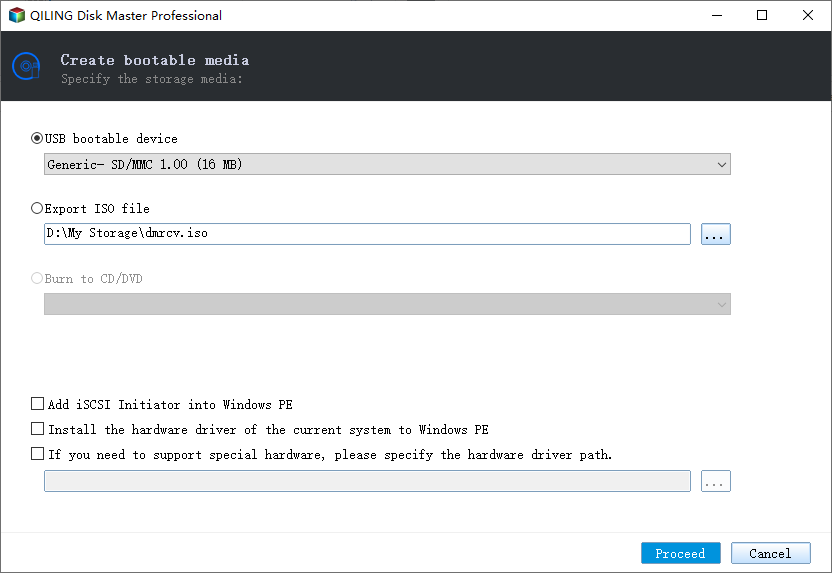
Step 5. Then click "Proceed" to start.
After successfully booting into Windows, now you can continue with the hard drive and partition backup with Qiling Backup software.
After backing up your data, you can shut down your computer and replace the failed hard drive with the new one. To restore the backup, launch Qiling Backup, select the image file, and click "Recovery" to retrieve your hard disk data.
Related Articles
- How to Fix Slow USB Transfer Speed and Speed Up USB in Windows 10/8/7
- Fix macOS Sierra 10.12.1 Update Stuck or Fail to Download Error
- How to Recover Your Deleted Firefox Browsing History
- How to Solve Webcam Freeze Up in Windows 10 Error?
- How to Backup Minecraft Worlds [Full & Detailed Tutorial]
You can backup your Minecraft Worlds using three different methods, which will be explained in this article. If you're not familiar with backing up your Minecraft Worlds, this is a helpful guide to learn. After reading this, you can choose the method that suits you best. - How to Backup/Transfer Kodi(XBMC) with Addons and Settings
If you're looking to transfer Kodi with all its configurations from one device to another, a simple backup and transfer tool is a must-have.
Products
Articles & Tutorials
- Data Recovery
- Data Backup
- File Recovery
- File Backup
- System Backup and Restore
- Disk and Partition Clone
- Technical articles
- Mobile articles
- Disk Master Help
- Windows Data Recovery Tutorials
- Windows Secure Delete Tutorials
- Windows Partition Management Tutorials
- Windows File Backup and Restore Tutorials
- Windows System Backup and Restore Tutorials
- Windows Disk Backup and Restore Tutorials
- Windows Clone Tutorials