VSS Shadow Storage Too Small for a Windows System Backup
A failed system image may mention the Volume Shadow Copy Service (VSS), but a VSS error does not always mean the shadow-storage limit is too small. The destination can also be full, a VSS writer can be in an error state, or another job can be running. Identify the failing volume before changing any setting. Reducing a shadow-storage limit can delete restore points.
Check the failure and current allocation
Step 1. Record the backup error, time, source volume, and destination. Confirm that the destination has enough free space for the selected system partitions and is not the same failing disk.
Step 2. Open an elevated Command Prompt and run vssadmin list shadowstorage. Read the Used, Allocated, and Maximum values for the affected volume. Run vssadmin list writers and note any writer whose state is not Stable.
Step 3. If the shadow-storage association is near its limit, free ordinary space on the relevant volume and retry after closing competing backup tasks. Do not run a resize or delete command just to test a guess; changing the limit may remove existing shadow copies.
Check the Qiling system-backup task
Step 1. In Backup and Recovery > System backup, confirm that the Windows and required boot partitions are selected. Compare Required space with the destination's Free space; the red free-space warning is a destination-capacity problem, not proof of a VSS limit.

Step 2. Select a reachable destination with sufficient headroom. Click Proceed and watch whether the job reaches the backup progress screen or fails while preparing the snapshot.
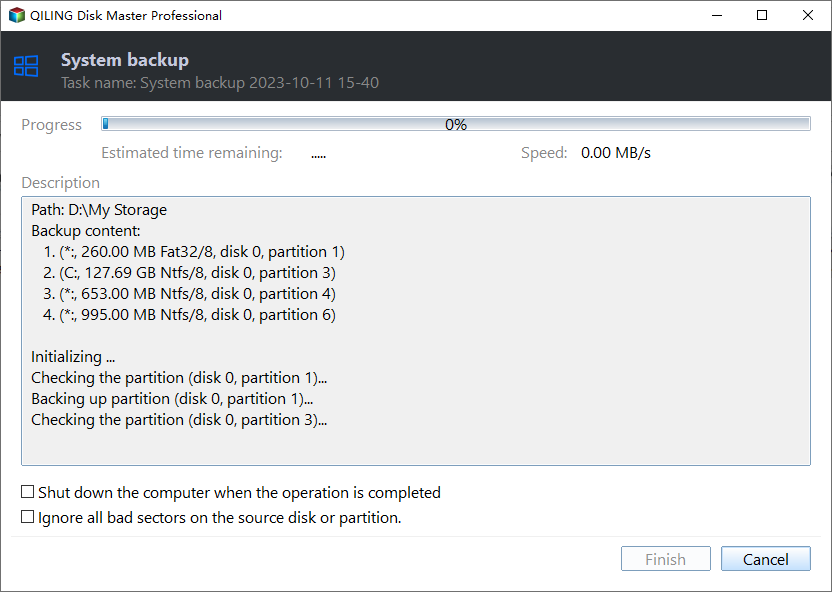
Step 3. If it fails again, match the new time to the Windows Application event log and Qiling task result. A failed writer needs investigation of its service or application; extra destination space alone will not fix it.
Preserve a usable recovery point
After a successful backup, confirm that the image appears in the task list and can be browsed or selected for recovery. Keep an older known-good image until the new one is verified. If an administrator must change VSS allocation, document the old values and the possible loss of restore points first.
Related Articles
- Volume Shadow Copy Service Issues
Check VSS service and writer problems separately. - Backup Shadow-Copy Error
Investigate a backup that fails while reading a snapshot.
Products
Articles & Tutorials
- Data Recovery
- Data Backup
- File Recovery
- File Backup
- System Backup and Restore
- Disk and Partition Clone
- Technical articles
- Mobile articles
- Disk Master Help
- Windows Data Recovery Tutorials
- Windows Secure Delete Tutorials
- Windows Partition Management Tutorials
- Windows File Backup and Restore Tutorials
- Windows System Backup and Restore Tutorials
- Windows Disk Backup and Restore Tutorials
- Windows Clone Tutorials