Windows 11 26H2 USB Drive Cannot Safely Eject
Quick Navigation:
- Why Eject Fails After 26H2
- Back Up the Drive Before You Pull It
- Disconnect the Drive Safely
- Restore the Eject Option
- Frequently Asked Questions
The copy has finished, the drive is sitting in the port, and Windows will not let it go. Safely Remove Hardware is missing from the tray, or the prompt says the device is in use. The behavior is more common on Windows 11 26H2, and the safe response is to let the writes finish and back the drive up before you unplug anything.
Why Eject Fails After 26H2
Windows blocks an eject while any handle is open on the volume. A thumbnail, an antivirus scan, the search indexer, a cloud sync client, or a program that recently opened a file on the drive all count, and none of them appear in the tray.
26H2 also changed how some USB storage is enumerated. Drives that report themselves as fixed disks are no longer listed under Safely Remove Hardware, because Windows assumes a fixed disk cannot be removed. The drive keeps working, but the menu option disappears, and unplugging it while writes are still cached is what damages the file system.
Write caching is the second half of the problem. With caching enabled, Windows confirms a copy before the data has actually reached the drive. The activity light on the enclosure is the only reliable sign: while it blinks, the drive is still writing, whatever the progress bar shows.
Back Up the Drive Before You Pull It
When the eject is refused, do not pull the cable to make the message go away. Back the drive up first, because that copy is what protects you if a forced disconnect damages the file system. Qiling Disk Master clones the whole external drive to an internal disk or a second external drive, and the clone stays readable even if the original is later repaired or reformatted.
Step 1. Select the USB Drive
Start the program and right-click the external drive. Confirm the capacity and model against Explorer and against the drive's label, since two similar enclosures are easy to mix up.
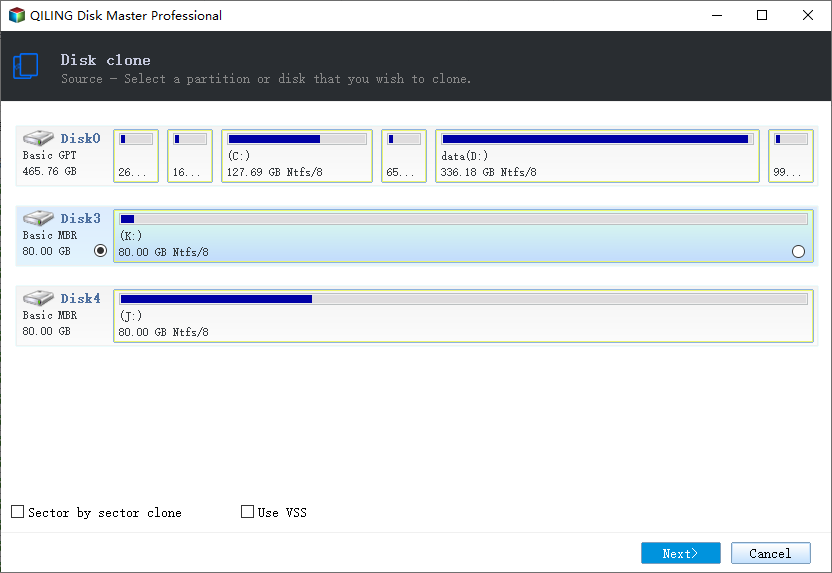
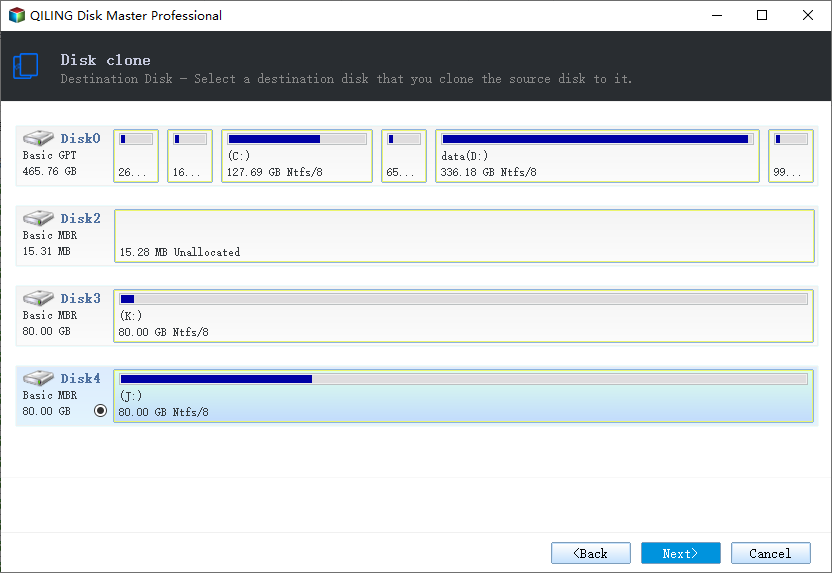
Step 2. Choose a Destination Disk
Right-click the disk that will hold the copy and choose Clone. The destination must be at least as large as the source. Do not choose the same drive, and do not choose a partition that is too small.
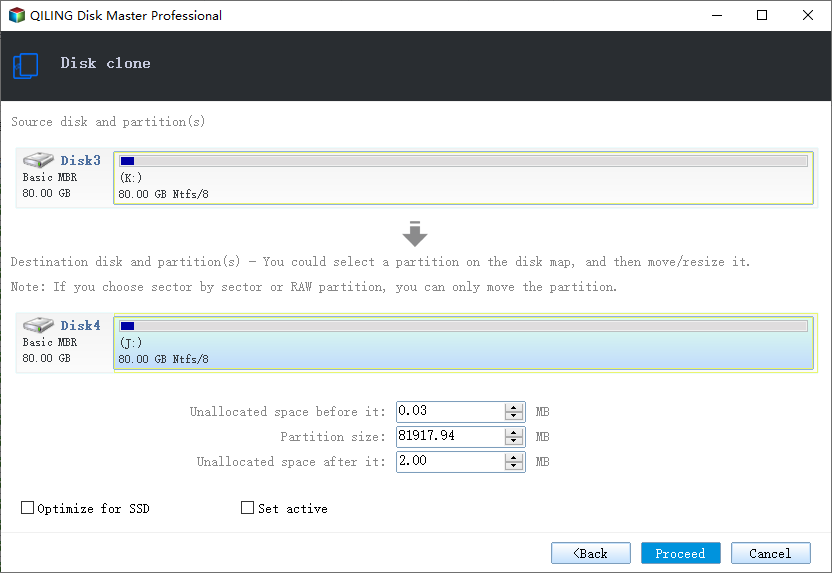
Step 3. Preview and Proceed
Review the pending operations list before you commit. Leave both drives connected until the program reports that the clone is complete, and check the copy in Explorer before you unplug the USB drive.
Disconnect the Drive Safely
Close every window that shows content from the drive, including Explorer, media players, and any portable app that runs from it. Wait for the activity light to stop blinking, then open Settings > Bluetooth & devices > Devices, find the drive, and choose Remove device. Windows flushes cached writes before it releases the device.
If that entry is missing as well, open Disk Management, right-click the disk, and choose Offline. The drive stops accepting writes and can be unplugged once the light is out. Never take an internal system disk offline this way.
Signing out of Windows is a slower but reliable alternative: it closes the handles that belong to your session and releases the drive cleanly. Restarting the PC works too, as long as you shut it down properly instead of holding the power button.
Restore the Eject Option
Open the drive's properties in Device Manager, set the removal policy to Quick removal, and apply it. Quick removal disables write caching, so the drive can be unplugged as soon as the light stops, at the cost of slightly slower copies. Also update the USB host controller and chipset drivers from the PC or motherboard vendor, then restart and check the tray again.
If the drive is still reported as a fixed disk after those changes, Windows will not offer Safely Remove Hardware for it, because the option is tied to the reported device type. In that case use Remove device in Settings or shut the PC down before unplugging.
Frequently Asked Questions
Why is Safely Remove Hardware missing?
Most often the drive reports itself as a fixed disk, so Windows does not expect it to be removed. Write caching policy and third-party USB drivers can hide the option as well.
Is it safe to unplug when the light is off?
With Quick removal set and no file open from the drive, yes. The light going out confirms that nothing is being written at that moment.
Did the 26H2 update corrupt my drive?
The update does not write to your files. Corruption comes from unplugging during cached writes, which leaves the file system inconsistent. Restore from the backup first, then repair the drive.
Can I lose data by forcing the unplug?
Yes. Pending writes can be lost, and the file allocation table or directory entries can be left inconsistent. That is why the backup comes before the disconnect.
Related Articles
- Windows 11 System Image Backup Removed
- USB4 and Thunderbolt 5 External SSD Not Detected
- The 3-2-1-1-0 Backup Rule for Ransomware
- Move Games to Another Drive or a New Computer
Products
Articles & Tutorials
- Data Recovery
- Data Backup
- File Recovery
- File Backup
- System Backup and Restore
- Disk and Partition Clone
- Technical articles
- Mobile articles
- Disk Master Help
- Windows Data Recovery Tutorials
- Windows Secure Delete Tutorials
- Windows Partition Management Tutorials
- Windows File Backup and Restore Tutorials
- Windows System Backup and Restore Tutorials
- Windows Disk Backup and Restore Tutorials
- Windows Clone Tutorials