3-2-1-1-0 Backup Rule: Ransomware-Proof Your PC
Quick Navigation:
- What the 3-2-1-1-0 Rule Adds
- Map Your Copies to Different Media
- Keep One Copy Offline
- Automate and Verify with Qiling
- Frequently Asked Questions
The classic 3-2-1 rule says three copies, two media types, one offsite. Ransomware changed the math, because an attacker who reaches your network can encrypt every connected backup at once. The 3-2-1-1-0 rule adds the two elements that actually stop that outcome.
What the 3-2-1-1-0 Rule Adds
The first 1 means one copy must be offline or immutable. Offline means disconnected from the network after the backup finishes; immutable means the storage cannot be altered or deleted during a retention period even by an administrator account.
The 0 means zero errors in the restore process. A backup that has never been tested is a guess. You need a documented, repeatable restore that has been proven on real hardware or a virtual machine.
Together the five digits describe a practical target: three copies, two media types, one offsite, one offline or immutable, and zero unverified backup sets.
Map Your Copies to Different Media
A simple home or small-office layout is: the original data on the PC, a full system image on an external SSD, and a second copy on a NAS or cloud account. The two media types satisfy the 2, and the cloud or offsite drive satisfies the first 1.
Keep the external SSD disconnected when it is not in use. A drive that stays plugged in is online storage, and ransomware will find it through a mapped letter or a network path.
Versioning matters as much as duplication. Cloud storage with file version history can recover a pre-attack copy even if the latest file was encrypted. A plain mirror of the encrypted file is not a backup.
Keep One Copy Offline
Rotate two external drives: while one is connected for the weekly backup, the other stays in a drawer or a safe. This gives you an offline copy that no process on the PC can reach.
For the offline copy, use a full system image plus the user folders. An image restores the machine; the folders let you pull a single document without a full restore.
Test the offline copy at least once a quarter. Connect it, open the image, restore one folder to a spare location, and confirm that the files open. Then disconnect it again.
Automate and Verify with Qiling
Qiling Disk Master can schedule a system image and file-level backups, and it can restore either one to the original or a replacement disk. Automation removes the human delay that ransomware exploits.
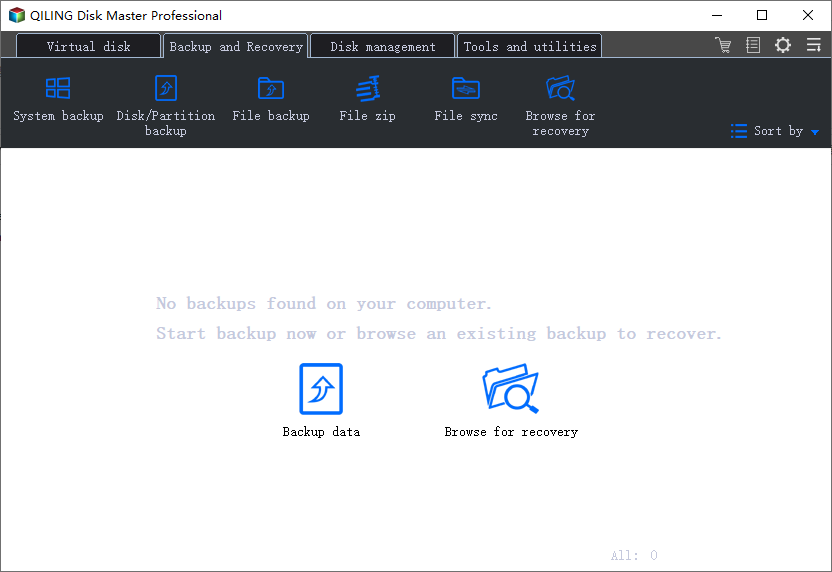
Step 1. Create the Local Image
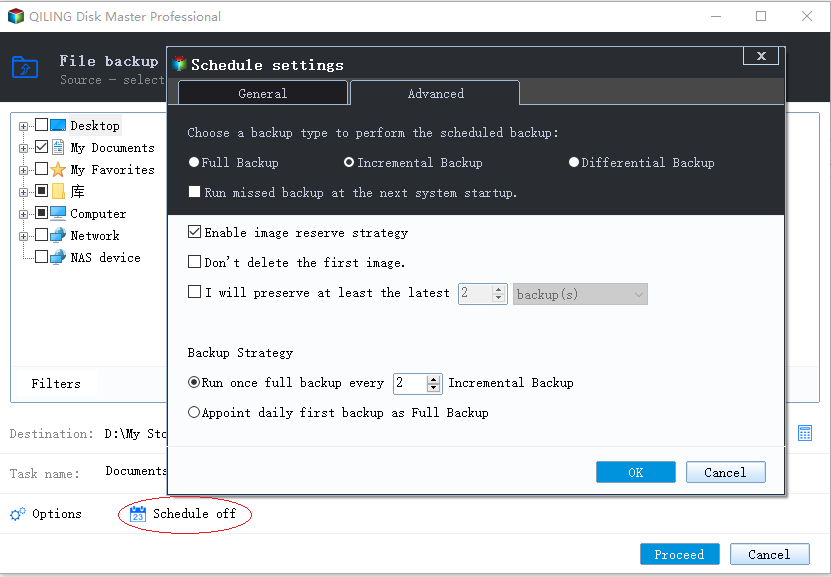
Run a full System Backup to the external drive that will be rotated offline. Keep the first image complete, then use incremental backups for the weekly schedule.
Step 2. Schedule File Backups
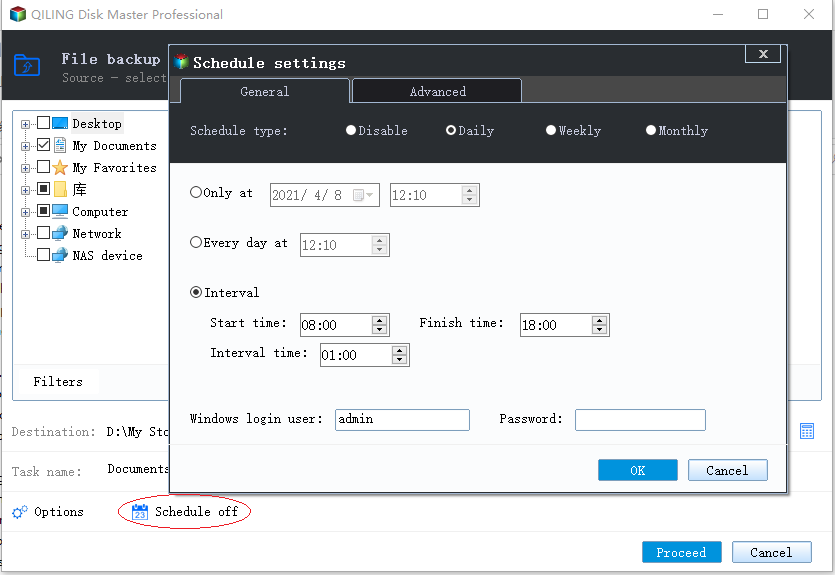
Add a file backup task for Documents, Desktop, Pictures, and any project folders. Set a daily or weekly schedule and enable versioned copies so an encrypted file does not overwrite the last good one.
Step 3. Preview and Proceed
Review both tasks, then click Proceed. After the first run, perform a test restore to a spare folder and record the result as your zero-error proof.
Frequently Asked Questions
Is 3-2-1 enough in 2026?
It covers disk failure and site loss but not a ransomware attack that reaches connected backups. The extra offline copy closes that gap.
Does OneDrive count as a backup copy?
Only if it keeps version history and the account is not reachable with the same credentials as the infected PC. Sync alone can mirror encrypted files.
How often should I test a restore?
At least quarterly, and after any change to the backup tool, the destination, or the operating system.
Can I encrypt the backup drive?
Yes. Keep the recovery key somewhere other than the PC, or the backup becomes unreadable after a theft or a disk failure.
For the original strategy, see the 3-2-1 backup rule explained.
Related Articles
- The 3-2-1 Backup Rule Explained
- Ransomware Backup Solutions
- Best Windows Backup Tools Before a Feature Update
- Windows 11 Removed System Image Backup: What to Use
Products
Articles & Tutorials
- Data Recovery
- Data Backup
- File Recovery
- File Backup
- System Backup and Restore
- Disk and Partition Clone
- Technical articles
- Mobile articles
- Disk Master Help
- Windows Data Recovery Tutorials
- Windows Secure Delete Tutorials
- Windows Partition Management Tutorials
- Windows File Backup and Restore Tutorials
- Windows System Backup and Restore Tutorials
- Windows Disk Backup and Restore Tutorials
- Windows Clone Tutorials