[3 Ways] How to Backup Laptop to OneDrive Quickly
Should I Use OneDrive to Backup My Laptop
OneDrive is a file hosting service provided by Microsoft, offering 5 GB of free cloud storage, similar to Google Drive and Dropbox.
OneDrive allows users to store various types of files, including photos, videos, documents, and music, making it a convenient tool for both personal and professional use. Many people also use OneDrive to back up their data, taking advantage of its benefits.
- Seamless device transition: When users replace their old laptops, backing up important files to OneDrive ensures they maintain access and continuity on their new device.
- Access anywhere: OneDrive is an internet-connected service, making it easy to access your files from anywhere at any time.
- Enhanced security: Backing up a laptop to the cloud is generally safer than keeping files local, as it protects against hardware failure, theft, or physical damage to the device.
Backing up your laptop to OneDrive is a great idea, and there are several ways to do it. One option is to use professional backup software like Qiling Backup to transfer your files to OneDrive, providing a reliable and efficient way to safeguard your data. This method is especially useful for those who want a hassle-free experience. Alternatively, you can manually upload files to OneDrive via the web interface or use the built-in OneDrive Desktop app to automatically sync your files to the cloud.
Backup Laptop to OneDrive with Backup Software
Backing up a laptop to OneDrive can be efficiently done with professional backup software. If you're unsure which software to choose, you might consider using Qiling Backup Home, a handy and professional program that offers many excellent features, including the ability to back up your laptop to OneDrive.
- Qiling Backup can quickly back up or recover the whole data on the laptop with just a few clicks.
- Cloning a system that's running smoothly allows for easy restoration if it ever breaks down, providing a backup solution.
- Qiling Backup can back up both files and disk partitions.
- Qiling Backup supports backing up files and folders to various storage devices, including HDD, SSD, RAID, USB, and NAS.
How to Backup Laptop to OneDrive with Backup Software
Don't worry, Qiling Backup is super simple to use. Just follow the leads: download and install the software, connect your laptop to OneDrive, and let the software do the rest. It's that easy!
Step 1. To start a disk backup, open Qiling Backup and select "Disk Backup" on the home page.

Step 2. Qiling Backup allows you to select the backup scope, giving you the flexibility to back up an entire disk or a specific partition based on your needs.
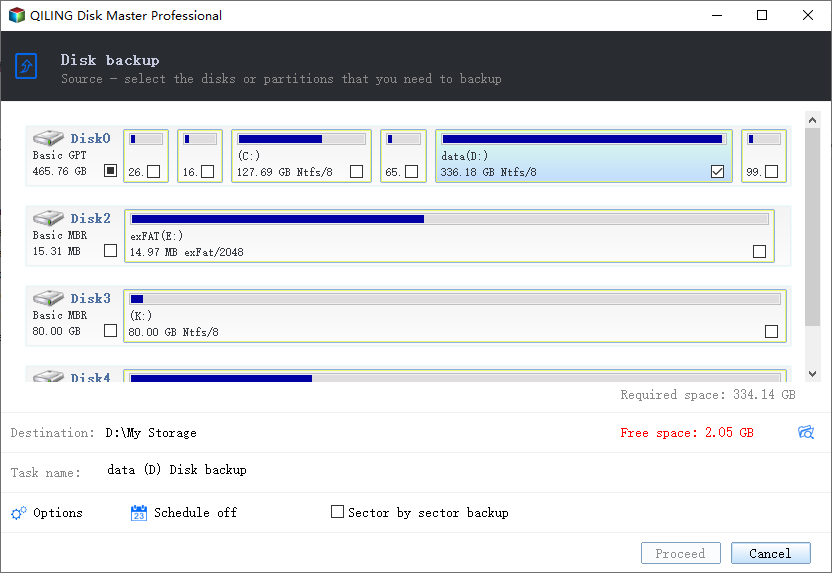
Step 3. Save the disk backup to a local drive or NAS.
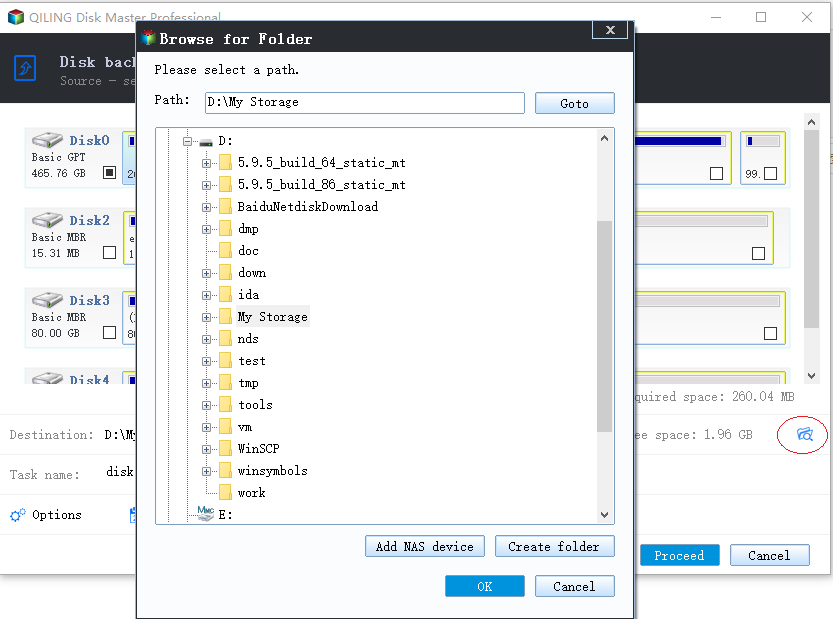
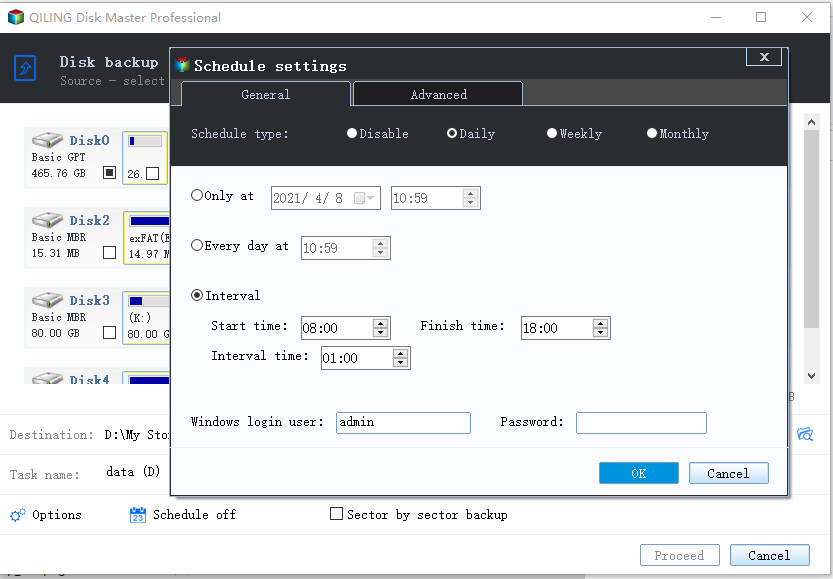
Step 4. After the backup process is completed, you can click "Proceed" and then right-click any one of the tasks to further manage your backup, such as recovering it or creating an incremental backup.
Backup Laptop to OneDrive with OneDrive Web
To back up your laptop to OneDrive without downloading third-party software, you can visit the OneDrive website and start the backup process from there.
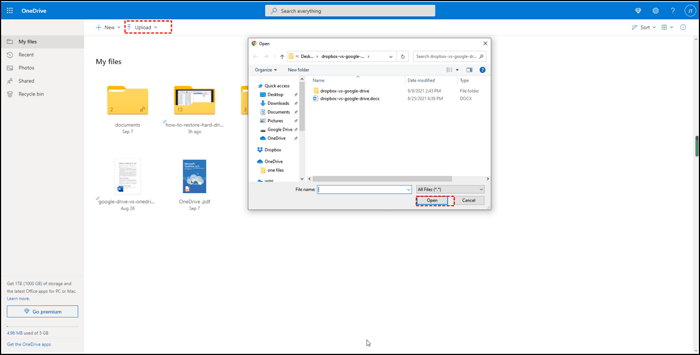
Step 1. To access OneDrive, you can visit the OneDrive website and log in with your Microsoft OneDrive account.
Step 2. Click "Upload" on the upper side.
Step 3. Select the files and folders you want to upload, click "Open" to start the process, and be mindful of the number of items to avoid any issues.
Backup Laptop to OneDrive with OneDrive Desktop
If you're using Windows 10/11, you can skip visiting the website as OneDrive Desktop is already installed. For more information on backing up your laptop to OneDrive, you can refer to the details provided here.
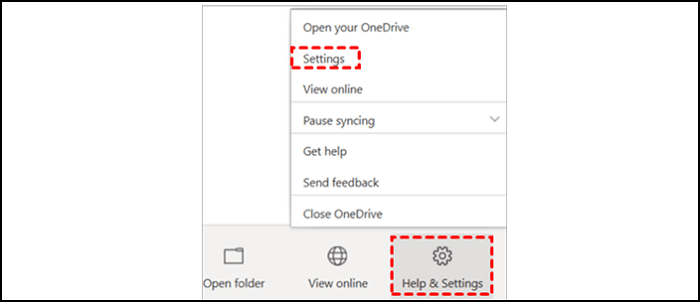
Step 1. Start OneDrive Desktop, click "Help & Settings" and hit "Settings".
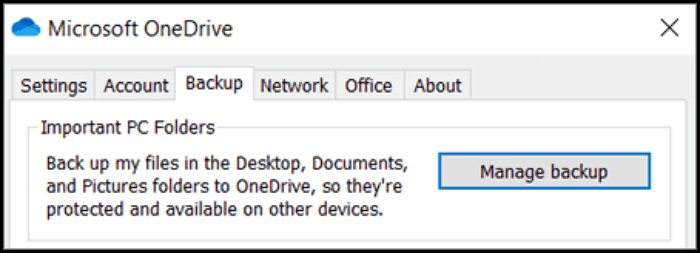
Step 2. Click "Backup" and choose "Manage Backup".
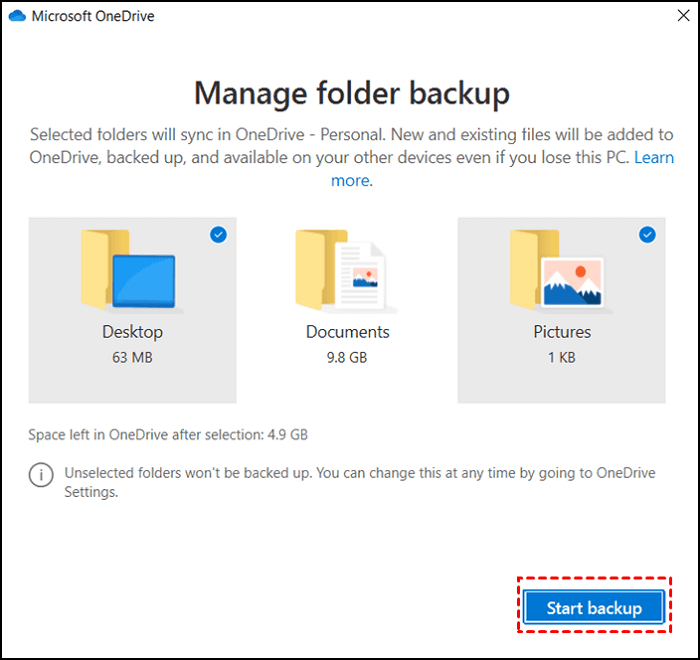
Step 3. Select the folders you want to back up to OneDrive, then click "Start backup".
Conclusion
If you forget to back up your laptop frequently, you may lose important files, photos, and documents if your laptop is stolen, damaged, or experiences a system crash. This can lead to significant time and effort to recreate or recover the lost data, potentially causing inconvenience and financial losses. Regular backups through OneDrive can help mitigate these risks by ensuring that your data is safely stored and can be easily restored in case of an emergency.
- You accidentally deleted important files and didn't have a backup file to restore them.
- Your laptop may be stolen on your way home, which could result in wasted time if you don't have backup files.
- The system crashed unexpectedly, resulting in a blue screen of death error, requiring a financial investment to restore it.
Qiling Backup offers 250 GB of free cloud storage, making it a suitable option for users who want to save large files of more than 5 GB.
Backup Laptop to OneDrive FAQs
Do you still have some questions to ask after reading the whole page? Try to find your answers here.
Can I automatically backup to OneDrive?
Qiling Backup, a professional backup software, can help you back up automatically.
- 1. On the home page, select "Create Backup" and then click "Select backup contents".
- 2. Choose "File/Disk/OS/Mail" as you want.
- 3. Click "Cloud" and choose "OneDrive".
- 4. The backup will start by clicking "Proceed".
Does OneDrive backup everything?
OneDrive can back up various types of files, including photos, videos, documents, and music, but the extent of the backup depends on the amount of cloud storage space you have available.
How do I backup my Windows 10 computer to OneDrive?
Windows 10 computers have a built-in OneDrive Desktop app that allows for easy backup of the entire computer.
- 1. Start OneDrive Desktop, click "Help & Settings" and hit "Settings".
- 2. Click "Backup" and choose "Manage Backup".
- 3. Select the folders you want to back up to OneDrive, and then click "Start backup".
Can you back up your entire C drive to OneDrive?
To quickly back up your entire C drive, you'll need disk backup software. Qiling Backup is a helpful tool for this task.
- 1. To create a backup, select "Create Backup" on the home page, then click "Select backup contents".
- 2. Click "Disk" and choose C drive.
- 3. Click "Cloud" and choose "OneDrive".
- 4. The backup will start by clicking "Proceed".
Related Articles
- Fully Ghost Windows 10 64 Bit/32 Bit with Windows 10 Ghost Software
- Backup Red Dead Redemption 2 Save Files [ 2 Plans]
- System State Backup & System Image Backup Windows 10 [2022]
- How to Migrate or Clone Windows 10/11 from HDD to SSD
- Acronis Universal Restore for Windows & Its Alternative
Acronis Universal Restore is a tool that allows you to restore a system image to new hardware, but this article will also explore alternative options that may better meet your needs. - (Easiest) Windows 10 Apps Data Backup: Backup Installed Applications in Windows 10
Step-by-step Windows 10 apps data backup tutorial shows you how to backup installed software in Windows 10 PC. It is helpful when you want to restore missing apps removed by Windows 10 update.
Products
Articles & Tutorials
- Data Recovery
- Data Backup
- File Recovery
- File Backup
- System Backup and Restore
- Disk and Partition Clone
- Technical articles
- Mobile articles
- Disk Master Help
- Windows Data Recovery Tutorials
- Windows Secure Delete Tutorials
- Windows Partition Management Tutorials
- Windows File Backup and Restore Tutorials
- Windows System Backup and Restore Tutorials
- Windows Disk Backup and Restore Tutorials
- Windows Clone Tutorials