[Solved] Fix iPhone Contacts Missing Issue with Tips
Summary
If your iPhone contacts have gone missing, don't worry, this guide has got you covered. We'll walk you through some solutions to help you retrieve your contacts and get them back on your iPhone.
If your iPhone contacts are missing, you can try restoring from an iTunes or iCloud backup if you have one. If not, you may need to manually re-enter the contacts or use a third-party app to recover them.
You have two options to solve the problem of missing iPhone contacts: either find some solutions to address the issue or use a third-party recovery tool to recover the missing contacts directly. This guide covers both methods, providing you with the necessary information to tackle the problem.
Why are some of my contacts missing from my iPhone?
Before starting, it's essential to understand the potential factors that can lead to the "iPhone contacts missing" issue, allowing you to take preventive measures and avoid losing contacts in the future.
1. Software upgrade.
The new iOS system can sometimes introduce bugs rather than fix them, leading to issues like iPhone freezing, getting stuck during updates, or even files disappearing. To avoid these problems, it's recommended to back up your iPhone regularly, check its compatibility with the new system, ensure there's enough storage space, and maintain a consistent power supply.
2. iPhone jailbreak.
To avoid data loss when jailbreaking your iPhone via third-party apps, back up your device, upgrade to the latest iOS version, ensure it's fully charged, and have at least 2GB of free space.
3. Hardware issues.
The most common source of data loss is when someone interrupts their phone's charging process or removes the battery during a firmware update, causing a disruption in power supply. To avoid this, it's essential to ensure a consistent power supply while upgrading the phone's firmware.
4. Virus causes.
As iOS viruses and malware become more prevalent, it's essential to be cautious when browsing online to protect your device and data from potential threats, and avoid visiting suspicious or illegal websites to minimize the risk of infection.
5. Maldeletion.
Male deletion is a common mistake that occurs when a person mistakenly presses the delete button, often due to human error, and accidentally deletes important data or files. This can happen when a person is in a rush, distracted, or unfamiliar with the software or system being used. As a result, male deletion can lead to data loss, frustration, and wasted time trying to recover the deleted information.
How to Fix Contacts Disappeared from iPhone
If your iPhone contacts seem to have vanished, don't panic! They're likely just not displaying properly. To get them back on screen, try one of the quick fixes below.
Solution 1. Restart Your iPhone
Restarting your iPhone can be helpful for resolving various issues, including missing contacts. Many users have found it useful in resolving their problems. If you're experiencing issues with missing contacts, one of the first steps to try is restarting your iPhone. This simple action can sometimes resolve the issue and restore your contacts.
Solution 2.Toggle Contacts in iCloud Off and On Again
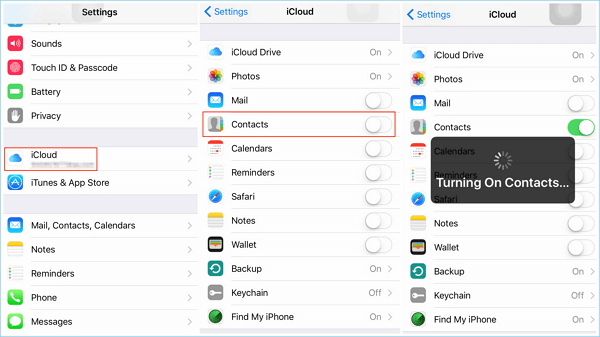
To fix the issue of missing names in Contacts on your iPhone, toggle Contacts in iCloud on and then off again. This simple trick can resolve the problem. To do this, go to Settings, scroll down and tap on your name, then tap on "iCloud," select "Contacts," and toggle it on and off again.
Step 1. To disable iCloud Contacts, go to Settings > [your name] > iCloud and toggle off the Contacts switch.
Step 2. You'll be asked to decide what to do with previously synced contacts, and you can choose to delete them from your iPhone while keeping them in iCloud.
Step 3. Turn Contacts on, and your iCloud contacts should now be back on your device. If the names of the contacts are not back, follow the next solution to get the disappeared contacts back.
Solution 3.Change Your Contacts Settings
Step 1. To change the contact list to show all contacts on your iPhone, go to the Contacts app, click on "Groups" at the top of the contacts page, and select "All on My iPhone" instead of "All iCloud."
Step 2. Check to see if the contacts have come back. If not, try our 3rd option.
Solution 4.Turn Individual Accounts Off and On
Step 1. Go to Settings > Accounts and Passwords.
Step 2. Select each account that syncs your contacts with your device (like Gmail, Outlook, iCloud, and so forth).
Step 3. To resolve the issue of contacts not syncing, turn off the contacts button for each connected account, wait 10-20 seconds, and then turn it back on. This process should be repeated for all connected accounts. Once completed, check if the issue is resolved.
Solution 5.Try Forcing Your Contacts to Rebuild
Step 1. Open any random contact on your iDevice. Make some edits to the information (like adding a fax number or home phone number—even if it's a fake number) and save.
Step 2. To restart your iPhone, use the Slider to power off the device or go to Settings > General > Reset > Shut Down, and then power it back up.
Solution 6.Use Qiling MobiSaver to Recover Missing Contacts
If all else fails, try recovering lost contacts from a backup you made using iTunes or iCloud, provided the backup includes the missing contacts. Note that restoring from a backup will erase all existing iPhone data.
If you're missing your iPhone contacts and don't want to erase existing data, we suggest using Qiling MobiSaver, a professional iPhone data recovery tool, to retrieve your contacts from an iTunes or iCloud backup. Alternatively, if there's no available backup, you can still attempt to recover your files without one. Follow the guide below to get started with your iPhone contact recovery process.
Step 1. Connect iPhone to Your PC
Launch Qiling MobiSaver, select "Recover from iOS Device" on the left, and click "Start".
Step 2. Scan iPhone to Find Lost Contacts
Qiling MobiSaver will automatically scan your iPhone and find your lost contacts.
Step 3. Preview and Restore Contacts
After selecting the contacts you want to recover, click on "Recover to PC" or "Recover to Device" to choose where you want to save the list.
Note:
- If you lose contacts, messages, or other data after updating to iOS 10, stop using your iOS device immediately to prevent further data loss and potential corruption.
- Qiling MobiSaver requires a serial number for activation and you may need to purchase one.
The Bottom Line
Many iPhone users have experienced the frustrating issue of disappearing contacts, and it's great that you're looking for a solution. The good news is that there are several reasons why this might happen, and we have some helpful tips to get your contacts back. Whether it's due to a software glitch, a hardware issue, or simply a mistake, we've got you covered. Just follow the steps outlined in this guide, and you should be able to recover your contacts and get back to enjoying your iPhone as usual.
Related Articles
- [Solved] 7 Ways to Fix Contacts Missing from iPhone
- Qiling MobiSaver 7.6 Crack with Serial Key, Code [Latest]
- iPhone Backup Extractor Crack
- 2 Methods to Recover Deleted/Lost iOS 11 Data from iPhone 8/8 Plus/iPhone X
- How to Backup Data from Corrupted SD Card
Do you want to learn how to a backup corrupted SD card? Go through this post and get to know about the most reliable way to back up important data from corrupted SD cards with ease. - Moser Baer Pen Drive Recovery Tool - Recover Lost/Delete Files
Moser Baer pen drive recovery tool helps you recover deleted or lost files from moser baer on Windows or Mac, including photos, videos, documents and more.
Products
Articles & Tutorials
- Data Recovery
- Data Backup
- File Recovery
- File Backup
- System Backup and Restore
- Disk and Partition Clone
- Technical articles
- Mobile articles
- Disk Master Help
- Windows Data Recovery Tutorials
- Windows Secure Delete Tutorials
- Windows Partition Management Tutorials
- Windows File Backup and Restore Tutorials
- Windows System Backup and Restore Tutorials
- Windows Disk Backup and Restore Tutorials
- Windows Clone Tutorials