iPhone Photo Vault Recovery (99% Users Rated Useful)
Summary
If you accidentally deleted photos from your iPhone's Photo Vault, don't worry! If you have a backup of your Photos on iCloud or iTunes, you can easily recover them. However, if you don't have a backup, you can use third-party software to retrieve your deleted photos without having to restore your entire device. This can be a convenient solution to get your photos back.
| Workable Solutions | Step-by-step Troubleshooting |
|---|---|
| Method 1. Qiling MobiSaver | Connect iPhone to Your PC and Launch Qiling MobiSaver; Scan iPhone and Find Important...Full steps |
| Method 2. iTunes Backup | Connect your iPhone to your computer. Run iTunes and select the iPhone device icon in iTunes...Full steps |
| Method 3. iCloud Backup | Press the Reset All Content and Settings. It will erase the data present on the iPhone; Restart the iPhone...Full steps |
The Photo Vault app is a popular choice among iPhone users, offering a secure and private way to manage photos and videos. With a password-protected feature, users can keep their personal content hidden, and the app is regularly updated to ensure compatibility with various Apple devices, including iPhones, iPads, and iPods.
If you've accidentally deleted the Photo Vault app, you're probably worried about losing your photos and videos. Fortunately, recovering these images and videos is not impossible, and there are ways to do so with ease.
Top 3 Ways for Photo Vault Recovery on iPhone
The Photo Vault app, known for its high level of security, can still result in accidental photo deletions or app uninstallations, leading to the loss of cherished images and videos, necessitating the recovery of these valuable digital memories.
You can recover photos from Photo Vault on iPhone by using methods such as using a data recovery software, restoring from iCloud or iTunes backup, or using a third-party recovery app. These methods may require effort, time, and patience, but can be effective in retrieving your lost photos.
Method 1. Recover Deleted Photos from Photo Vault App Without Backup
To recover deleted photos from the Photo Vault app, you can use data recovery software for iPhone, such as Qiling MobiSaver, which allows you to restore any files on your iPhone with simple steps, including recovering lost or permanently deleted messages, videos, photos, contacts, and other files.
Qiling MobiSaver is a lifesaver when it comes to recovering deleted data from your iPhone. Whether you've accidentally deleted important files, or your device has suffered from a software glitch, this software can help you access and retrieve your lost data with ease.
The software allows users to recover data via three modes.
- 1. You can install the app on your iPhone and connect it to your PC to scan for lost data.
- 2. Users can also use the software to restore lost data from iTunes backup.
- 3. The app allows for the direct extraction of lost data from an iCloud backup.
To recover your lost data, connect your iPhone to your PC using a USB cable. Open iTunes on your PC and select your iPhone from the top left corner.
Step 1. Connect iPhone to Your PC
Launch Qiling MobiSaver, choose "Recover from iOS Device" on the left, and click "Start" to proceed with the recovery process.
Step 2. Scan for Lost iPhone Photos
Qiling MobiSaver will automatically scan your iPhone and find both existing and lost photos for you.
Step 3. Preview and Restore Photos
To recover photos, select the "Photos" option on the left, view and choose the desired photos, and then select either "Recover to PC" or "Recover to Device" to initiate the recovery process.
The data recovery software is easy to use and functions efficiently, allowing you to recover lost data within a few minutes, which is why Qiling MobiSaver is so popular.
If you need to recover data from multiple iOS devices, you can use the Technician edition of Qiling MobiSaver, which allows you to access deleted data from various iOS devices.
Qiling MobiSaver is a versatile recovery app that supports various devices, including iPhone, iPad, iPod, Windows, macOS, and Catalina. It allows users to recover a range of data types, such as videos, photos, messages, contacts, notes, WhatsApp chat history, Safari bookmarks, and voice memos. To get started, simply download Qiling MobiSaver and take advantage of its excellent features.
Method 2. Recover Deleted Photos from Photo Vault via iTunes Backup
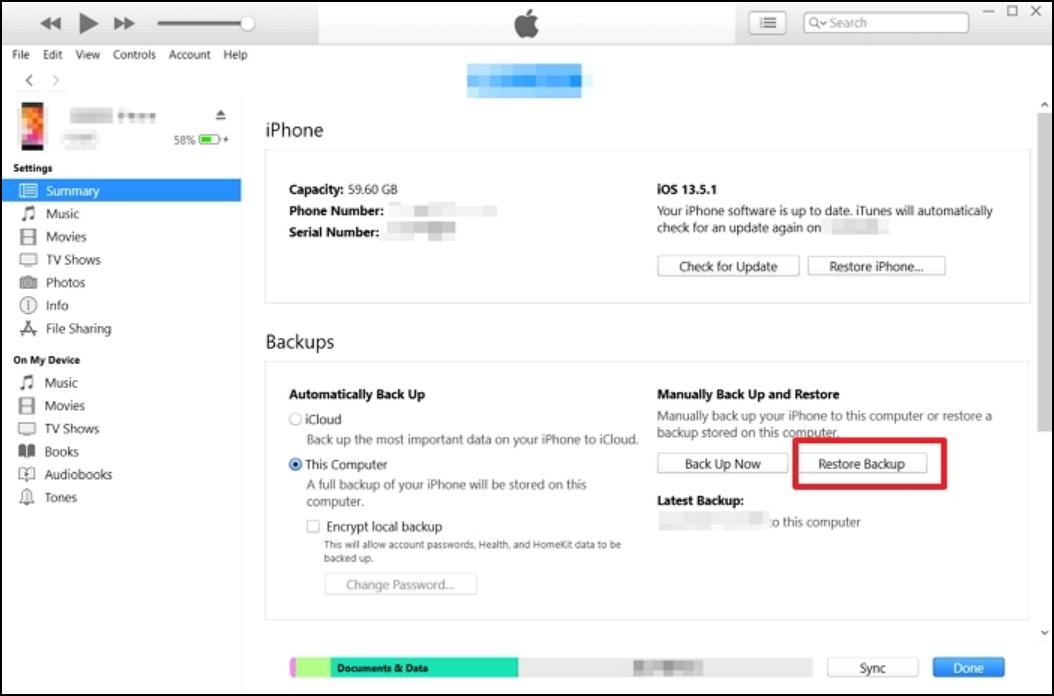
To recover deleted photos from the Photo Vault app using iTunes, first, connect your iPhone to your computer and open iTunes. Then, select your device and click on "Summary" and then "Restore iPhone" to restore your iPhone to its previous state. After that, open the Photo Vault app and it will automatically recover the deleted photos. This method is free, simple, and doesn't take much time.
Here are the steps you can follow to get lost photos from the Photo Vault app through iTunes backup.
Step 1. To sync your iPhone with your computer, start by connecting your iPhone to your computer. Then, run iTunes and select the iPhone device icon within the program.
Step 2. Go to Device Summary, select This Computer, and choose the "Restore Backup" option.
Step 3. Select the backup containing the desired photos, enter the password, and click the "Restore" button to initiate the recovery process.
Method 3. Perform Photo Vault Recovery from iCloud Backup
You can also recover deleted photos from the Photo Vault app using iCloud. To do this, you can use the iCloud backup method to retrieve the lost data on your iPhone. The process is simple and involves a few straightforward steps.
Check out the steps listed below to know how to get back the lost photos from the Photo Vault app.
Step 1. Press the reset all content and settings option. This will erase all data on the iPhone.
Step 2. To resolve the issue, simply restart the iPhone by pressing and holding the Sleep/Wake button until the "Slide to Power Off" slider appears, then slide it to the right to turn off the iPhone. Next, press and hold the Sleep/Wake button again until the Apple logo appears to turn it back on. After restarting, set up the iPhone again by following the on-screen instructions, and the issue should be resolved.
Step 3. When you get the Apps & Data screen, select the "Restore" from the iCloud Backup option.
Step 4. Now, you must opt for the appropriate backup. Give some time for the photo restoration to complete.
Photo Vault Recovery FAQs
Using the Photo Vault app leads to the occurrence of several questions. Some of them are answered here.
Can I recover photo vault password?
If you have enabled password recovery using your email ID while setting up the Photo Vault app, you can recover your password by clicking on the "Yes" option when prompted, allowing you to regain access to your password-protected photos.
How do I restore my vault backup?
Your Vault Backup is accessible on your iCloud account. You can access the files online by signing in to your Apple account, and then retrieve them on your PC or Mac.
How do I recover encrypted files from photo vault?
If you have an iTunes backup of your iPhone, you can restore it to recover your files, but they will only be accessible after the backup is restored due to encryption.
The Bottom Line
Recovering deleted photos from the Photo Vault app is an easy and hassle-free process. There are three different methods to retrieve the lost data, all of which involve simple steps that can be followed to recover the deleted photos.
You can recover lost photos and videos from the Photo Vault app on your iPhone using various methods, including using the data recovery software Qiling MobiSaver, which is easy to use and compatible with different devices. This app allows you to access deleted photos, contacts, and videos, making it a reliable solution for recovering lost data.
Related Articles
- What Is the Latest Version of iTunes 2022
- Top 3 Ways to Recover Permanently Deleted Voicemail iPhone
- 7 Ways to Troubleshoot WhatsApp Checking for New Messages [Solved]
- [Solved] iPhone Messages Disappeared But Still Taking up Space
- How to Recover Deleted Audio Driver on Windows 7
If you accidentally deleted audio driver on Windows 7 computer, you may need to get the tips for how to recover deleted audio drive efficiently. - How to Recover BKF Files in Windows 7/10
Losing BKF files can be frustrating, especially if they contain important data. However, with the right tools and techniques, you can recover your BKF files and get back to work.
Products
Articles & Tutorials
- Data Recovery
- Data Backup
- File Recovery
- File Backup
- System Backup and Restore
- Disk and Partition Clone
- Technical articles
- Mobile articles
- Disk Master Help
- Windows Data Recovery Tutorials
- Windows Secure Delete Tutorials
- Windows Partition Management Tutorials
- Windows File Backup and Restore Tutorials
- Windows System Backup and Restore Tutorials
- Windows Disk Backup and Restore Tutorials
- Windows Clone Tutorials