Mac Raw Recovery: How to Recover Data from Raw Hard Drive/Partition
Symptoms of Raw Drive/Partition on Mac
A Mac's hard drive may display files as RAW due to system errors, such as virus infections, power outages, format failures, or improper shutdowns, causing the drive to become corrupted and unreadable. This can result in various symptoms, including the inability to access files, a RAW file system error, and a drive that appears to be in a state of disrepair.
- The file system is displayed as "RAW"
- File names contain "weird" characters.
- When you access files, it will warn "Sector not found"
- The message "Disk is not formatted. Do you want to format now?" is a common alert that appears when trying to access an external hard drive or other storage device that has not been properly initialized or formatted. This message is usually displayed by the operating system, such as Windows, when it detects that the disk is not in a usable state and needs to be formatted before it can be used to store data.
To fix a RAW partition, you can erase and format the drive with a new file system, rebuilding DBR, FAT, MFT, etc., allowing access and use of the partition again.
Before formatting a RAW Mac drive, it's essential to recover any crucial data first using a professional Mac RAW recovery tool. This will prevent data loss, and once the important files are safely recovered, you can then proceed with formatting the RAW disk.
The Solution for Mac RAW Data Recovery
If the data on the hard drive is important or irreplaceable, stop using it immediately and use specialized RAW recovery software to recover the files in advance.
Deep Data Recovery for Mac is the best Mac data recovery software due to its wide range of supported file systems and various scanning modes. It allows users to recover data from Mac hard drives, external drives, memory cards, and even retrieve deleted files from the trash.
The software is easy-You can safely rely on this tool to recover lost files from your Mac hard drive, which has been trusted by many users worldwide. With a simple 3-step process, you can restore all lost data on Mac versions 10.15, 10.14, 10.13, 10.12, or below, including recovering RAW data.
Step 1. Launch Deep Data Recovery, select the file types you want to recover, and click "Fast Scan" to begin the recovery process.

Note: You can choose different search modes based on where and why the data was lost.
Step 2. Select the disk location where you lost data and files, then click the "Scan" button.

Step 3. Deep Data Recovery for Mac will immediately scan your selected disk volume and display the scanning results on the left pane.

Step 4. To recover the selected file(s), simply choose them from the scan results and click the "Recover" button. This will restore the files back to their original state.
Also read:Mac partition recovery involves recovering deleted or lost partitions on a macOS or Mac OS X system. To do this, you can use third-party software such as Disk Drill, Deep Data Recovery Wizard, or Disk Warrior.
How to Fix Mac RAW Partition by Formatting
After successfully recovering files from a RAW disk with Qiling Mac RAW recovery program, you can attempt to repair the corrupted RAW partition by formatting it to a supported file system on Mac, including APFS, HFS+, HFS X, FAT16, FAT32, exFAT, and NTFS.
Formatting a RAW file system to NTFS/FAT32 can be done easily using two methods. These solutions are applicable to various types of storage devices, including hard drives, USB drives, SD cards, and memory cards. Whether you need to format a RAW drive on an HDD, USB, SD card, or memory card, these methods can help you achieve the desired file system format.
1. Format RAW Partition with Disk Utility
Step 1. Go to "Applications" > "Utilities" > Double click and open "Disk Utility".
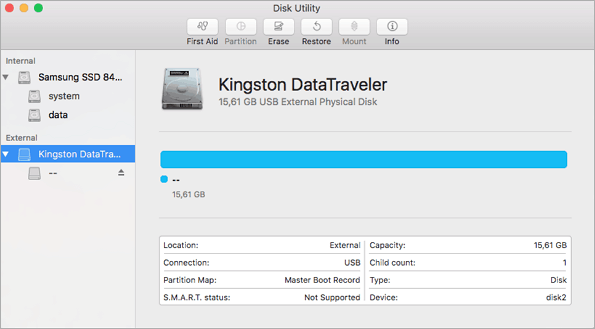
Step 2. To erase data from a USB flash drive, select your RAW drive or other USB flash drives on the sidebar and choose the "Erase" option.
Step 3. Rename the RAW partition, choose MS-DOS (FAT) for the format, Master Boot Record for the scheme, and then click "Erase".
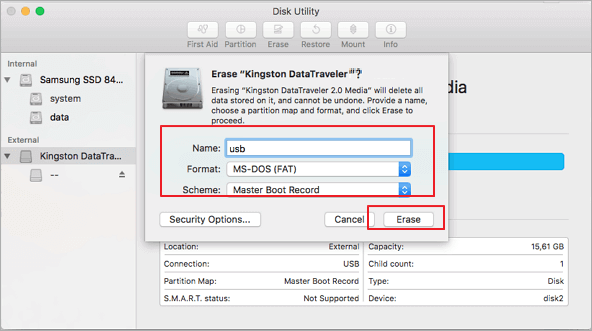
Wait for the process to complete, then you'll have an empty new hard drive with FAT32 as the file system, ready for saving data again.
2. Format RAW Drive on Mac with Terminal Command Line
If you're comfortable with Terminal commands, you can also fix and format a RAW partition on your Mac, but for novices, it's recommended to use the Disk Utility for a simpler process.
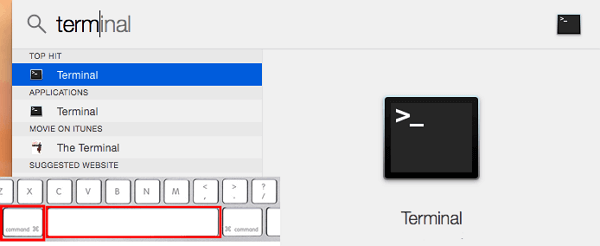
Step 1. Hit cmd + space to run Spotlight, type: terminal, and hit Enter.
Step 2. Type:diskutil list and find out the corrupted RAW drive.
Step 3. Type: sudo diskutil eraseDisk FAT32 MBRFormat /dev/disk2.
- sudo gives you user right
- Diskutil calls disk utility program
- eraseDisk commands to format
- FAT32 sets the file system
- MBRFormat tells disk utility to format with a Master Boot Record
- /dev/disk2 is the location of an external hard drive
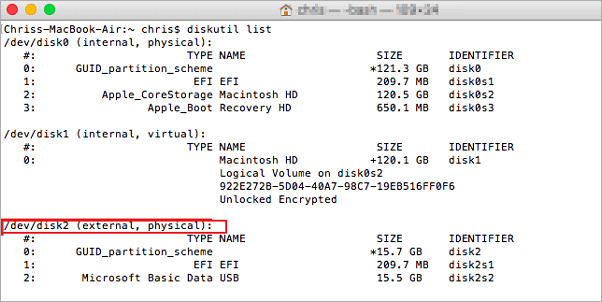
Step 4. Wait for the process to complete. Then, type "diskutil list" in command to verify if the formatting was successful.
Conclusion
If you want to recover corrupted RAW files from a digital camera, SD card, or hard drive on Mac, Qiling Mac RAW recovery software is a great choice. This professional and easy-to-use tool not only recovers RAW files but also fixes corrupted photos and repairs corrupted MOV/MP4 files on Mac.
To avoid the hassle of data recovery after a hard drive corruption, it's more practical to prevent the issue from happening in the first place. When using a computer, pay attention to the following: regularly back up your important files, avoid using your computer while it's still booting up, and be cautious when disconnecting external devices to prevent sudden shutdowns. By taking these precautions, you can minimize the risk of data loss and avoid the stress of dealing with a corrupted hard drive.
- Install and upgrade the antivirus software
- Safely eject the external USB drive
- Avoid misoperation, such as sudden power outage
- Use the advanced file system, like NTFS
- Back up important data regularly
FAQs About Mac Raw Hard Drive Data Recovery
Here are the frequently asked questions related to RAW recovery for Mac. If you also have any of these problems, you can find the methods here.
What is raw drive recovery?
Mac Raw recovery is a type of data recovery that can help users recover most of the lost files on a hard drive, SD card, USB flash drive, or other storage media devices when the hard drive is crashed or the file system has been damaged.
How do I restore raw disk?
To restore a RAW disk, you can use Qiling Data Recovery Wizard for Mac, which offers a straightforward process in just three steps. Firstly, you need to download and install the software on your Mac.
Step 1. Connect the selected RAW hard drive to the computer and run the Deep data recovery software. Click the Scan button to start the scanning process. The software will scan the RAW hard drive and recover the lost data and files.
Step 2. Qiling Mac RAW recovery software scans the selected disk volume, displaying the results on the left pane.
Step 3.After scanning, select the desired files and click the "Recover Now" button to retrieve them.
Is Mac Data Recovery Free?
The free version of Qiling Data Recovery Wizard for Mac allows you to recover up to 2 GB of data for free, enabling you to recover deleted or lost files from Mac devices and external storage media.
What is the best data recovery software for Mac?
Qiling Data Recovery Wizard is a top-notch data recovery software for Mac that can handle complex recovery cases, including deleted file recovery, formatted recovery, RAW recovery, partition recovery, virus attack recovery, OS crash recovery, and more.
Other best data recovery software for Mac you can try is:
- Disk Drill
- PhotoRec
- TestDisk
- Exif Untrasher
Related Articles
- Mac Trash Recovery | Restore Trash Data on Mac
- How to Recover Deleted Emails on Mac?
- Can't Find My WD Passport on Mac! How to Fix?
- 2 Ways to Recover Unsaved iWork Document on Mac
- How to Recover MOV Files from SD Card/Formatted SD Card
Whether you want to recover deleted or lost MOV files from SD card, check out the guidelines for how to recover MOV files from SD card due to deletion or SD card format. - How to Recover Shift Deleted Excel Files from Windows PC
Want to recover a shift deleted Excel file in Windows 11/10/7? This article provides a solution for recovering shift deleted Excel files from your desktop or PC.
Products
Articles & Tutorials
- Data Recovery
- Data Backup
- File Recovery
- File Backup
- System Backup and Restore
- Disk and Partition Clone
- Technical articles
- Mobile articles
- Disk Master Help
- Windows Data Recovery Tutorials
- Windows Secure Delete Tutorials
- Windows Partition Management Tutorials
- Windows File Backup and Restore Tutorials
- Windows System Backup and Restore Tutorials
- Windows Disk Backup and Restore Tutorials
- Windows Clone Tutorials