How Can I Get My Contacts Back from a Broken Android Phone
Summary
Have you ever broken your smartphone and despaired at the broken and unresponsive touchscreen? You don't have to say goodbye to your device just yet. Here are our tips to get your contacts back. Follow the details below, and salvage what's left on your smartphone.
In this article you'll learn:
Terrible Experience: Broke My HTC!
To recover contacts from your broken HTC phone, you can try using a data recovery software, such as Deep Data Recovery, to extract contacts from the phone's internal storage. This can be done even if the phone's screen is cracked and you can still see the display. Alternatively, you can also try using a cloud backup service, such as Google Contacts or HTC's own backup service, to restore your contacts to a new phone. If you've synced your contacts to your Google account, you can also try signing in to your account on a new phone and syncing your contacts to transfer them to the new device. This way, you can easily transfer your contacts to a new phone and avoid the hassle of getting the old phone repaired.
Recovering photos from an Android phone is relatively easy, but contacts and messages are stored in the internal memory, making them more challenging to export. However, it's not impossible to recover contacts.
Best Choice: You Have Backups of Your Phone.
If you've backed up your phone, recovering lost contacts is a breeze. Simply purchase the same brand of Android phone, log in to your account, and your lost data will be restored. Note that you must buy the exact same brand, as different phones have different cloud systems; for instance, if your old phone was a Samsung, you can't recover contacts by logging into a Samsung account on a new HTC phone.
Another Try: Recover Contacts With a Computer.
If the display is still working but the touchscreen is broken, you can fix it by connecting the device to a computer. This allows you to use the touchscreen functionality via the computer, bypassing the physical touchscreen.
- Go to the "Android Device Manager" website and sign in with your Google account.
- If you have GPS enabled on your device, it can be detected by the web tool, which can also pick up your smartphone's location. In most cases, your phone is already registered, but you can pair it with your Google account if you haven't done so.
- To access your device with a broken display, click on the "Lock" button and select "Unlock". This will allow you to still access your device, and then you can connect it to a PC to transfer and back up your data.
What If You Can't Open the GPS on Your Broken Android Phone?
You can use a USB OTG (On The Go) to connect a hard drive, USB stick or accessory to your Android tablet and smartphone.
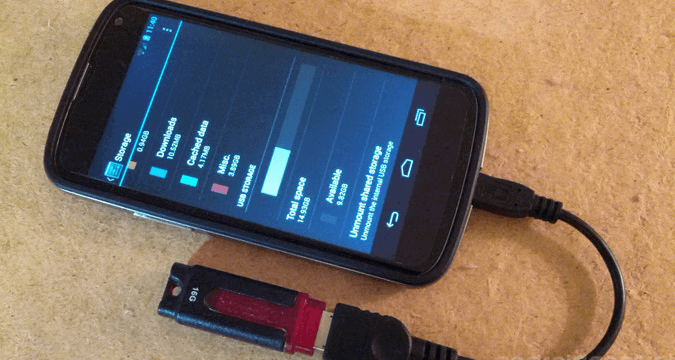
All USB-Compatible devices can be used as long as they don't require an external power supply, and the storage device (hard disk or USB stick) must be in FAT32 format, not NTFS.
Last Choice: Repair the Broken Screen.
If you're unable to recover your data using the previously mentioned methods, you can take your phone to a repair shop where a professional can extract your data and also fix any hardware issues with your phone. This option requires a fee, but it provides a guaranteed way to recover your data while also fixing your phone.
Related Articles
- How to Backup and Recover BBM Chat History
- How to Recover Deleted Browsing History on Android Phone?
- Fix Stuck on Android System Recovery 3e Screen Without Losing Data
- Recover Deleted Text Messages from Samsung Galaxy Note 4
Products
Articles & Tutorials
- Data Recovery
- Data Backup
- File Recovery
- File Backup
- System Backup and Restore
- Disk and Partition Clone
- Technical articles
- Mobile articles
- Disk Master Help
- Windows Data Recovery Tutorials
- Windows Secure Delete Tutorials
- Windows Partition Management Tutorials
- Windows File Backup and Restore Tutorials
- Windows System Backup and Restore Tutorials
- Windows Disk Backup and Restore Tutorials
- Windows Clone Tutorials