4 Tips to Recover Deleted Files from Android
Losing data on your phone can be a frustrating experience, resulting in not only lost files but also wasted time and energy trying to recover them. To help you avoid this hassle, we've compiled some techniques to easily retrieve lost files.
- Tip 1. Recover Deleted Data on Android from Google Account
- Tip 2. Recover Deleted Android Files with Qiling MobiSaver for Android
- Tip 3. Recover Deleted Data from Recycle Bin
- Tip 4. Retrieve WhatsApp Data from Android Phone
Tip 1. Recover Deleted Data on Android from Google Account
If you've backed up your Android phone to a Google account, you can restore your phone from Google, but this only works if your device hasn't been set up yet. If it has, you'll need to factory reset it first, which will erase everything. If you don't want to erase everything, you can try recovering deleted data without resetting.
Step 1. Open your Android phone, whether it's brand new or has been reset, and follow the setup process to get it up and running.
Step 2. To begin setting up your device, tap on the "Arrow" icon.
Step 3. Choose the system language and tap "Next", then connect to a Wi-Fi network.
Step 4. To continue, tap "Accept and Continue", then select "No Thanks", followed by "Next". Next, enter your Google account details and tap "Next" again.
Step 5. To proceed, tap "Accept" on the Google services page, then check the boxes as needed, and finally tap "Next."
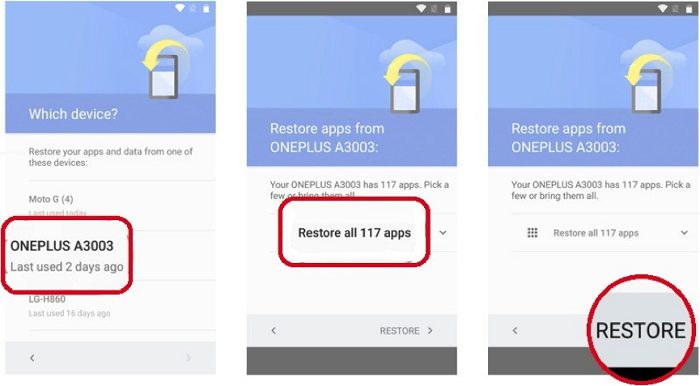
Step 6. To restore an app on your device, go to the "Which device" page, select the device you want to restore, tap the app you wish to restore, and then tap "Restore."
Step 7. To set up your device, follow the on-screen instructions. This will guide you through the process of configuring your device and getting it ready for use.
Tip 2. Recover Deleted Android Files with Qiling MobiSaver for Android
If you don't want to reset your Android device, you can try using recovery tools like Qiling MobiSaver for Android to recover deleted files. This professional and reliable tool has helped thousands of users retrieve their lost data, including contacts, messages, videos, and documents.
The software is safe, clean, and fast, and has a high success rate, making it a great option. You can download it on your computer to try it out.
Step1. To use Deep Data Recovery for Android, connect your phone to a computer, launch the program, and click "Recycle Bin Scan" to proceed. Note that this program only works with rooted Android phones.

Step 2. This program will quickly scan your device and display all of the data in well organized tables, allowing you to select the types that contain the deleted data.

Step 3. To recover deleted files, first preview the deleted files, then select the ones you wish to recover and click "Restore."

Tip 3. Recover Deleted Data from Recycle Bin
If you've deleted data, you can try recovering it by checking your Recycle bin, which is specific to certain apps like the Gallery app, not the entire device. For these apps, you can easily recover deleted files without any hassle.
Tip 4. Retrieve WhatsApp Data from Android Phone
To restore WhatsApp messages on an Android phone, you can try two methods: restoring from a local backup or from Google Drive. If you have an SD card, you can insert it into another Android device to access your chat history. Otherwise, you can restore WhatsApp data from your device's internal memory or Google Drive. For more detailed instructions, you can refer to a guide on the topic.
Conclusion
If initial methods fail, consider seeking help from recovery services, apps, or the developer for assistance in recovering deleted Android files.
Related Articles
- Tips for Android 7.0 | Android N Update
- Knox Recovery: How to Recover Lost Data from My Knox
- Recover Deleted Photos from Samsung Galaxy Tab
- How to Recover Deleted Text Messages on Android
Products
Articles & Tutorials
- Data Recovery
- Data Backup
- File Recovery
- File Backup
- System Backup and Restore
- Disk and Partition Clone
- Technical articles
- Mobile articles
- Disk Master Help
- Windows Data Recovery Tutorials
- Windows Secure Delete Tutorials
- Windows Partition Management Tutorials
- Windows File Backup and Restore Tutorials
- Windows System Backup and Restore Tutorials
- Windows Disk Backup and Restore Tutorials
- Windows Clone Tutorials