Can TRIM Slow Down an SSD? How to Check It in Windows
TRIM tells an SSD which blocks no longer hold needed file data. It generally helps the drive manage free space over time. A brief period of background maintenance after large deletions can coincide with lower performance, but persistent slowness should not be blamed on TRIM without checking health, temperature, capacity, and workloads.
Check the Windows TRIM setting
Step 1. Open Command Prompt as administrator.
Step 2. Run fsutil behavior query DisableDeleteNotify.
Step 3. Interpret DisableDeleteNotify = 0 as deletion notifications enabled for the reported file system; 1 means disabled. The result is a Windows setting, not proof that a particular enclosure forwards TRIM to the drive.
Step 4. Record the file system and connection type. Some USB adapters and storage layers may not pass the command through.
Use Windows Optimize Drives
Search Start for Defragment and Optimize Drives. Check that Windows identifies the SSD as a solid-state drive, then review its scheduled optimization status. Windows normally uses an appropriate optimization method for SSDs; do not run old-style manual defragmentation repeatedly to chase a benchmark score.
Investigate persistent slowdowns
Check free capacity, drive health, temperature, firmware, background downloads, and whether the measured task is read-heavy or write-heavy. Large writes may slow after an SSD's fast cache fills. A nearly full SSD or a weak USB adapter can compound the effect. Compare results with the same test method and similar free-space conditions.
What Qiling Disk Master Pro can check
Qiling Disk Master Pro's Disk health view can display available S.M.A.R.T. information for the selected SSD. Use it to look for drive warnings while investigating a slowdown, and verify that you selected the right model. It is not a TRIM switch or a direct test that deletion notifications reached the SSD; use the Windows command above for the setting and the hardware vendor's tools for device-specific diagnostics.
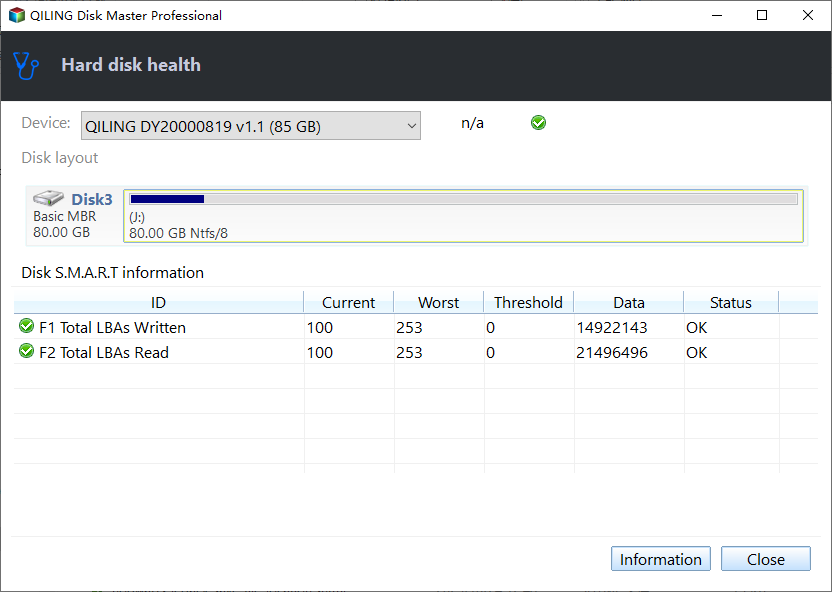
If you see errors or uncorrectable media warnings, back up data before tests. Do not disable TRIM as a speculative fix: it may make sustained write performance worse over time and complicate deletion behavior. If a supported system genuinely has deletion notifications disabled, consult the SSD and platform documentation before changing the setting.
Know what the command does not show
fsutil does not certify SSD health, prove every TRIM request reaches NAND, or diagnose a game server delay. Use vendor diagnostics or an appropriate storage-health view for those questions. If performance remains poor on a supported internal connection after health and temperature checks, investigate controller drivers and firmware through official channels.
Related Articles
- Check Disk Health
Read health indicators before performance testing. - SSD Game Launches
Separate disk issues from launcher delays.
Products
Articles & Tutorials
- Data Recovery
- Data Backup
- File Recovery
- File Backup
- System Backup and Restore
- Disk and Partition Clone
- Technical articles
- Mobile articles
- Disk Master Help
- Windows Data Recovery Tutorials
- Windows Secure Delete Tutorials
- Windows Partition Management Tutorials
- Windows File Backup and Restore Tutorials
- Windows System Backup and Restore Tutorials
- Windows Disk Backup and Restore Tutorials
- Windows Clone Tutorials