DoD Disk Wipe: What It Means for HDDs and SSDs
'DoD wipe' is often used as shorthand for a multi-pass overwrite pattern. It is not a universal certification that a drive is safe for every disposal scenario. The correct sanitization method depends on the media type, data sensitivity, and whether the device will be reused.
Separate HDD Overwrite from SSD Sanitization
On a healthy magnetic HDD, overwriting accessible sectors may be an appropriate clearing method, subject to your organization's policy and the drive's condition. Multiple passes take longer and are not automatically better for every modern drive. SSD controllers can remap flash cells, so a host-level overwrite may not reach every previous physical location. For SSDs, evaluate the manufacturer's supported sanitize or cryptographic erase method instead.
A quick format mainly recreates file-system structures; it is not a verified sanitization method. A failing disk may not finish any software wipe, and highly sensitive media may need controlled physical destruction. NIST's current media-sanitization guidance is a better decision framework than relying on a tool's 'DoD' label alone.
Prepare a Disposal or Reuse Plan
Step 1. Identify the exact physical drive by model, serial number, capacity, and connection. Check whether it is an HDD, SATA SSD, NVMe SSD, or USB device behind a bridge. Keep a second person involved when organizational policy requires custody records.
Step 2. Back up any files to be retained and open sample files on a separate destination. Export license keys and recovery information you are authorized to keep. Confirm that the drive is not the only copy of backups or a Windows boot disk still in use.
Step 3. Decide whether the goal is ordinary reuse, resale, or disposal under a formal data-protection policy. Choose a method the specific drive and policy support, and record how completion will be verified. Do not start a wipe while these questions are unresolved.
Understand Qiling's Wipe Data Screen
Qiling Disk Master provides Tools and utilities > Wipe data. Its screen lets you choose a disk or partition and an Erase times value. The existence of a pass-count control does not by itself establish compliance with a named DoD or NIST method.
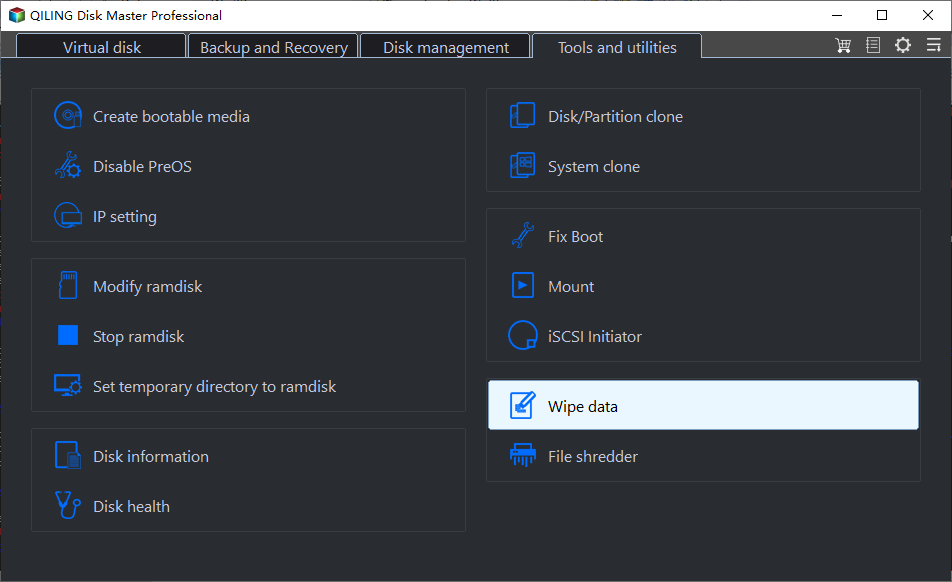
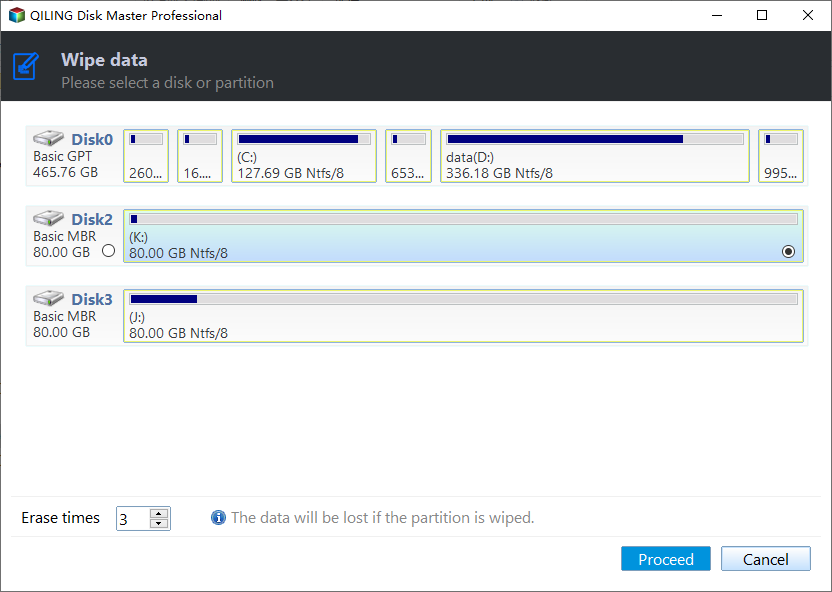
Compare the screenshot's selected disk with the drive you intend to sanitize; disk letters can change. This article stops before the irreversible Proceed action while the physical device, retained data, and policy requirements are unknown. A mistaken whole-disk wipe can destroy Windows, recovery partitions, and every file on that disk.
Verify the Result and Document It
After an independently approved sanitization, verification should match the method: read-back checks for an overwrite, completion status and vendor evidence for device sanitize, or custody records for physical destruction. A blank File Explorer view alone is not proof. Keep the drive model, serial, operator, date, method, and verification result in the record, without storing sensitive data in that record.
Conclusion
Choose the method by media type and policy, not by a marketing label. Back up and identify the disk first; execution and verification require an approved, device-specific plan.
Related Articles
- Securely Erase an HDD
Compare overwrite and disposal decisions for magnetic disks. - Securely Erase an SSD
Understand controller-level sanitization for flash storage.
Products
Articles & Tutorials
- Data Recovery
- Data Backup
- File Recovery
- File Backup
- System Backup and Restore
- Disk and Partition Clone
- Technical articles
- Mobile articles
- Disk Master Help
- Windows Data Recovery Tutorials
- Windows Secure Delete Tutorials
- Windows Partition Management Tutorials
- Windows File Backup and Restore Tutorials
- Windows System Backup and Restore Tutorials
- Windows Disk Backup and Restore Tutorials
- Windows Clone Tutorials