GPT Backup Header Corrupt: Repair the Partition Table
Quick Navigation:
- Two Copies of the Table
- Why the Last Sectors Matter
- Read Before You Write
- Rebuild the Table Safely
- Frequently Asked Questions
A GPT disk keeps its partition table twice: once in the second sector and once in the final sector. When the copy at the end of the disk no longer validates, Windows can treat a perfectly healthy drive as uninitialized or turn every volume on it into RAW. The situation is common after an interrupted clone, a power cut during a partition operation, or a USB enclosure that drops the link while the last sectors are written.
Two Copies of the Table
The primary GPT header sits in LBA 1, immediately after the protective MBR, and points to an array of 128 partition entries that normally start at LBA 2. The backup header sits in the last LBA of the disk and points to a second copy of that array in the 32 sectors before it. Each header stores a CRC32 of itself and a CRC32 of the array, so a mismatch is detected without reading the whole disk.
Windows reads the primary header first. If it validates, the backup is ignored until something writes to the disk, and then the backup is expected to match. If the primary fails its checksum, Windows falls back to the backup, and a disk whose backup also fails is reported as uninitialized rather than as damaged.
The two copies explain a symptom that looks contradictory. A disk can lose a partition and still show the other volumes as healthy, or it can show every volume as RAW while the partition layout in the map looks correct. Both states come from the same mismatch between the header and the entry array.
Why the Last Sectors Matter
Cloning and imaging tools write the primary structures early and the backup header at the very end of the task. A power loss, a sleep transition, or an enclosure reset in that window leaves the destination with a valid primary and a stale or empty backup. The clone then boots on the machine that made it but fails validation as soon as a tool reads the end of the disk.
Solid-state drives add their own failure mode. The last logical block addresses are often mapped to blocks that have been rewritten many times, and a bridge chip in a USB enclosure can reorder or truncate writes near the end of the reported capacity. A drive that has been over-provisioned or that reports more capacity than its NAND holds will wrap around and corrupt exactly those sectors, and the result looks like a disk that refuses to initialize.
Sector size mismatches belong in the same list. A 4Kn drive cloned from a 512e source changes the last LBA, and a tool that copies the table verbatim puts the backup header in a location the new disk does not consider the end. The table then fails on the destination while the source remains fine.
None of this implies that the data is gone. The partition entries and the file systems they describe sit at the start of the disk, and the volumes normally mount once correct headers are written. That is also the reason a careless repair is dangerous: writing a new table over a good entry array destroys the map to data that was still readable.
Read Before You Write
Start with a read-only surface test on the suspect disk. A drive that returns errors in its final sectors will corrupt the backup header again after any repair, and the test result decides whether the disk stays in service. The test only reads, so it cannot make the table worse.
Then clone the disk before touching the partition table. A sector-level copy captures the current headers and the entry array exactly as they are, which gives you a second attempt if a repair writes something wrong. Work on the copy from that point and keep the original untouched until the copy mounts with its files readable. A copied disk that reports a single protective partition has the same header problem on the destination, not a new fault.
Record three values before the repair: the disk size in sectors, the offset and size of each volume, and the partition type of the first entry. A rebuilt table should reproduce those values. If the volume offsets in the new table differ, stop and recover files from the copy instead of writing the result back.
Windows offers to initialize a disk the moment it cannot read the table. Decline that prompt. Initializing writes a fresh GPT over the existing entries, and the volumes become unallocated even though their data is still on the platters.
Rebuild the Table Safely
Qiling Disk Master reads the disk map below the file system layer, runs a read-only surface test, and clones a disk sector by sector when the source is unreliable. Its partition recovery scans the disk for file system signatures and rebuilds the entries in the table, which is the step that makes a disk with a broken backup header readable again.
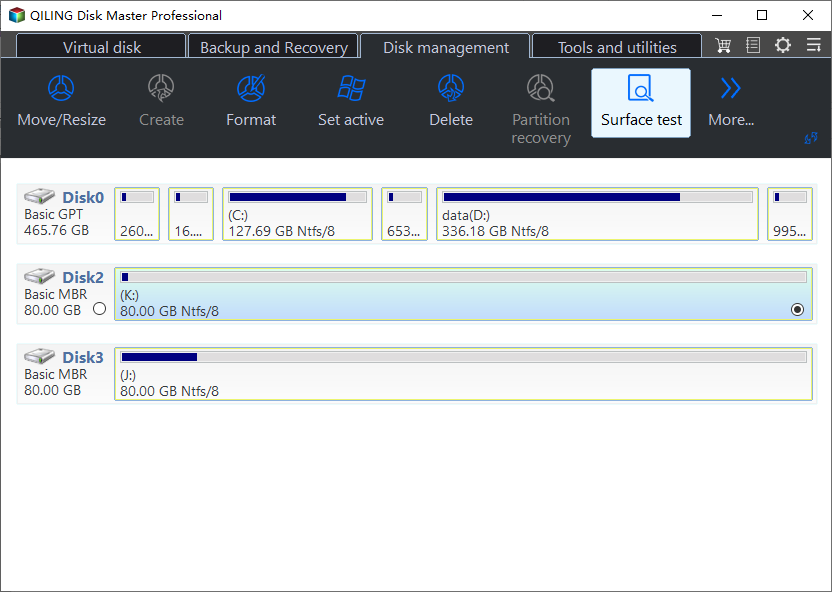
Step 1. Run a Read-Only Surface Test
Open the surface test from the disk map and run a normal read pass over the whole drive. Errors in the final sectors confirm that the backup header failed because of the hardware, and the disk should be replaced after its data is copied.
Step 2. Clone the Disk Before Any Write
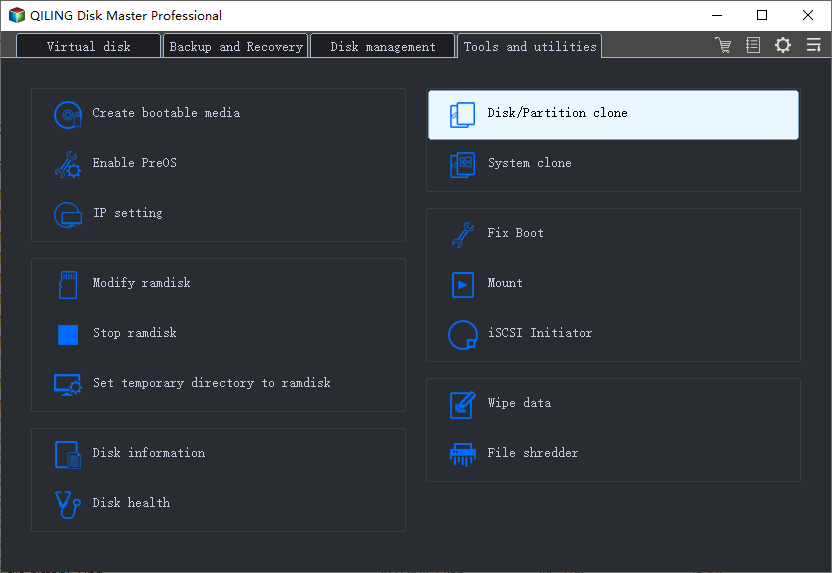
Open Disk/Partition clone and select the suspect disk as the source. Tick Sector by sector clone so the headers and the entry array are copied byte for byte, and choose a destination that is at least as large as the source.
Step 3. Preview the Copy and Proceed
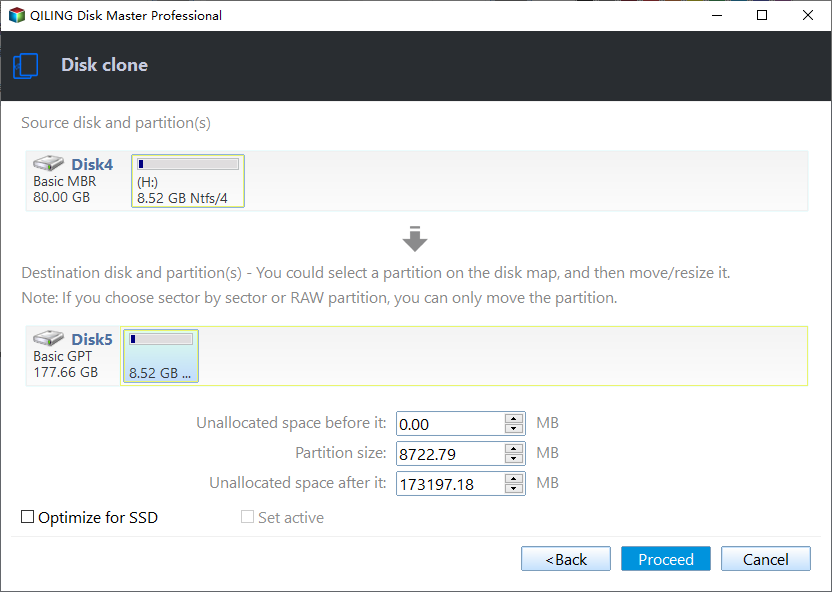
On the preview page, keep Copy as the source so the layout is not recalculated, and confirm that every partition from the source appears on the destination. Click Proceed and wait for the finalizing phase, which writes the backup header to the new disk.
Step 4. Rebuild the Partition Entries on the Copy
Select the copy, open Partition recovery, and run a full scan. The wizard lists the volumes it can identify from their file system signatures; review the sizes and offsets, then confirm the rebuild so the entries are written back into a valid table.
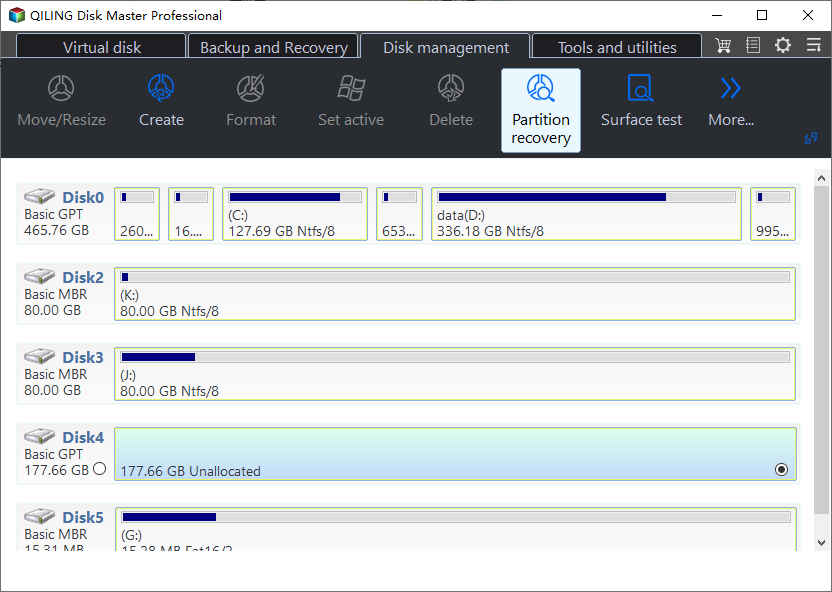
After the rebuild, open the map again and compare the layout with the values you recorded. A volume that mounts and lists its folders is the confirmation that the entry array was reconstructed correctly, and only then should the result be written back to the original disk.
Frequently Asked Questions
Can Windows repair the backup header itself?
No. Windows either uses the backup when the primary fails or offers to initialize the disk when both fail. It has no command that regenerates the header from the entry array, which is why a third-party tool is needed.
Does initializing the disk erase the files?
It writes a new partition table, so the volumes disappear from the map. The file data stays on the disk until it is overwritten, but every later write reduces the chance of a clean recovery.
Is the disk safe to use after a repair?
Only if the surface test was clean. A backup header that failed because of bad sectors at the end of the drive will fail again, and the repaired table gives no protection against that.
Related Articles
- Can't Initialize Disk: Fix an Unknown Disk
- GPT Protective Partition After Cloning
- Access a GPT Protective Partition Without Losing Data
- Recover Data From a GPT Protective Partition
- What a GPT Disk Is and How to Manage It
Products
Articles & Tutorials
- Data Recovery
- Data Backup
- File Recovery
- File Backup
- System Backup and Restore
- Disk and Partition Clone
- Technical articles
- Mobile articles
- Disk Master Help
- Windows Data Recovery Tutorials
- Windows Secure Delete Tutorials
- Windows Partition Management Tutorials
- Windows File Backup and Restore Tutorials
- Windows System Backup and Restore Tutorials
- Windows Disk Backup and Restore Tutorials
- Windows Clone Tutorials