How to Activate Qiling Partition Master
To activate Qiling Partition Master, follow the full steps provided, which include completing the activation process, regardless of whether you have the trial version, free version, or another edition. The process is clear and straightforward.
Quick Navigation:
Activate Trial Version | Active Qiling Partition Master with Serial Key
Activate Free Version | How to Activate Qiling Partition Master Free
What's New of Qiling Partition Master
Activate Trial Version | Active Qiling Partition Master with Serial Key
Step 1. Download and install Qiling Partition Master.
First, download and install the Trial Version of the software on your PC. Once installed, launch the Trial Version and click on the "Activate" button.
Step 2. Find and fill in the serial number.
Please enter your serial number in the text boxes as shown in the picture, which you received after purchasing via email.
Step 3. Then you will successfully activate the full version.
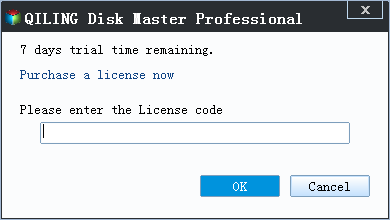
Qiling Partition Master is a partition manager that allows users to resize, move, merge, and split partitions on their hard drive. However, the activation process for this software can be a bit tricky, and some users may be looking for a crack or serial key to bypass the activation requirements.
Activate Free Version | How to Activate Qiling Partition Master Free
Step 1.To upgrade to the full version, download and install the Free Version on your PC, then click "Upgrade".
Step 2. Find and fill in the serial number.
To activate your software, go to the website and enter your serial number in the text boxes, which you can find in the email you received after purchasing. Fill in the serial number as shown in the picture below.
Step 3.Click "Activate" and you will successfully upgrade to the full version.
Download Partition Software and Apply its New Features
Qiling Partition Master has released an updated version, simplifying the process of adjusting hard drives or partitions.
See the new features below:
1. Support convert NTFS to FAT32
- Support conversion of disks of any size.
- You can read and write NTFS partitions under MacOS. We have resolved the issue of NTFS not being writable on Mac.
- Compatible with more devices, such as smart plug-in storage devices.
2. Support smart split partition.
You can split a hard drive partition in one click without needing any extra steps.
Check our video about Qiling Partition Master Activation:
Related Articles
- Easy and Step-by-Step Guide to Use SSD for OS Only
- [Tested & Effective] Delete All Partitions on Windows 11/10/8/7 PC at One Time
- How to Fix Data Error Cyclic Redundancy Check on External Hard Drive
- 4 Tips| How to Format C Drive in Windows 11/10/8.1/8/7
- How to Fix Pen Drive Showing Write-Protected Error
Are you looking for some solutions to fix pen drive showing write-protected error? This article will provide you with a complete tutorial to fix your issue. Now, you can read this article. - Quick Format an External Hard Drive in Windows 10 With CHKDSK Pass, or Full Format?
Do you need a quick format with CHKDSK or a full format? This page explains the answer and reasons, then provide a full guide on formatting an external hard drive.
Products
Articles & Tutorials
- Data Recovery
- Data Backup
- File Recovery
- File Backup
- System Backup and Restore
- Disk and Partition Clone
- Technical articles
- Mobile articles
- Disk Master Help
- Windows Data Recovery Tutorials
- Windows Secure Delete Tutorials
- Windows Partition Management Tutorials
- Windows File Backup and Restore Tutorials
- Windows System Backup and Restore Tutorials
- Windows Disk Backup and Restore Tutorials
- Windows Clone Tutorials