Get Qiling Partition Master 6.0 with an Official License Key
This page mainly talks about:
If you're searching for a crack keygen, serial number, or generator of Qiling Partition Master torrent, you can find an official serial key here to unlock the full features in the latest version of Qiling Partition Master immediately.
What Is Qiling Partition Master Crack Keygen
A keygen, or key generator, is a program that creates software keys or activation codes, allowing users to upgrade their software to the full version.
The Qiling Partition Master keygen uses encryption algorithms and high-level security mechanisms to activate the software and protect users' rights.
The availability of free serial keys for Qiling Partition Master has led to some users exploiting this by using crack keygens to generate faulty codes, resulting in financial losses for both Qiling software and its users.
- Warning
- If you're looking for Qiling Partition Master keygen or crack keygen, stop! It's illegal and can violate your rights, including privacy.
Known Unsafe Ways to Use Qiling Partition Master [Attention!!!]
As Qiling Partition Master updates and becomes more powerful in resolving disk management issues, many hackers and deceitful YouTubers are misguiding people by showing faulty ways to crack the software.
Crackers often display or showcase online their illegal ways of breaking software security mechanisms, which include various methods such as exploiting vulnerabilities, using malware, and bypassing authentication mechanisms.
- Using Crack Keygen or Crack Key Generator
- Using Crack Activator
- Manually modifying the hosts' file
- Replace some security .dll files
These methods are not only used to crack Qiling Partition Master but also to crack other paid software, making them versatile and widely applicable.
While it might be workable, Qiling software recommends against using crack solutions, as they not only harm the company's profits but also cause more damage to the user themselves.
Potential Issues after Using Cracked Software or Crack Key:
- #1. Tamper users local hosts file on a computer without notification.
- #2. Leave a back door on the computer.
- #3. Remote control users' computers for mining, stealing privacy, and even spreading viruses.
- #4. Software activation failure with authorized key.
- #5. Trojan infection or commercial loss.
- For Your Information:
- To protect your rights and privacy, it's wise to download and purchase software directly from the original software producers, as this ensures authenticity and prevents potential legal and security issues.
How to Get An Official Torrent and Upgrade Partition Master to Full Version
To get official access to Qiling Partition Master, you can visit their official website and look for the "Download" or "Get Started" section. From there, you can follow the instructions to obtain a free trial or purchase a license key, which will grant you access to the full features of the software, including unlocking and managing partitions. You can also check their official documentation or support resources for more information on obtaining a license key.
Here are the 3 official accesses of getting a license code for Qiling partition manager software:
#1. 30% OFF for Genuine Qiling Partition Master Torrent
For advanced users seeking a discounted Qiling Partition Master key, this offer provides a reasonable discount.
Qiling Software offers a long-term official discount, and you can get a 30% OFF discount on Qiling Partition Master by clicking the button here to obtain a serial number now.
Qiling Partition Master
Get Official License to Unlock Its Full Features
#2. Directly Purchase Key from Qiling Official Site
To fully secure your rights, it's recommended to directly purchase a product key or serial number from the official website of Qiling Partition Master. This ensures that you obtain the key from a trusted source, protecting your privacy and user rights. You can find the official product page on the Qiling Partition Master website.
#3. Enjoy Basic Hard Drive Management in Qiling Partition Master Free Edition
For some Windows beginners who only need free software to execute basic disk management operations on Windows computers or external storage devices, Qiling Partition Master Free Edition is a suitable option.
Qiling Partition Master Free Edition can resize, move, merge, split, and convert disk partitions, as well as create, delete, and format partitions, making it a versatile tool for managing disk space and optimizing system performance. It also supports disk cloning, wiping, and checking for errors, making it a comprehensive solution for various disk-related tasks. Additionally, it can convert between FAT, NTFS, and HFS file systems, and back up and restore partitions, ensuring data safety and integrity.
- Create or delete partitions.
- Resize or move partitions, extending, merging, shrinking partitions.
- Format partitions, change partition formats.
- Check and fix partition or external storage device errors.
- Wipe or erase hard drives, external hard drives, etc.
- Change drive letter, label.
- Hide or unhide partition.
- Convert primary to logical, or vice versa.
- Resize Dynamic partition.
- Explorer disk or partition usage.
Free Download 2022 Newest Version of Qiling Partition Master
Once you obtain the official activation key for Qiling Partition Master, be sure to download the genuine software from the Qiling official website.
To get the latest version of Qiling Partition Master and its new features, download it from the Qiling software site. This will allow you to effectively manage your hard drives.
Qiling Partition Master has been updated to v16.0, allowing for the direct download of its new features.
What's New in Qiling Partition Master 6.0? Check the feature list:
- Merge non-adjacent partitions without deleting volumes or losing any data.
- Resize NTFS partition.
- Manage BitLocker partitions, unlock or remove BitLocker protection.
- Automatically showdown or sleep after executing operations.
- Fix issues on the high-resolution screen.
What Else Can You Get from Qiling Partition Master 6.0 Full Version?
The advanced features of Qiling Partition Master include resizing partitions, moving partitions, merging partitions, deleting partitions, creating disk images, and recovering data from disk images. These features allow for more complex and detailed management of disk partitions, making it a powerful tool for users who need to perform advanced disk operations.
- To resolve the C drive low disk space issue, adjust the disk layout by moving some files to other drives. This can be done by creating a new folder on a different drive, such as D or E, and moving some of the files from C to the new folder.
- You can allocate disk space to any partition without deleting or formatting it by using the built-in Windows feature called "Extend Volume" or by using third-party disk management tools. This allows you to increase the size of a partition without losing any data or reformatting the partition. This is useful for adding more storage space to a partition without having to delete or reformat it, which can be a time-consuming and data-risky process.
- 1-click to partition a new hard drive.
- Recover lost partitions and data.
- Recover lost partitions and data.
- Migrate OS with installed programs to HDD/SSD.
- Convert MBR to GPT, GPT to MBR without data loss.
- To convert a Basic disk to a Dynamic disk or vice versa, you can use the built-in Disk Management tool in Windows. This process is non-destructive, meaning it won't erase any data on the disk.
- Convert NTFS to FAT32 or FAT32 to NTFS without formatting.
- Convert primary to logical, logical to the primary partition.
- Manage hard drive partitions without OS via bootable disk.
- 4K alignment SSD.
An Easy Guide to Manage Hard Drives with Qiling Partition Master 6.0
To manage your hard drives using Qiling Partition Master, follow these easy steps. First, download and install the software on your computer. Then, launch the program and select the disk you want to manage.
#1. 1-Click to Partition a New Hard Drive/SSD
To install a brand new HDD or SSD, simply plug it into your computer and open Qiling Partition Master. From there, you can create partitions on the disk all at once, making it easy to set up your new storage device.
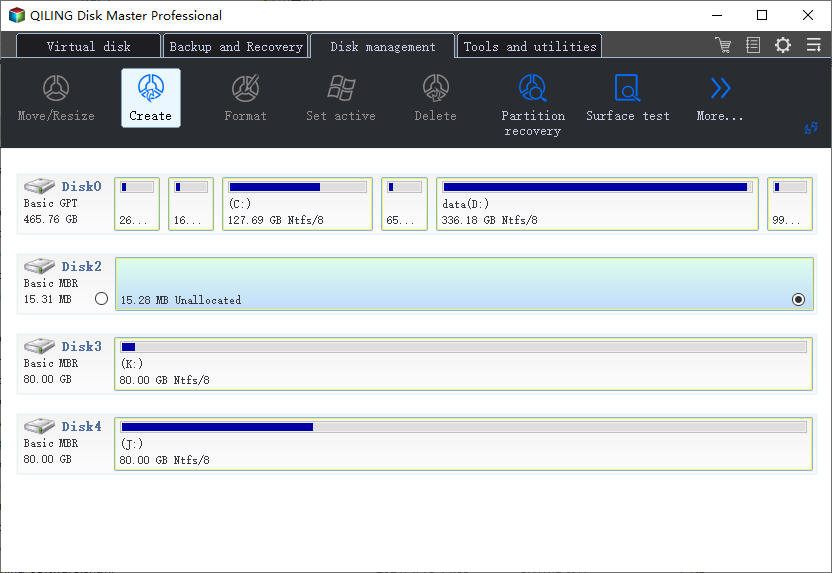
Step 1.To create a new partition on a disk, open Qiling Partition Master, select the disk you want to work with, and then click the "Create" button in the Disk management page.
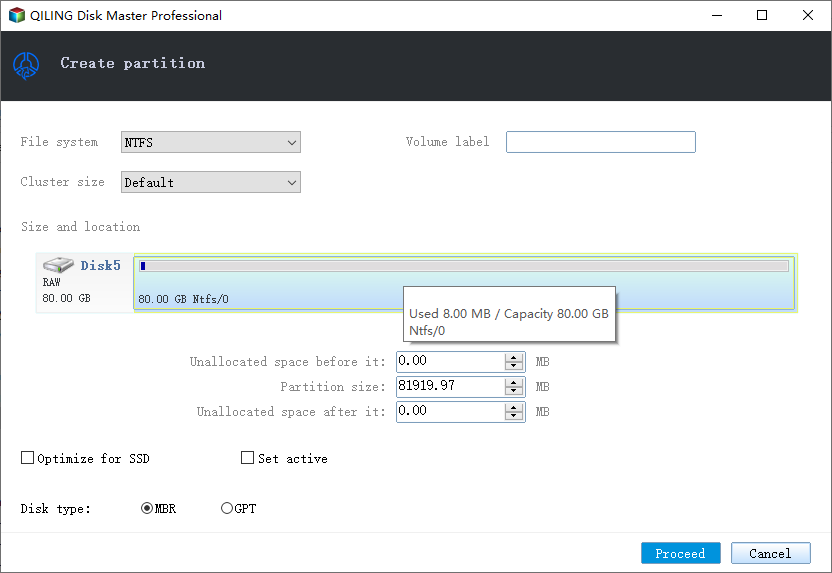
Step 2.You can continue to customize how many partitions you want to create, and set the partition style you want, MBR or GPT, which allows for more flexibility and control over the partitioning process, particularly useful for advanced users and system administrators who can create complex partition
You can either choose to customize the settings or accept the default settings offered by Qiling Partition Master. Once you've made your selections, click "Proceed".
#2. Migrate OS to HDD/SSD
If you get a new disk and want to switch or migrate Windows OS with installed programs to the disk, take Qiling Partition Master for help. The process is easy for anyone of you:
Steps to migrate OS to HDD/SSD:
- Run Qiling Partition Master, select Migrate OS from the tools page.
- Select the SSD or HDD as the destination disk and click Next.
- Preview the layout of your target disk, then click Proceed to start migrating your OS to a new disk.
- Be aware that the target disk's data and partitions will be completely erased. Make sure you have backed up any important data before proceeding. If you haven't backed it up yet, do so now to avoid losing your files.
Note:If you're migrating your OS to an SSD or HDD, be aware that the process will erase all existing partitions and data on the target drive if there's not enough unallocated space. Make sure to back up any important data on the target disk to an external drive beforehand.
#3. Extend Partition
To extend your C drive or partition, you can use the built-in Disk Management tool in Windows. First, open the Disk Management tool by searching for it in the Start menu, then right-click on the partition you want to extend and select "Extend".
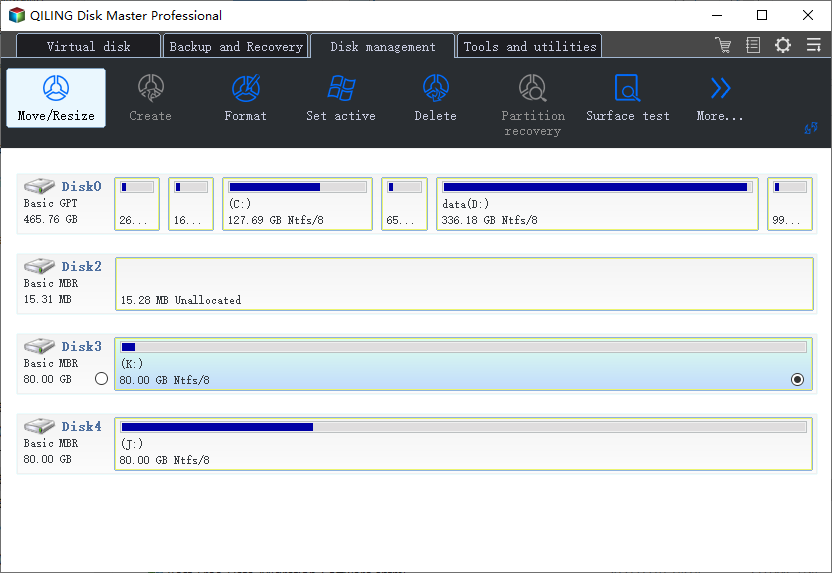
Step 1. Locate the Target Partition.
To extend a partition, first locate the target partition and select "Resize/Move".
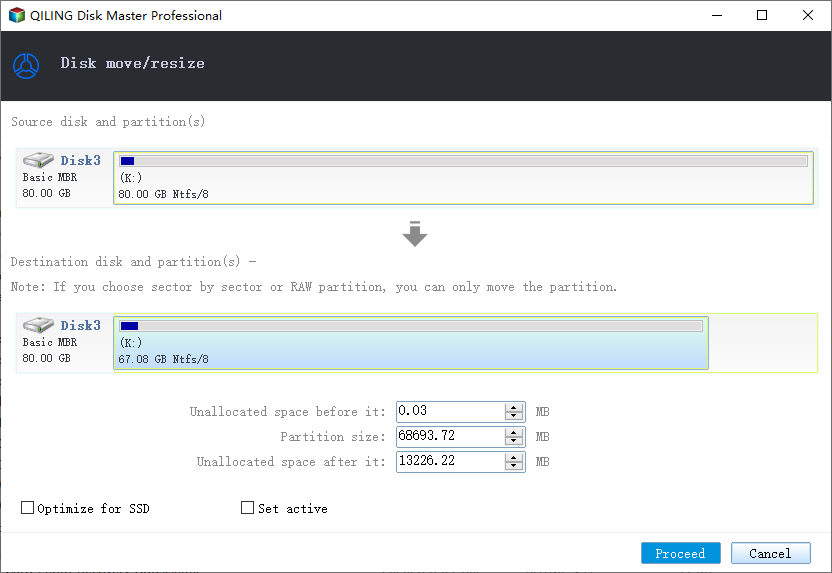
Step 2. Extend the Target Partition.
To add unallocated space to your current partition, drag the partition panel to the right or left, then click "Proceed" to confirm the change.
Extra Option: Get Space from Another Drive
If there's not enough unallocated space on your disk, select a larger partition with enough free space, and then choose "Resize/Move".
To shrink the partition size for unallocated space, drag the partition panel to the right or left, creating unallocated space. This will free up space on the partition, making it available for use.
Warning: Stop Using Qiling Partition Maser Crack Keygen
Using a crack key or keygen for Qiling Partition Master can compromise your privacy and potentially harm your computer, making it an unwise decision.
We recommend visiting our official website at https://www.idiskhome.com to download genuine software for disk management. You can also try purchasing an authorized key using one of the provided accesses to unlock the software.
Related Articles
- [Fixed] 'Current Read-Only State Yes' on USB Flash Drive/SD Card
- C Drive is Full in Windows 11
- SSD Optimzier for Windows 11 Free Download with Ultimate Guide
- How to Use Disk Management to Set Up Hard Drive or SSD in 2026
- How to Clone 2TB HDD to 1TB SSD in Windows 11/10/8/7? Your Guide Is Here
- Easy Ways to Clean a Disk and Improve Its Performance
- How Do I Clone HDD to SSD in Windows 11 and Make It Bootable? 2022 Complete Guide
- Asus Laptop Boot Menu: Get Everything Clear to Boot Asus PC and Laptop (from USB)
Products
Articles & Tutorials
- Data Recovery
- Data Backup
- File Recovery
- File Backup
- System Backup and Restore
- Disk and Partition Clone
- Technical articles
- Mobile articles
- Disk Master Help
- Windows Data Recovery Tutorials
- Windows Secure Delete Tutorials
- Windows Partition Management Tutorials
- Windows File Backup and Restore Tutorials
- Windows System Backup and Restore Tutorials
- Windows Disk Backup and Restore Tutorials
- Windows Clone Tutorials