Windows 11 VS Windows 10 Gaming: Is Windows 11 Better for Gaming
| Workable Solutions | Step-by-step Troubleshooting |
|---|---|
| New Feature 1 - Auto HDR | Windows 11 offers Auto HDR (high dynamic range) feature which allows you to view every little detail...Full steps |
| New Feature 2 - Direct Storage | Another pleasant addition to Windows 11 is its "direct storage" feature. Direct storage means that the load...Full steps |
| New Feature 3 - Game Pass | Windows 11 is going to give you a built-in Xbox Game Pass. Yes, you heard it right. You can now get an Xbox...Full steps |
| Get Better Game Experience | Let's prepare your computer to get the full benefits of Windows 11. Windows 11 vs Windows 10 gaming is different...Full steps |
Windows 11 is designed to be better for gaming than Windows 10, with features such as improved performance, faster load times, and enhanced graphics capabilities, making it a more thrilling experience for gamers.
Windows 11 takes gaming to the next level with its exciting new features, providing an unparalleled gaming experience. For gamers, certain essentials are a must-have, and Windows 11 delivers, offering a world of possibilities that were previously lacking.
Windows 11 has undergone significant improvements, spanning from graphics to speed. A detailed analysis will reveal what's better in the new operating system.
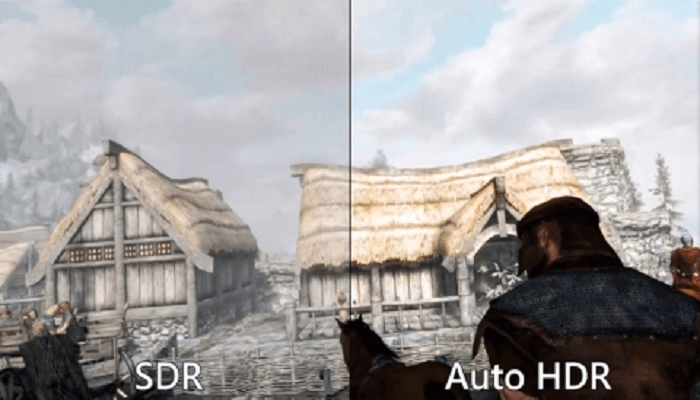
New Feature 1 - Auto HDR
Windows 11's Auto HDR feature enhances game graphics by displaying detailed lighting, providing a realistic and vivid gaming experience.
The new console's graphics capabilities allow for a highly immersive gaming experience, with vibrant colors and detailed visuals that make every movement and element stand out. The Auto HDR feature enhances the visuals, making the game look more realistic and engaging. This leads to a more enjoyable and improved gameplay experience.
The new feature of Auto HDR in Windows 11 provides a significant improvement in gaming visuals, allowing for a more immersive experience with enhanced shadows, reflections, and lighting. This is a notable difference between Windows 11 and Windows 10 gaming.
New Feature 2 - Direct Storage
Windows 11 features a "direct storage" feature that significantly reduces load times, providing a next-generation gaming experience.
This feature enables faster loading times on NVMe SSDs, significantly improving the gaming experience by reducing wait times for game loading.
When playing games with friends, it's frustrating to wait for the game to load. However, Windows 11 has introduced a feature called direct storage that helps resolve this issue, allowing you to get started sooner.
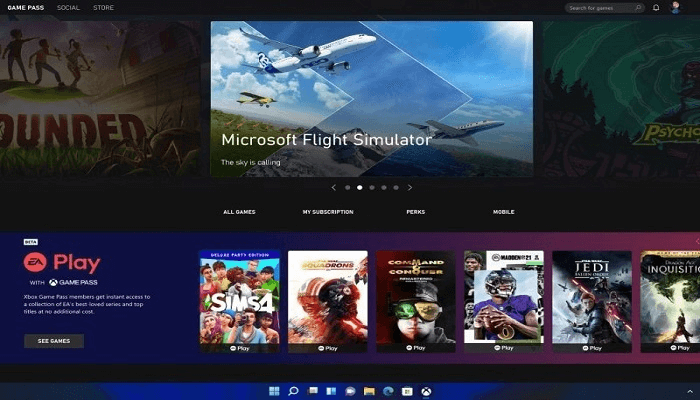
New Feature 3 - Game Pass
Windows 11 will come with a built-in Xbox Game Pass, making it more accessible than ever. This means Xbox game lovers can enjoy a wide range of games directly from their Windows 11 device.
Xbox's Game Pass feature is set to become even more accessible with the upcoming Windows 11 update, making it a game-changer for all gamers.
How to Get Better Game Experience
To get the full benefits of Windows 11, we need to optimize our computer for gaming. Unlike Windows 10, Windows 11 gaming requires more storage space, so extending the C drive is a good idea. To do this, we can download the Qiling Partition Master, a tool that allows us to easily extend the C drive and provides many other useful features, such as partition management and disk cleanup, making it a valuable asset for our computer.
The "Resize/Move" feature allows you to adjust the size of a selected disk partition to your liking, enabling you to shrink a volume, extend another one, or create unallocated space for specific use.
The "Clone" feature is used to create an exact copy of a hard disk or partition, duplicating its layout and content. This can be useful for upgrading a hard drive, replacing a failing one, or backing up data.
"Delete" is a common method to remove an unwanted disk partition, turning it into unallocated space.
Formatting a drive partition can change the file system, fix corruption issues, and sometimes remove viruses and malware, making it a useful tool in various situations.
Allocating space from a larger partition to a smaller one can be helpful when there's a significant size disparity between two drive partitions.
The "Migrate OS" feature allows for the easy transfer of a Windows installation drive to another without the need for a complete reinstall.
Qiling Partition Master customers are increasingly converting between GPT and MBR, as well as between NTFS and FAT32, and switching from Basic to Dynamic disks, which offers numerous benefits. However, there are even more functional and practical features waiting to be explored in the software.
Conclusion
Windows 11 is now ready for gaming, and the mystery of Windows 11 vs Windows 10 gaming is solved. To get started, update to Windows 11 and download the Qiling partition tool to prepare your computer for its incredible features. We've provided a detailed analysis of what's new in Windows 11, and we hope this guide helps you make the most of it.
Related Articles
- [Fixed] Windows Media Creation Tool Can't Find USB Error: We Can't Find a USB Flash Drive
- Free Download Kingston DT 101 G2 Repair/Format Tool
- Top 8 Best Free Windows 11/10/8/7 Disk Management Tools (2022 Update)
- Windows 11/10 Slow Suddenly: The Complete Guide to Speed Up Windows 11/10
- Can't Format/Clean USB Bootable Flash Drive, How to Fix
Why can't format/clean WinTo USB bootable flash drive? How can you fix this error efficiently? this article will guide you on how to remove this error. - Clean VS Formatting a Hard Drive, Can You Tell Me Their Difference
Is cleaning a hard drive the same as formatting a hard drive? Of course not. This article focuses on this question and tells you how to format a hard drive instead of cleaning a hard drive.
Products
Articles & Tutorials
- Data Recovery
- Data Backup
- File Recovery
- File Backup
- System Backup and Restore
- Disk and Partition Clone
- Technical articles
- Mobile articles
- Disk Master Help
- Windows Data Recovery Tutorials
- Windows Secure Delete Tutorials
- Windows Partition Management Tutorials
- Windows File Backup and Restore Tutorials
- Windows System Backup and Restore Tutorials
- Windows Disk Backup and Restore Tutorials
- Windows Clone Tutorials