Best Canon Data Recovery for Mac & Windows PC
Quick Navigation:
- What Canon File Recovery Software is Use for?
- How Does Canon Camera Recovery Software Work to Recover Files?
- Simple Steps for How to Recover Deleted or Lost Files from Canon Camera
- Step 1. Download the Canon Camera File Recovery Software
- Step 2. Connect Canon Camera with computer
- Step 3. Select File Types to Scan Lost Canon Camera Data
- Step 4. Select Canon Camera to Scan
- Step 5. Perform Canon Data Recovery
Canon is a worldwide famous camera brand. You can see people use Canon cameras either for taking pictures or capturing videos everywhere. However, after creating the precious photos or videos, you may also face the issues that most people encounter, losing or deleting files from Canon camera intentionally or accidentally. It's normal. You create data and you remove data. It is how everything goes on. However, the problem is that among the deleted files, some are important for you, and you shouldn't lose them at all. That's the reason you need a Canon data recovery tool.
What Is Canon File Recovery Software Used For?
As its name implies, it is used for users to recover files from Canon camera. It supports files lost due to reasons below (included but not limited to ):
- intentionally or unintentionally deletion.
- Are you worried about losing precious photos or videos from your Canon camera due to errors or formatting? Don't worry!
- Inaccessible to the files, you have to reset the Canon camera to factory settings, with all files erased.
- If your Canon camera's memory card has been infected with a virus, it's essential to clear the virus to prevent further damage. Deleting files from the device can help in this process.
If you've lost or deleted files from your Canon camera, there's hope for recovery. Canon camera file recovery software can help you retrieve the files, even if they've been deleted or lost due to various reasons.
How Does Canon Camera Recovery Software Work to Recover Files?
When you delete files from your Canon camera, they don't disappear immediately. Instead, they're marked as useless and become invisible in their original locations, waiting to be replaced by new data. If you want to recover the deleted or lost files, you must do so before new data overwrites them, or you'll lose them permanently.
Your Safe & Effective Canon File Recovery Software
- Supported video formats are: AVI, MOV, MP4, M4V, 3GP, 3G2, WMV, MKV, ASF, FLV, SWF, MPG, RM/RMVB, MPEG etc.
- Supported picture formats are: NEF, CRW, CR2, ORF, SR2, SRF, K25, KDC, DCR, RAF, MRW, PEF, X3F, JPEG, JPG, TIFF, TIF, BMP, GIF, PNG, XCF, PAT, ARW, DNG, PSP, PCT, RAW, MOS, PSD, EPS, INDD, ERF, FH3, FH5, FH7, FH8 FH9, FH11, MCD, VWX, MEF, WP, CDR, CPT, VSD, DWG, PGM, PPM, PCX, MNG, MSP, WMF, WPG, EMF, ANI, NRW, TGA, JP2 etc.
Simple Steps for How to Recover Deleted or Lost Files from Canon Camera
Step 1. Download the Canon Camera File Recovery Software
Click the download button to get the Canon Camera recovery software installation package. Select the right version according to your computer OS, namely macOS or Windows. After that, install it on your computer.
Step 2. Connect Canon Camera with computer
Use a digital cable to connect your Canon Camera with your computer or remove the memory card for Canon camera and connect the memory card with computer since the deleted files are in the memory card.
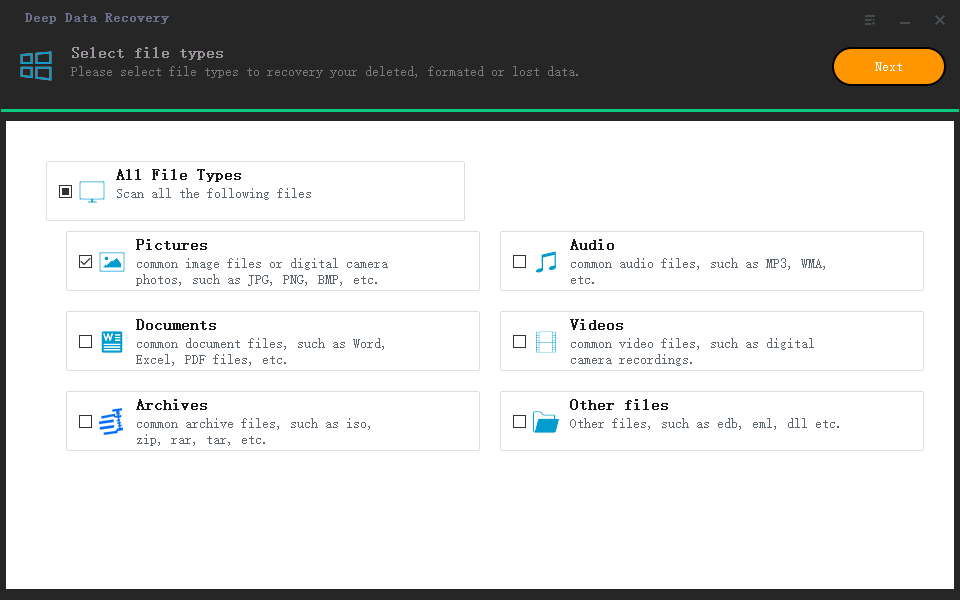
Step 3. Select File Types to Scan Lost Canon Camera Data
Launch the Canon data recovery software. In the first window, all the supported file types are selected by default. Please uncheck them and only keep the file types you need checked. Click "Next".
Step 4. Select Canon Camera to Scan
Please select the external hard drive that stands for the Canon Camera from where the files are deleted or lost. Click "Scan".

Step 5. Perform Canon Data Recovery
How much time it takes to scan the Canon camera fully depends on how many files are deleted in the device. More files means it takes longer to scan. During the scanning process, you can keep it running in the background while you do other tasks. When it finishes, you can select the result files to preview. If any of them is the file you need, check it and click "Recover" to save it to your computer.

Tips for better result:
- Use the Canon data recovery software as soon as you find you've lost files. It will avoid more files being overwritten by new data.
- If you didn't find the target files in the result window, try the "DEEP Scan" feature in the result window. It will start to scan for the deleted or lost files deeper.
Related Articles
- How to Recover Deleted Videos from Canon Camera
- Canon PowerShot Photo Recovery – Recover Deleted Photos from PowerShot
- Canon Photo Recovery – Recover Deleted Photos from Canon Camera
- How to Convert Dynamic Disk to Basic in Windows 10 without Losing Data?
Learn how to convert a dynamic disk to basic disk without losing data on Windows 10 with Qiling Disk Master. - How to Convert a Shortcut File into Original File
Are you surprised when files or folders on your USB pen drive suddenly turn into shortcuts? If so, you're not alone. Many people have encountered this issue and are looking for a solution to recover their files. - How to Correct #DIV/0 Error in Excel | Check Your Full Guide 2022
#DIV/0 is one of the most frequent errors in tables when we are in middle of work. It is frustrated to see such annoying error. How to correct #DIV/0 error? And how to avoid #DIV/0 error in Excel down the line? Read and bookmark this page, check methods to fix the #DIV/0 error.
Products
Articles & Tutorials
- Data Recovery
- Data Backup
- File Recovery
- File Backup
- System Backup and Restore
- Disk and Partition Clone
- Technical articles
- Mobile articles
- Disk Master Help
- Windows Data Recovery Tutorials
- Windows Secure Delete Tutorials
- Windows Partition Management Tutorials
- Windows File Backup and Restore Tutorials
- Windows System Backup and Restore Tutorials
- Windows Disk Backup and Restore Tutorials
- Windows Clone Tutorials