Recover Deleted Differencing VHD Files
Quick Navigation:
- How a Differencing Chain Works
- Stop the Virtual Machine
- Look for the File and the Chain
- Scan the Host Volume
- Frequently Asked Questions
A differencing disk holds only the changes made since its parent was created, so on its own it looks almost empty. Deleting it breaks the chain and the virtual machine either refuses to start or comes up with the state from the parent disk. The file is still recoverable in many cases, but only if the virtual machine stops writing to that folder first.
How a Differencing Chain Works
Hyper-V and Virtual PC keep a read-only parent disk and a child disk that records every new or modified block. When the machine reads data, the parent supplies the untouched blocks and the child supplies the changes on top.
Losing the child therefore means losing the whole difference, while losing the parent makes the child unusable even though most of its blocks are missing rather than damaged. Checkpoints add more children to the chain, which is why the folder often contains several files with long identifier names.
The chain also matters for recovery: a child file restored without its parent restores nothing usable, so both files have to sit at the paths recorded inside their headers.
Stop the Virtual Machine
Shut the virtual machine down through its own operating system, or use the shutdown command in the management console. Do not save its state, because a saved state keeps handles open on the disk files.
Do not start the machine again to check whether the error is real. Hyper-V creates a fresh child disk when the configured one is missing, and that new file starts writing to the same folder immediately.
Skip checkpoint merges and any disk inspection option until the data is copied out. A merge rewrites the chain, and a damaged chain that is merged in the wrong order cannot be rebuilt.
Look for the File and the Chain
Search the virtual machine folder for the disk extensions, including the checkpoint format that Hyper-V uses for children. Sort by modification date so the newest files appear first.
Check the Recycle Bin, any secondary folder used during a storage migration, and the default virtual hard disk directory. Deleted children are often moved rather than erased when the machine was reconfigured.
Open the settings of the virtual machine and note the exact path and file name it expects. A restored file must go back to that path, because the parent link is stored inside the disk header and does not follow a rename.
Scan the Host Volume
If the child file is gone from every location, Qiling Deep Data Recovery scans the host volume where the virtual disks lived and lists large disk images that no longer appear in the folder.
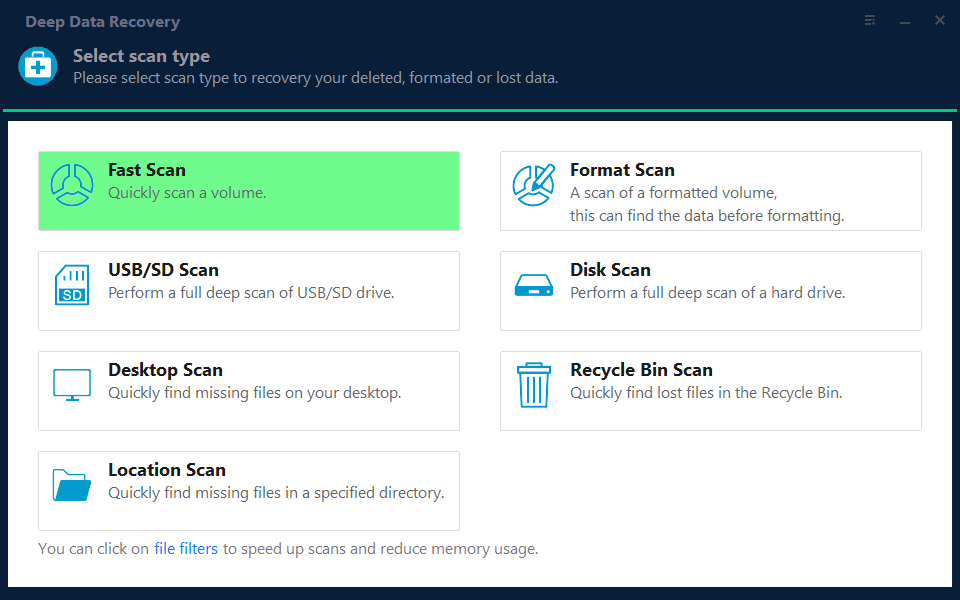
Step 1. Select the Recovery Mode
Fast Scan covers a child disk that was deleted recently from a healthy volume. Use the deeper scan when the volume was formatted or when a checkpoint merge was interrupted.
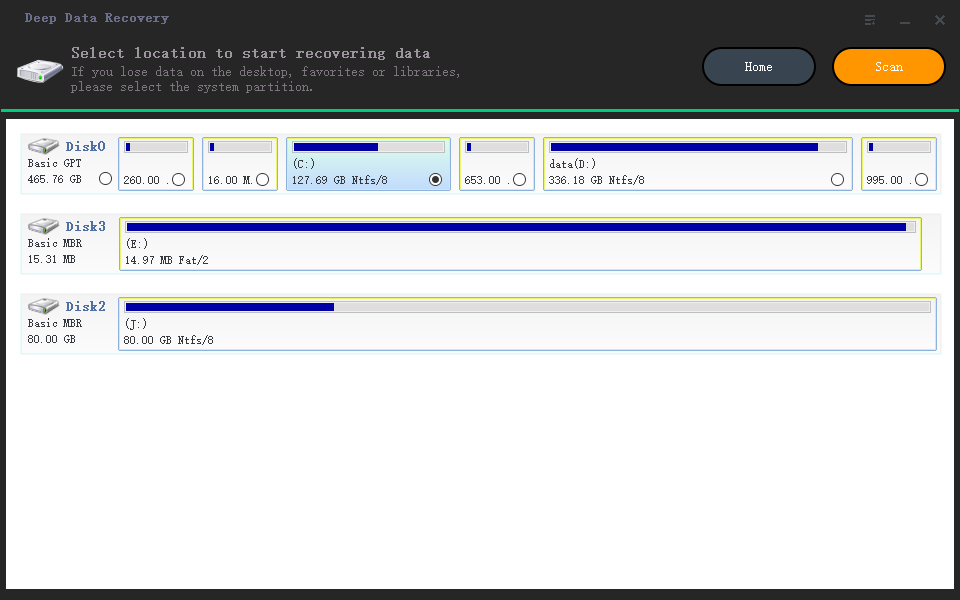
Step 2. Choose the Location
Select the host disk that held the virtual machine folder, not a disk inside the guest system. Filtering by size afterwards makes the large image files easy to find.
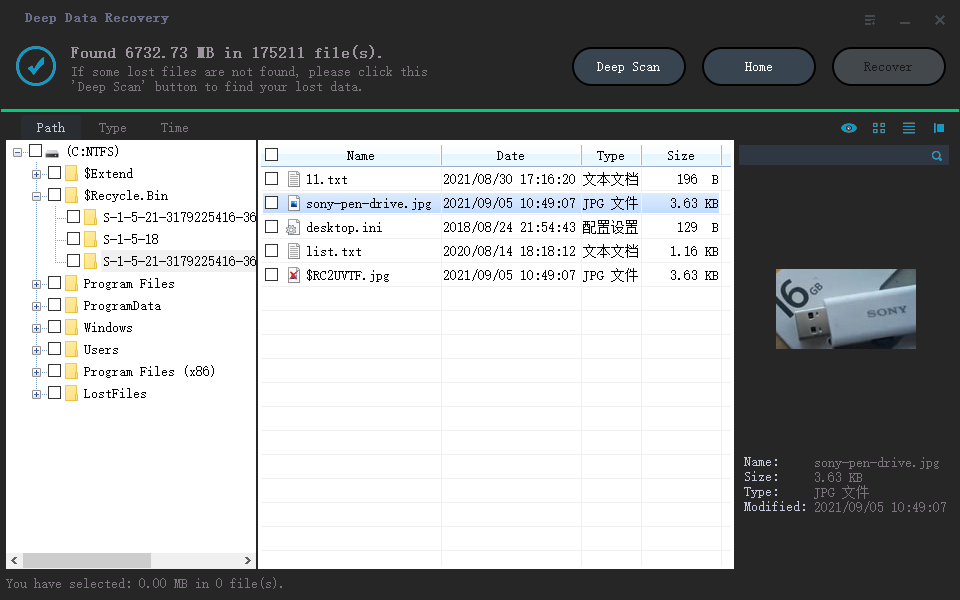
Step 3. Scan and Save to Another Drive
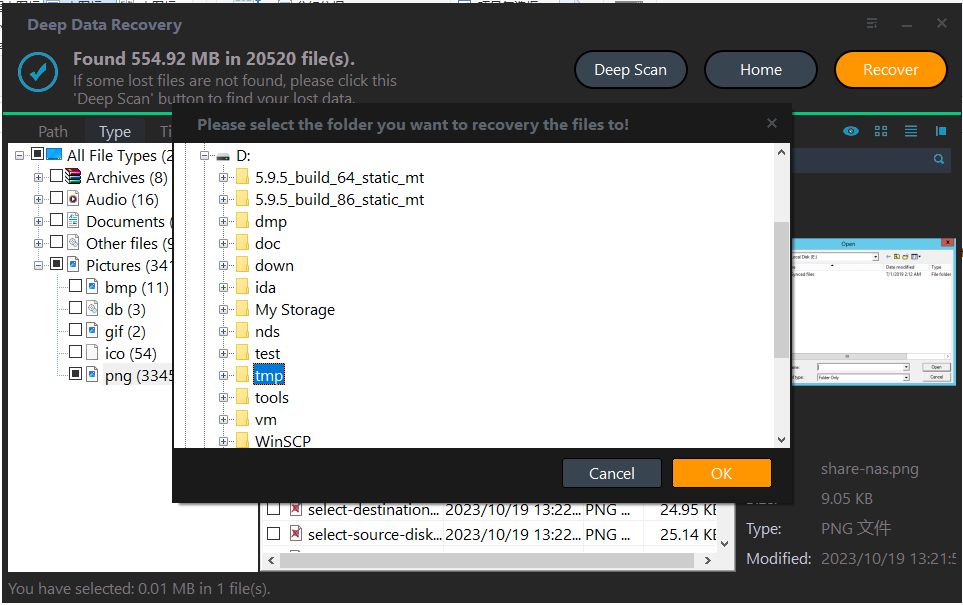
Sort the results by size, check the file type, and confirm the date against the checkpoint history. Save the recovered image to a different physical disk and copy it back only after the virtual machine is reconfigured.
Frequently Asked Questions
Can a differencing disk be started without its parent?
No. The child stores only changes, so the parent path recorded in its header has to resolve before the machine can read the base data.
Will recreating the missing child recover the virtual machine?
It creates an empty chain that starts from the parent state. The changes that were in the deleted file are not in the new one, which is why the original should be recovered first.
Do checkpoints contain a copy of the data?
Each checkpoint adds another child to the chain, so the data is spread across several files. Recover all of them and keep their original names and paths.
Related Articles
- Recover Deleted VHDX Virtual Disks on Windows
- Recover Deleted WSL ext4 Files From a VHDX
- Recover Deleted Files From a Storage Spaces Volume
- Windows 11 25H2 Lost Partition Becomes Unallocated
- Recover Files After CHKDSK on Windows 11
Products
Articles & Tutorials
- Data Recovery
- Data Backup
- File Recovery
- File Backup
- System Backup and Restore
- Disk and Partition Clone
- Technical articles
- Mobile articles
- Disk Master Help
- Windows Data Recovery Tutorials
- Windows Secure Delete Tutorials
- Windows Partition Management Tutorials
- Windows File Backup and Restore Tutorials
- Windows System Backup and Restore Tutorials
- Windows Disk Backup and Restore Tutorials
- Windows Clone Tutorials