Recover Deleted USD Scene Files on Windows
Quick Navigation:
- Understand the File and Its Dependencies
- Find a Backup and Protect the Source
- Recover Local Files with Qiling
- Check the Recovered Result
- Frequently Asked Questions
Accidental deletion can remove a design file while leaving a preview, shortcut, or older export behind. Before running a scan, identify the actual saved file and the physical disk that held it. This guide explains how to recover USD Scene Files from Windows storage and check whether the recovered work is usable.
Understand the File and Its Dependencies
USD scenes can be composed from layers, references, and payloads. A recovered root layer may be valid while its referenced assets are absent.
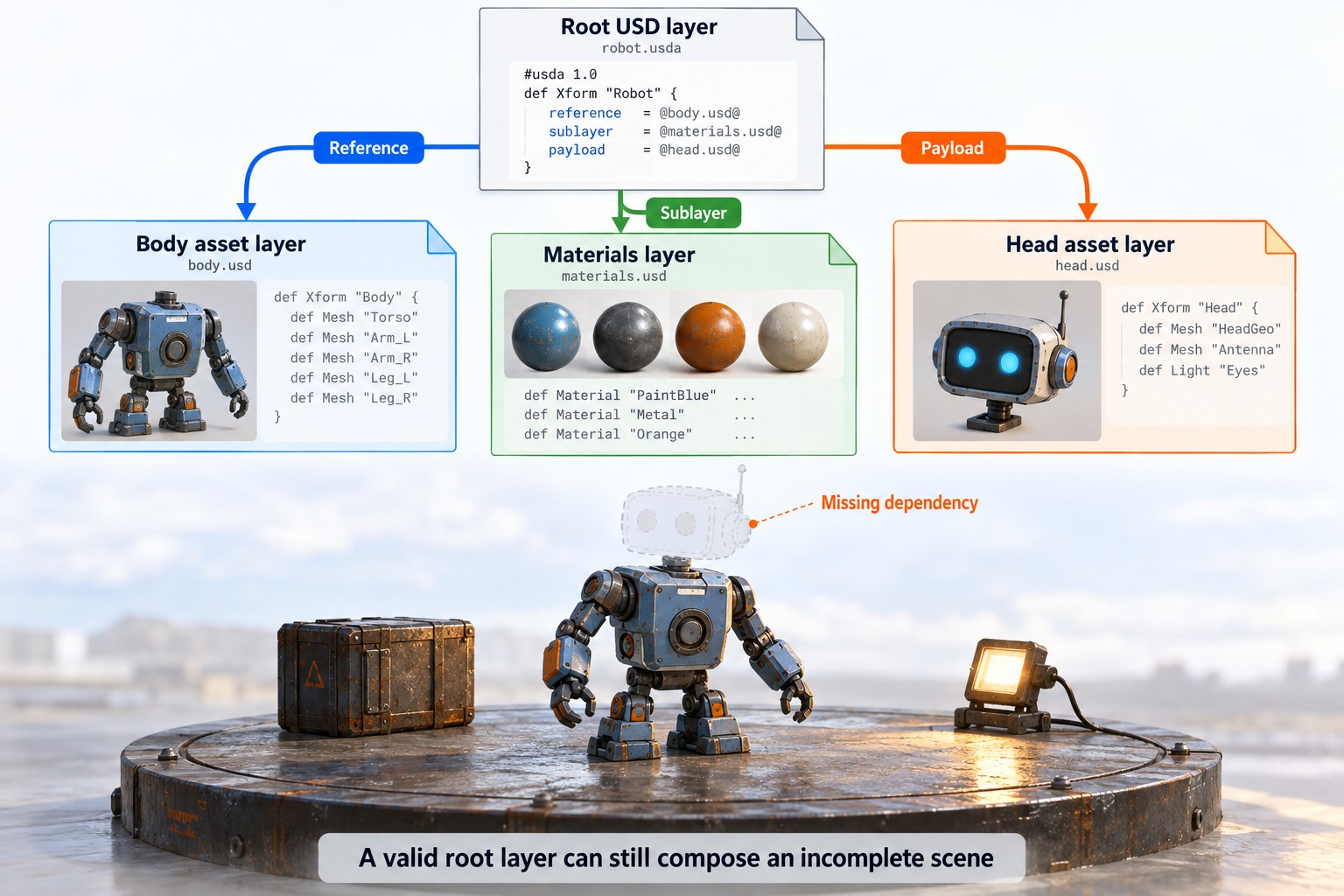
Knowledge illustration: a root USD layer composes referenced layers and payloads; a valid root can still have missing assets. AI-generated conceptual diagram, not a software screenshot.
Record the original folder, application version, expected file size, and last useful revision. Keep a list of referenced files or sequence members where relevant. A visible preview or familiar filename does not prove that editable geometry, metadata, or every frame is intact.
If the file still exists but will not open, preserve it and investigate corruption or compatibility separately. An undelete scan does not automatically repair damaged internal structures or recreate changes that were never saved.
Find a Backup and Protect the Source
Check scene repositories, publish folders, asset caches, Recycle Bin, and version history. Recover the dependency tree, including referenced layers and textures, not just the root USD file.
Check Windows and Application Copies
Open Recycle Bin and compare the original path and deletion date. Check application-managed versions, Windows backups, and the version history of synced folders. When possible, copy a candidate to another physical disk for inspection instead of replacing your only surviving version.
Prepare a Separate Recovery Destination
If no usable backup exists, stop saving, rendering, exporting, or installing software onto the source disk. New writes can overwrite deleted content. SSD TRIM can also make deleted blocks unavailable. Prepare another physical drive with enough space for multiple candidate versions and companion resources.
If the device disconnects repeatedly, makes unusual noises, or reports hardware errors, stop repeated scans and seek specialist assistance. Do not format the source to make it accessible. A local scan cannot recover files that existed only on a remote project server or cloud service.
Recover Local Files with Qiling Deep Data Recovery
Qiling Deep Data Recovery searches Windows-visible local disks and removable storage for lost files. Recovery depends on the remaining file records and data. Do not assume that every specialized design format has a dedicated preview or repair function.
Step 1. Select the Recovery Mode
Run the program from a disk other than the source. Select Fast Scan for recent local deletion, Recycle Bin Scan after emptying the bin, USB/SD Scan for removable storage, or Format Scan after an accidental format. Choose according to the loss event, not the file extension.

Step 2. Select the Source Volume and Click Scan
Identify the volume that contained the original project folder. Check its drive letter and capacity before selecting it, especially if several external disks are connected. Click Scan and allow the scan to complete. Do not select the destination drive merely because it is empty.

Step 3. Review Versions and Related Files
Review names, folders, extensions, sizes, and dates where available. Select several plausible versions rather than discarding alternatives immediately. Include referenced components, resource folders, or sequence files identified earlier. For files with numbered versions, retain the suffixes.

Step 4. Recover to Another Physical Disk
Select the candidates and click Recover. Choose a folder on the prepared destination disk, not another partition of the physical source disk. Wait for the output to finish saving, confirm the files exist, and keep an untouched copy before opening anything in a design application.

Check the Recovered Result
Open a copy in a compatible USD application. Check unresolved asset paths, expected prims, variants, payloads, and the time range. Compare the composed stage with the intended publish.
If validation fails, compare other recovered versions and backups before editing. Missing references, unsupported versions, or export limitations can resemble corruption. After confirming a working result, back up the file and its dependencies together, with a clear application version and revision label.
Frequently Asked Questions
Why does the root USD open as an incomplete scene?
Referenced layers, payloads, or textures may be missing or from the wrong revision.
Are USD files always plain text?
No. USD workflows use text and binary representations, so a text-editor check alone is insufficient.
Should I save a repaired or converted copy over the recovered original?
No. Keep the recovered original unchanged and work on duplicates. This preserves alternatives if a conversion, upgrade, or repair drops important information.
Related Articles
Products
Articles & Tutorials
- Data Recovery
- Data Backup
- File Recovery
- File Backup
- System Backup and Restore
- Disk and Partition Clone
- Technical articles
- Mobile articles
- Disk Master Help
- Windows Data Recovery Tutorials
- Windows Secure Delete Tutorials
- Windows Partition Management Tutorials
- Windows File Backup and Restore Tutorials
- Windows System Backup and Restore Tutorials
- Windows Disk Backup and Restore Tutorials
- Windows Clone Tutorials