Files Missing After a Partition Table Rebuild: Recovery
Quick Navigation:
- What a Rebuild Restores
- Why the Volume Turns RAW
- Find Files by Signature
- Recover with Qiling Deep Data Recovery
- Frequently Asked Questions
Rebuilding a partition table feels like a repair because the volume appears again and Explorer offers to open it. In practice the rebuild only restores the outline: each partition has a start, an end, and a type, and none of those describe the files inside. This is why a disk can look repaired and still contain nothing.
What a Rebuild Restores
The partition table on a GPT disk lives in the first sectors and in a backup copy at the end, and it records where each partition begins, where it ends, and which type it holds. Rebuilding writes those boundaries back from a scan or from a manual guess.
The file system keeps its own records inside the partition: the master file table on NTFS, the allocation bitmap, the log journal. Those structures are only valid if the partition starts at the exact sector where the file system was created.
A rebuild that lands one megabyte off, or that labels an NTFS volume with the wrong type identifier, leaves a boundary in place and the file system out of reach. The disk looks repaired, and the volume still refuses to open.
Why the Volume Turns RAW
Windows reads the boot sector at the first sector of the partition. If that sector is not the boot sector of a file system it recognizes, the volume is reported as RAW and Explorer offers to format it.
The same result appears when the rebuilt table points at the right place but the type or the partition GUID is wrong, or when a quick format ran after the rebuild to make the volume usable again. In each case the file system is either misaligned or overwritten at its head.
RAW is a statement about what Windows can parse, not about whether the data is there. The file records usually remain where the file system left them, and they can be read by a tool that does not depend on the mount.
Find Files by Signature
A signature scan ignores the file system and reads the raw device, matching the headers and internal structures of known formats: documents, archives, photos, mail stores, and video containers. It finds files whose names and folders are already lost.
Results arrive grouped by type and size, so dates, dimensions, and camera metadata become the way to identify what matters. Previews confirm which files open before you commit to saving a large batch.
Do not rebuild the table a second time with a different guess before imaging the disk. Each attempt writes to the same first sectors, and that area is the only copy of the original layout.
Recover with Qiling Deep Data Recovery
Qiling Deep Data Recovery reads the raw disk or an image of it and rebuilds what it can from both the file records and the file signatures. Run the scan on an image when the disk is unstable, and keep the original untouched until the results are saved.
If the rebuilt table is close but the volume still will not mount, the checks in recovering a RAW partition to NTFS explain how to read the data before changing the layout again.
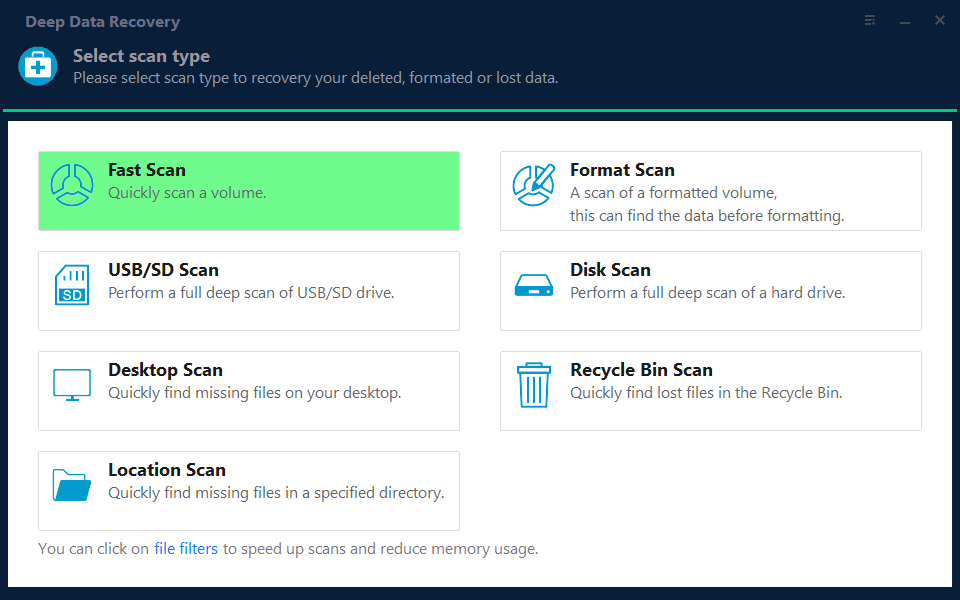
Step 1. Choose the Recovery Mode
Use Format Scan for a volume that reports RAW after the rebuild, and Fast Scan only when the volume mounts and files are missing from a readable folder tree.
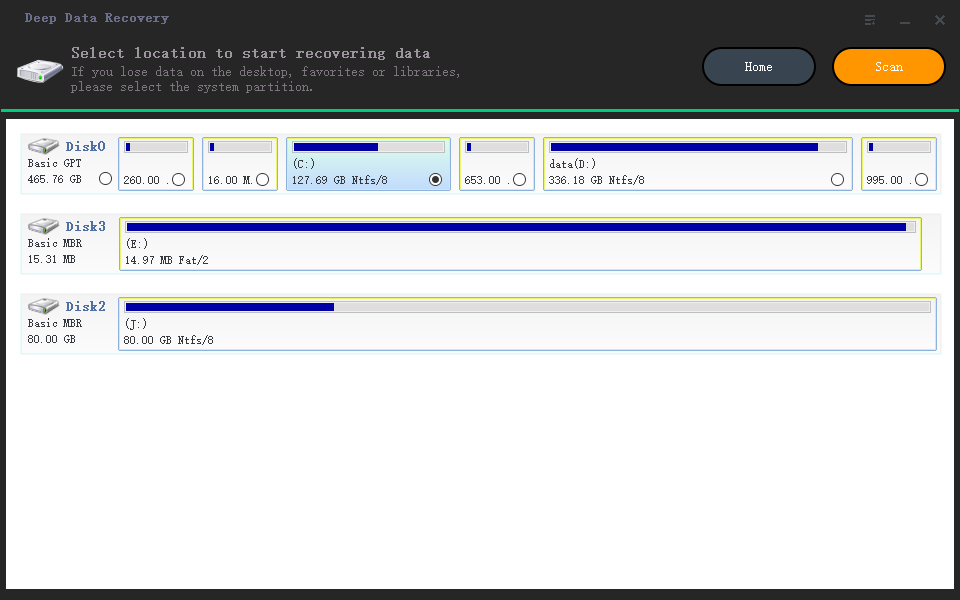
Step 2. Select the Rebuilt Disk
Select the physical disk by capacity and model, not by drive letter, because the letter may now belong to another partition. If you made an image, attach it and scan that instead.
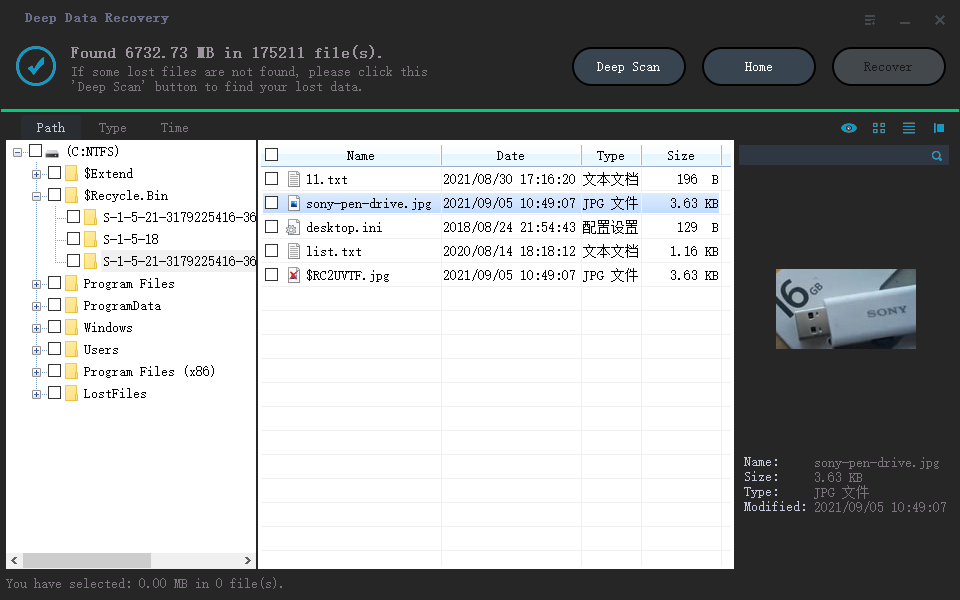
Step 3. Review the Results
Start with the type filter for the formats you need, then sort by date to find the files created before the rebuild. Open several previews, since a document that renders survived the table change intact.
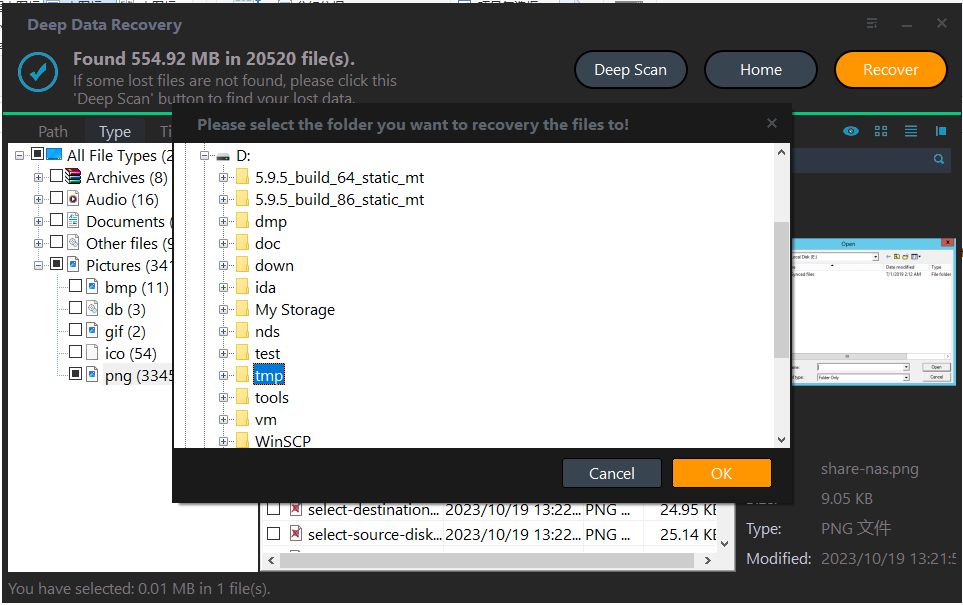
Step 4. Save to a Different Disk
Write the results to a disk outside the repaired one. Saving back to the same volume overwrites the blocks the next pass would read, and it also hides how much of the file system is still missing.
Frequently Asked Questions
Can the original file names come back?
Only if the file records survived. A Fast Scan can rebuild names and folders from an intact table, while a signature scan returns files without names and groups them by type. Both results can be saved together.
Is it safe to format the volume after the rebuild?
Not before the data is saved. A format writes a new file system over the old records, and after that even a signature scan has less to work with. Save first, format later if you still want the volume.
Does the rebuilt table have to be correct for a scan to work?
No. A signature scan reads the raw device and does not depend on the partition boundaries. A file-system scan does depend on them, which is why a wrong boundary produces an empty result there and a useful one in signature mode.
Related Articles
- Recover a RAW Partition Back to NTFS Without Data Loss
- How to Undelete a Partition in Windows
- How to Recover an NTFS Partition
- Windows 11 25H2: Lost Partition Shows as Unallocated
- GPT Protective Partition After Cloning
Products
Articles & Tutorials
- Data Recovery
- Data Backup
- File Recovery
- File Backup
- System Backup and Restore
- Disk and Partition Clone
- Technical articles
- Mobile articles
- Disk Master Help
- Windows Data Recovery Tutorials
- Windows Secure Delete Tutorials
- Windows Partition Management Tutorials
- Windows File Backup and Restore Tutorials
- Windows System Backup and Restore Tutorials
- Windows Disk Backup and Restore Tutorials
- Windows Clone Tutorials