How to Recover Deleted Photos from SD Card
Quick Navigation:
- How Accident of Memory Card Photo Loss Happen
- How to Recover Photos from SD Card on Windows or Mac
- Step by step to Recover Deleted Photos from SD Card
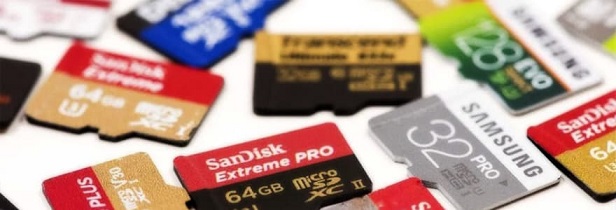
SD cards and memory cards are commonly used in Android smartphones and cameras, but the increasing issue of lost photos on SD cards has become a pressing concern. As a result, recovering deleted photos from an SD card has become a priority.
I accidentally deleted photos from my SD card by mistake, and I was trying to transfer them to my computer to free up space for upcoming holidays. Unfortunately, all the images and videos, including some precious old photos, were lost. I'm hoping to recover the deleted photos from the SD card, as they hold great sentimental value. Can you help me find a solution to recover deleted photos from SD card or SD card photo recovery?
How Accident of Memory Card Photo Loss Happen
- When the storage capacity of an SD card is full, deleting unnecessary files can free up space, but it's easy to accidentally delete important photos along with the unwanted ones.
- Accidental formatting. The format memory card will lead to all data lost, pictures included of course.
- Data loss from an SD card can occur due to various reasons. The most common causes include virus infection, which can be prevented by installing antivirus software to safeguard your data. However, other factors such as improper handling, physical damage, or software glitches can also lead to data loss. As a result, it's essential to be cautious when handling the SD card to prevent such incidents.
Stop saving new data to your SD card after accidentally deleting photos, as overwriting the card can make recovery impossible. Use data recovery software on your computer to retrieve deleted photos from the SD card as soon as possible.
How to Recover Photos from SD Card on Windows or Mac
Photos are often lost due to mistaken deletion while trying to free up space on an SD card, or due to format, damaged or RAW SD cards. In such cases, recovering pictures from the SD card becomes a pressing concern for users.
You can successfully restore deleted photos from an SD card with the help of a photo recovery tool, specifically designed for this purpose, such as Deep Data Recovery. This powerful tool can rescue lost data not only from computer local hard drives but also external drives like SD cards and USB drives. However, to avoid pictures being overwritten, it's essential to stop using the SD card once you've discovered data loss.
Your Safe & Effective SD Card Photo Recovery Tool
- The recovery software supports various SD card types, including SDHC/SDXC/MicroSD, and is compatible with multiple brands such as Samsung, Sandisk, Lexar, Micro, Kingston, and others. It can effectively recover photos from an SD card that has been deleted, formatted, or experienced media card errors.
- The best SD card photo recovery tool can recover or preview multiple image types, including JPG/JPEG, TIFF/TIF, PNG, BMP, GIF, PSD, CRW, CR2, NEF, ORF, SR2, MRW, DCR, WMF, RAW, SWF, SVG, RAF, and DNG.
- This program has two separate versions that allow you to easily recover photos from an SD card on either a Mac or Windows PC.
Download SD Card recovery software to recover photos now.
The photo recovery software is user-friendly and easy to use, allowing you to recover deleted photos from an SD card even with little experience. A brief introduction is provided to guide you through the process, making successful SD card data recovery a straightforward task.
Step by step to Recover Deleted Photos from SD Card
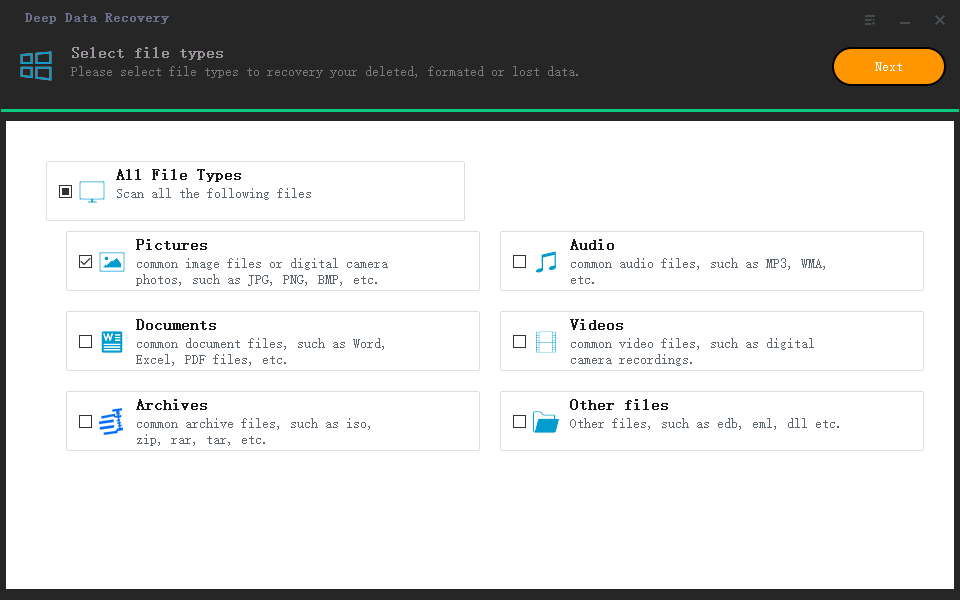
Step 1: Launch the SD card photo recovery software, select only "Pictures" and click "Next" to start recovering deleted photos from the SD card.
Step 2: Select your SD card and click "Scan" button to the analysis of your deleted pictures on the SD card.

Step 3: After the scan is complete, you can view the lost photos by "Path" and "Type". To recover them, select the desired photos and click the "Recover" button, which will save and recover the photo from the SD card to your computer or other drives. You can also preview the photos on the right side of the interface or double-click them to view them in more detail.

Related Articles
- How to Recover Deleted Photos from Sony Cybershot Camera
- How to Recover Deleted Photo from Transcend SD Card
- How to Recover RAW Partition to NTFS without Losing Data
- Move Program Files (x86) to Another Drive Safely and Easily
To move program files (x86) to another drive safely and easily, you can use the built-in Windows feature called "System" or a third-party software like Qiling Disk Master or PC Mover. These tools will help you transfer the files without affecting the programs - Ultimate Guide on SD Card Recovery in 2022
SD cards are widely used due to their high data transmission speed and hot-swappable features, which often lead to data loss problems. If you accidentally delete files on your SD card, you can use various recovery methods and SD recovery software to help recover deleted files. - Fix SD Card Files Not Showing in Mobile Phone, Camera or PC
If your SD card is not showing files on your mobile phone, camera, or computer, follow a comprehensive solution. First, recover important data such as photos, videos, audio, and documents on the SD card using data recovery advice.
Products
Articles & Tutorials
- Data Recovery
- Data Backup
- File Recovery
- File Backup
- System Backup and Restore
- Disk and Partition Clone
- Technical articles
- Mobile articles
- Disk Master Help
- Windows Data Recovery Tutorials
- Windows Secure Delete Tutorials
- Windows Partition Management Tutorials
- Windows File Backup and Restore Tutorials
- Windows System Backup and Restore Tutorials
- Windows Disk Backup and Restore Tutorials
- Windows Clone Tutorials