How to Fix Excel Found Unreadable Content Error (Easy Guide)
Excel Found Unreadable Content in 'Filename.xlsx'
I am generating files using this module. Some files I am able to open without any issues, but some other files throw an error when I try to open them, which prevents me from further processing. I need to identify the root cause and fix the issue. Can you help me with this?
The issue seems to be with the Excel file itself, not the module. This suggests that the other file XXXX.xlsx might be corrupted or has some issues that are causing the Excel module to fail. You may want to try to re-save the XXXX.xlsx file or try to open it in a different Excel version to see if the issue persists.

Excel file corruption occurs when the contents inside an Excel workbook become unreadable, often as a result of improper manipulation by an application that reads or writes .xlsx files, leading to damaged workbooks.
| Workable Solutions | Step-by-step Troubleshooting |
|---|---|
| Recover/Repair Corrupted Excel | Download, install and launch Deep Data Recovery. Go to the software's home screen and...Full steps |
| Set Excel as Read-only | In Excel, click "File" from the main menu. Select "Save" for a new...Full steps |
| Install Visual Basic Component | Go to "Control Panel > Programs > select Microsoft Office 2010"...Full steps |
What Causes the Excel Found Unreadable Content Error
Here are the reasons in one paragraph:
- The cache of Excel is probably full
- A virus attack or file corruption happens on your PC
- Excel application is not installed completely on your computer
- The system errors or system failure that results in full or partial file corruption.
As you can see, corruption can be a reason that leads to this error. Following are some workarounds you can try to resolve this error.
Method 1. Repair Corrupted Excel Content with File Repair Tool
To recover data from corrupted Excel files, use a professional file repair software like Deep Data Recovery, which is designed to efficiently repair corrupted Office files and PDF documents.
- Repair corrupted files with original format
- Support batch repair at a single time
- Repair damaged, corrupted, or inaccessible PDF files with this tool, which can recover all objects and restore them to their original format.
Step 1. Launch Deep Data Recovery, select the desired file types, and click "Fast Scan" to initiate the recovery process.

Note: You can choose different search modes based on where and why the data was lost.
Step 2. This software allows you to fix damaged Word, Excel, PPT, and PDF files in the same steps, enabling you to scan a disk with corrupted documents.

Step 3. Qiling data recovery and repair tool scans for all lost and corrupted files, allowing you to find target files by type or search by name in a search box.

Step 4. Deep Data Recovery can automatically repair damaged documents, and after previewing the file, you can click "Recover" to save the repaired Word, Excel, and PDF files to a safe location.
Method 2. Set the Excel File as Read-only
To remove the error "Excel found unreadable content", try opening the file in Excel, going to the "File" tab, clicking on "Open", and selecting the file. In the "Open" dialog box, click on the "Options" button, then check the box next to "Ignore unreadable cells" or "Ignore all errors" and click "OK". If the file still causes an error, try saving it as a new file in a different format.
Step 1. In Excel, click "File" from the main menu.
Step 2. To save your document, select the "Save" option for a new document or "Save As" for a previously saved document.
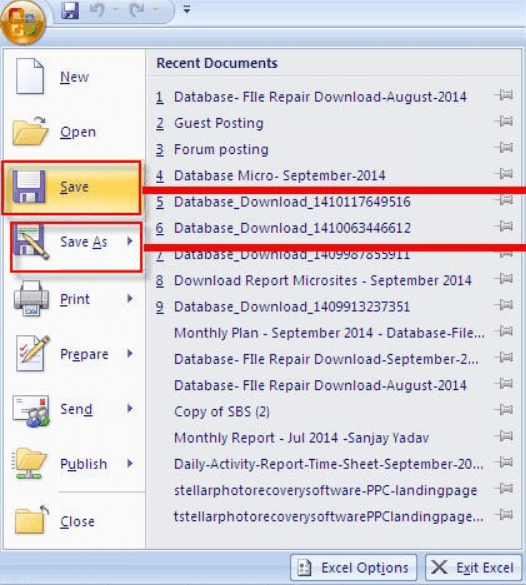
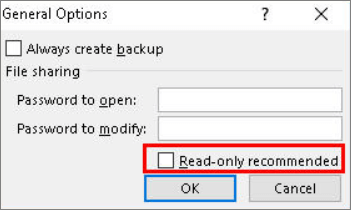
Step 3. From the "Save As" dialog box, click on "Tools" and then select "General Options".
Step 4. To make the document read-only, click the "read-only" checkbox and then click "OK".
Open a new, empty Excel file. Copy all contents from the damaged file into the new file. Save the new file.
Method 3. Install Visual Basic Component of MS Office
Installing the "Visual Basic" component of MS Office 2010 has been reported to resolve the error message. To repair unreadable Excel files, follow these steps:
Step 1. To access the Microsoft Office 2010 settings, go to the "Control Panel" and then click on the "Programs" section, where you can select Microsoft Office 2010.
Step 2. To add or remove Office Shared Features, follow these steps: Click "Change > Add or Remove Programs". Click the "plus" sign provided next to Office Shared Features at the bottom of this list.
Step 3. Click "Visual Basic for Applications" and select "Run from My Computer" from the dropdown menu.
Once you've completed the steps to fix the issue, reboot your system to ensure the data is recovered after the process finishes.
Conclusion
If you encounter an Excel file that is unreadable, there are ways to repair and recover the lost data. One option is to use Stellar Toolkit for File Repair, which can restore Excel files and also repair damaged Office files with ease.
Related Articles
- How to Activate Windows 10/11 with Product Key/Digital License/CMD
- Download the Easy & Free MS Office Recovery Software with Crack
- 7-Zip Data Error Fix (4 Methods)
- How to Enable/Disable Windows Boot Manager in Windows 11/10
- Why C Drive Is Full and How to Make Space
Are you facing the issue of a full C drive on your Windows device? This guide will walk you through the process of solving the problem and freeing up space on your C drive. - How to Fix the Issue GOPro Won't Turn on
People who use GoPro Hero always said the GoPro won't turn on. Check out the solutions mentioned in the article to fix it.
Products
Articles & Tutorials
- Data Recovery
- Data Backup
- File Recovery
- File Backup
- System Backup and Restore
- Disk and Partition Clone
- Technical articles
- Mobile articles
- Disk Master Help
- Windows Data Recovery Tutorials
- Windows Secure Delete Tutorials
- Windows Partition Management Tutorials
- Windows File Backup and Restore Tutorials
- Windows System Backup and Restore Tutorials
- Windows Disk Backup and Restore Tutorials
- Windows Clone Tutorials