How to Recover Data from FAT32 SD Card/Hard Drive/USB (Windows & Mac)
Overview of FAT32 File Recovery
SD cards from popular brands like Samsung, SanDisk, PNY, Transcend, Sony, Kingston, Lexar, and Toshiba offer extra storage capacity, ranging from 2GB to 64GB, and can be used universally across various devices such as PCs, cameras, smartphones, and game consoles. They utilize the FAT32 file system, making them compatible with a wide range of platforms.
Be careful when using FAT32 SD cards as they can become corrupted, turning the file system to RAW, which means all data will be lost if reformatted back to FAT32 on a Windows computer.
How to Recover Data from FAT32 SD Card/Hard Drive on Windows 10
If you're a Windows user, you can recover data from a FAT32 SD card or hard drive in two ways. You can either use Windows data recovery software or check if you have a backup. To recover data, follow these steps.
Method 1. Recover Data from FAT32 Hard Drive with Data Recovery Software
Accidental deletion, formatting, virus infection, and other threats can put contents on an SD card at risk, requiring an instant FAT32 SD card recovery solution. In such cases, it's essential to learn how to recover data files on a FAT32 SD card after accidents using free memory card recovery software, with Deep Data Recovery being a top-ranked option.
Easy Operation:
Recovering lost data is a straightforward process that can be completed in just three steps, even without extensive technical knowledge.
Wide Compatibility:
Fully supports FAT32/16/12, NTFS, EXT2/3, HFS+, ReFS.
High Quality:
Deep Data Recovery offers high-quality data recovery, performing a full scan of the drive without causing any damage to the original data.
Supports 250+ Files:
Recover all types of lost files, including photos, documents, videos, audio files, emails, compressed files, and more.
If you prefer a step-by-step guide, here's how to recover FAT32 SD card data. Start by stopping use of the SD card immediately to prevent data overwriting. Next, download and install a reliable data recovery software such as Deep Data Recovery.
Step 1. Connect the SD card, memory card, or CF Card to your computer and launch the Qiling memory card recovery software. Choose file types and click "USB/SD Scan" to start the recovery process.

Note: You can choose different search modes based on where and why the data was lost.
Step 2. To recover lost data from an SD card, go to the Devices section and select the SD card. Then, click "Scan" to initiate the recovery process.

Step 3. The software automatically starts a powerful scan that can find all lost files, including those with unknown or lost file names. After scanning, deleted items can be found in the tree-view panel on the left. To narrow down the search, users can click "Filter" to look for specific file types, such as photos, documents, videos, or emails.

Step 4. You can directly double-click the files to preview the content. Then, choose the wanted files and click "Recover" to restore them to a secure location on your PC or other external storage devices.
Method 2. Recover Data from FAT32 SD Card/Hard Drive with File History
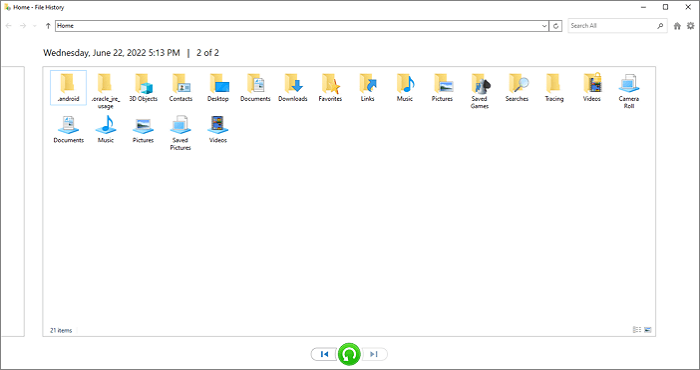
Windows 11/10/8.1 users have a built-in backup feature called File History, which backs up files in the Documents, Music, Pictures, Videos, and Desktop folders, as well as OneDrive files, to designated drives. If enabled, it allows for the recovery of FAT32 data.
Step 1. Click the Search box and type file history.
Step 2. Click "Restore personal files" from the search results.
Step 3. Choose the files you need to restore and preview them.
Step 4. Click the green "Restore" button.
How to Recover Data from FAT32 SD Card/Hard Drive on Mac
If you're a Mac user, recovering data from a corrupted FAT32 SD card or hard drive requires a slightly different approach. You can use Deep Data Recovery for Mac or restore data with Time Machine, both of which can help you recover your macOS data.
Method 1. Recover Data from FAT32 SD Card with Mac Data Recovery Software
Qiling offers a Mac version that allows users to recover deleted files on various macOS versions, including Ventura, Monterey, Big Sur, and Catalina. It also supports data recovery from a wide range of storage devices, such as hard drives, SSDs, USB flash drives, SD cards, and memory cards.
Step 1. Select file types and click "USB/SD Scan" to start
- To recover data from your memory card, correctly connect it to your Mac and then launch Deep Data Recovery for Mac.
- Choose file types and click "USB/SD Scan" to start.
Note: You can choose different search modes based on where and why the data was lost.
Step 2. Select the SD card
- To recover lost data from your SD card, go to the "SD Card Recovery" software, locate your Canon, Nikon, Go Pro, DJI, or Sony SD card, and click "Search for lost files".
Step 3. Filter lost SD card data
After scanning, all files, including photos, videos, and other types, will be displayed in the left panel of the scan results for easy access and identification.
Step 4. Preview and recover data
Preview the SD card data, select the wanted files, click "Recover" and avoid saving the recovered files on the SD card itself to prevent data overwriting.
Method 2. Recover Data from FAT32 SD Card with Time Machine
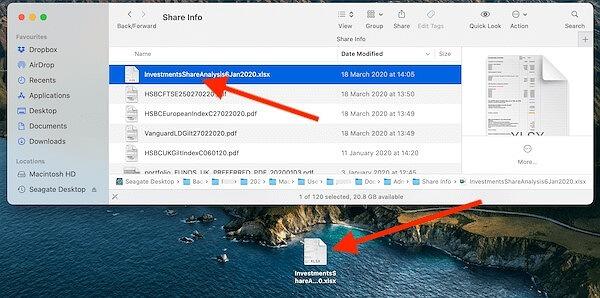
Mac users also have a built-in backup and recovery tool, which is called Time Machine. It helps users to back up apps, music, photos, email, and documents. Follow the steps below to run a Time Machine Data Recovery.
Step 1. Plug in the drive that contains the Time Machine Backup.
Step 2. To view the Time Machine Backup, open the drive and click on the database file inside it.
Step 3. Copy the files you want to restore and paste them to the new drive.
Conclusion
Whether you're using a Windows system or a macOS, you can recover data from a FAT32 SD card, hard drive, or USB flash drive. Utilizing data recovery software is the recommended approach, as it's straightforward and efficient. Even without a backup, it's still possible to retrieve your SD card data.
Recover Data from FAT32 SD Card FAQs
If you still have problems, you can read the questions and answers below to get additional help.
1. How do I recover data from FAT32?
To recover data from a FAT32 drive, follow these steps: first, identify the drive letter of the FAT32 drive, then open the Command Prompt as an administrator; next, type the command "chkdsk /f /r" followed by the drive letter (e.g.
- Download and install Deep Data Recovery
- Select the FAT32 partition and click Scan
- After the scan, find lost data through the file type
- Select the files you want to recover from the FAT32 drive, then click the "Recover" button to retrieve the lost data.
2. Can I recover data from a formatted SD card?
Yes, SD card formatted recovery is possible. Formatting an SD card causes file loss on the device, but the data is not completely erased, it's just the data structure on the card is broken, and the data is still present.
3. How do I fix a corrupted SD card?
If your SD card is corrupted, you can try to repair it and recover your data using the following methods:
- Change the SD Card Drive Letter
- Repair Corrupted File System
- Update SD Card Driver
- Format Corrupted SD Card
4. What is the best FAT32 Recovery tool?
For those in need of reliable data recovery tools, there are several options available for free. Qiling data recovery software is a top choice for both Mac and Windows users, while Linux users may prefer PhotoRec.
Related Articles
- Fix Corrupt Master File Table. CHKDSK Aborted Error in Windows 10/8/7
- Unparalleled RAID Recovery Services for RAID 0, 1, 5, 6 & 10 [2023 Tips]
- 2023 Solutions| How to Recover Deleted GoPro Files [Videos & Photos]
- Top 10 Best Hard Drive Repair Software
- How to Recover Data from BitLocker Encrypted Drive in Windows 11/10
If you've accidentally deleted a file from an encrypted drive, you can still recover data from a BitLocker Encrypted hard disk in Windows 11/10. - How to Recover Data from Blank/Empty SD Card
Recovering data from a blank SD card can be a relatively easy task if you use Deep Data Recovery to scan the card and retrieve your data in a timely manner.
Products
Articles & Tutorials
- Data Recovery
- Data Backup
- File Recovery
- File Backup
- System Backup and Restore
- Disk and Partition Clone
- Technical articles
- Mobile articles
- Disk Master Help
- Windows Data Recovery Tutorials
- Windows Secure Delete Tutorials
- Windows Partition Management Tutorials
- Windows File Backup and Restore Tutorials
- Windows System Backup and Restore Tutorials
- Windows Disk Backup and Restore Tutorials
- Windows Clone Tutorials