GetDataBack Full Version Alternative and Safe Download
Reliable data recovery software can help people recover data after accidental deletion, formatting, or virus infection, but many providers offer trial versions that require a license code to access full features.
Some people search for cracked data recovery software like Get Data Back for NTFS/FAT, but it's not trustworthy. Instead of cracking the software, it's recommended to stop this practice and find a legitimate way to recover your data.
Risks of Get Data Back for NTFS/FAT Full Version Crack
Hackers and warez websites exploit the growing need for cracked data recovery software, claiming to offer the best full version cracks with free license keys to help recover data from various storage devices.
Don't attempt to download Get Data Back full crack because it's dangerous and illegal. Don't take any more risks with cracked data recovery software:
- Unstable data recovery
- Further, permanent data loss
- Virus attack, malware infection
- Second storage device damage
- Economic loss, privacy leaking, etc.
When dealing with a data recovery issue, don't fall for cracked software that promises the world. Instead, opt for a genuine data recovery solution that's trustworthy and effective.
Download GetDataBack Full Version Alternative Software
There are many effective and free data recovery software options available that can replace Get Data Back, even without a crack. Some popular alternatives include Deep Data Recovery, Recuva, and Disk Drill, which offer similar features and capabilities. These software programs can recover lost or deleted files, photos, and other data from various storage devices, including hard drives, SSDs, USB drives, and memory cards.
There are free alternative tools that support NTFS, FAT, FAT32, exFAT, and EXT recovery. Two reliable Qiling data recovery tools can restore lost files from hard drives, USB memory sticks, and memory cards.
# 1. Download Qiling free file recovery software ( 2GB data recovery)
Qiling Deep Data Recovery supports recovering up to 2GB files for free, allowing users to restore various types of files, such as emails, documents, images, music, and videos, from storage devices.
# 2. Get Qiling data recovery software full with 30% off for license code
If you've lost files larger than 2GB, you can use Deep Data Recovery Pro to recover them. This software can help you retrieve files from situations like deletion, formatting, virus attacks, or RAW drives, and it guides you through the process with simple steps.
Qiling software offers a 30% discount on its official license code, making it a cost-effective solution despite not being free.
Click the button here to purchase a full version serial key for unlimited data recovery now:
Deep Data Recovery
Restore your lost files now
Click to Activate
30% OFF
After purchasing the software, a serial key will be sent to your email account. You can then activate it to unlock the full version, allowing for unlimited data recovery.
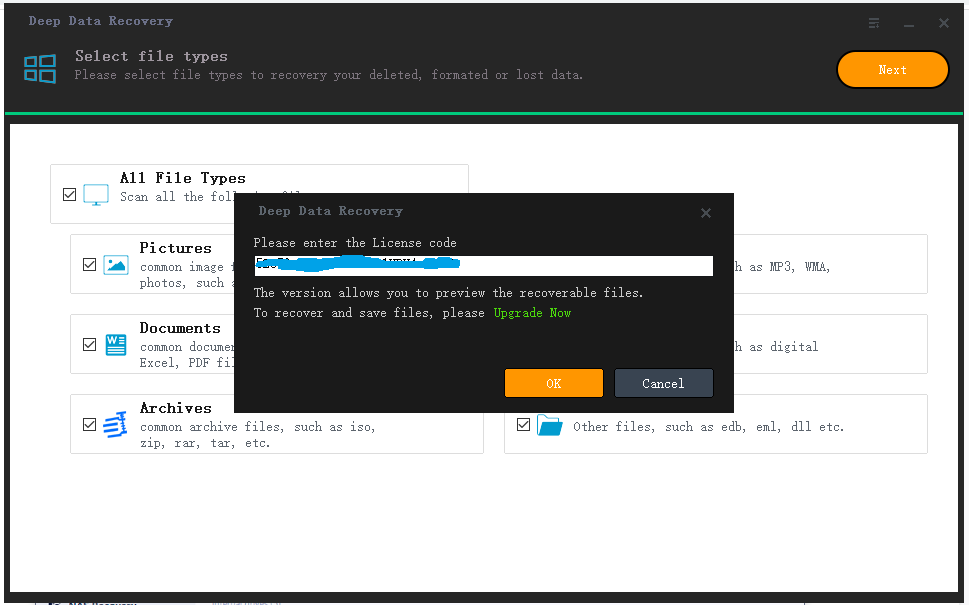
1. Run Deep Data Recovery, click "Upgrade Now" (for the Free edition user) or the "Activate" (for the Trial version user).
2. To upgrade or activate the software, copy and paste the license code and click on the corresponding button, either "Upgrade" for the free edition or "Activate" for the trial version.
Tutorial: Full Data Recovery in 3 Steps
Step 1. Run Deep Data Recovery on your computer, select the file types you want to recover and click "Fast Scan" to begin the process.

Note: You can choose different search modes based on where and why the data was lost.
Step 2. Connect the external storage device to your computer if it's an external device, then select the drive where the files were lost and click "Scan".

Step 3. The software rapidly scans deleted files, followed by a deep scan to locate more lost files. Once the scan is complete, a "Filter" feature allows for quick filtering of specific file types.

Step 4. Click the "Preview" button or double-click on a file to view its contents. Select the desired files, click "Recover", and choose a safe location to save them.
Whenever you lose files on storage devices, turn to reliable data recovery software like Deep Data Recovery for help. It's also essential to create a backup of your valuable files on computer, hard drive, and external storage devices to ensure you're prepared in case of a data loss issue. This way, you'll be able to recover your lost files and minimize the impact of data loss.
Here, we'd like to recommend you try Qiling Backup Free, with its File Backup feature, which allows you to back up all desired files at once, taking up very little space on the target storage device.
Related Articles
- Free Download Transcend JetFlash Online Recovery Tool
- EFS Decryption Guide: How to Recover Encrypted Files on NTFS Drive Without Effort
- How to Recover Permanently Deleted Files and Folders with or Without Software
- Command Prompt for USB Recovery: Recover Files Using CMD
- How to Recover An Overwritten or Replaced Word Document
Have you accidentally overwritten a Word document with another file having the same name? We've got solutions to help you recover the overwritten or replaced Word documents in Windows 11/10 or Mac. - How to Recover a Partition on a USB Drive
When you need to recover or restore a partition from a USB drive, it's essential to follow the correct procedure and consult a reliable guide for partition recovery on USB drives. This ensures that you can successfully retrieve your data and restore the partition to its original state.
Products
Articles & Tutorials
- Data Recovery
- Data Backup
- File Recovery
- File Backup
- System Backup and Restore
- Disk and Partition Clone
- Technical articles
- Mobile articles
- Disk Master Help
- Windows Data Recovery Tutorials
- Windows Secure Delete Tutorials
- Windows Partition Management Tutorials
- Windows File Backup and Restore Tutorials
- Windows System Backup and Restore Tutorials
- Windows Disk Backup and Restore Tutorials
- Windows Clone Tutorials