Recover Deleted Photos from Folder Lock App in Android and PC
How to recover files from Folder Lock:
1. Download and install Qiling file recovery software on Windows.
2. Run Deep Data Recovery from Folder Lock and scan the lost files.
3. To recover deleted files from Folder Lock, first preview the found files to ensure they are the ones you're looking for. Then, select the files you want to recover and follow the prompts to complete the recovery process. This will restore the deleted files to their original location or to a specified folder, depending on the software or tool being used.
Q: To recover deleted photos from the Folder Lock app in Android, first, download and install Qiling file recovery software on your computer. Launch the software and select the 'Storage' tab.
You use Folder Lock on your Android phone to store confidential photos, set a secure password, and then connected your phone to a PC via USB, where you deleted some files starting with a dot (.). Upon checking your photos in Folder Lock on your Android phone, you found that the files you deleted on the PC had also disappeared from the Folder Lock app.How to recover deleted photos from Folder Lock app in Android? Can anyone give me some suggestions? Thanks in advance."
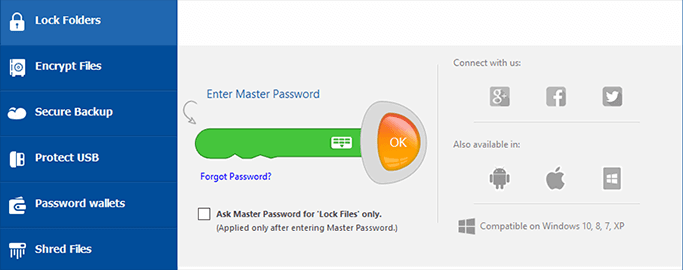
Folder Lock Files Disappeared, Is It Possible to Recover Files in Folder Lock
Folder Lock is a software used to hide, lock, or encrypt important files on Windows computers or Android devices by setting a master password. However, files in Folder Lock may be lost due to accidental deletion, formatting, software crashes, system upgrades, or other reasons.
If you've accidentally deleted files from Folder Lock, don't worry, a fast and efficient recovery is possible. You can use a professional file recovery software to recover deleted and lost files from Folder Lock on both Android and PC, restoring your deleted photos with ease.
- Notice:
- To recover data from Folder Lock, you need to enter the master password to unlock the Lock Folder, then start the recovery process. If you've forgotten the password, you can follow the instructions on how to unlock Folder Lock without a password.
How to Recover Deleted Files from Folder Lock on Windows 10
Folder Lock is a software that secures confidential files on a Windows computer by setting a master password, but it does not protect files in unexpected data loss situations.
If you've accidentally deleted photos from Folder Lock on your PC, don't worry! You can try using Folder Lock's built-in recovery feature or a third-party data recovery software to recover your deleted photos. Make sure to stop using Folder Lock and the affected drive to prevent overwriting of the deleted files. You can also try checking the "Recycle Bin" or "Trash" for the deleted photos.
Deep Data Recovery is a top-notch file recovery software that can restore deleted, hidden, encrypted, locked, or lost files from Folder Lock. With its powerful data recovery capacity and user-friendly wizard-like interface, this software makes it easy to recover files that were previously inaccessible. It's a reliable data recovery master that can help you retrieve your important files with minimal effort.
- Recover files from various devices including emptied recycle bin, hard drive, memory card, flash drive, digital camera, and camcorder.
- Restore deleted, formatted, and inaccessible data in different data loss situations.
- Recover lost memories with ease by retrieving photos, audio files, music, and emails from any storage device with our effective, safe, and complete solution.
- Repair corrupted files automatically during data recovery.
To recover data from Folder Lock, download Deep Data Recovery with just a few clicks.
Step 1. Run Deep Data Recovery. Select file types and click "Fast Scan" to start.

Note: You can choose different search modes based on where and why the data was lost.
Step 2.To recover a lost folder, select "Select Folder" under Specify a location and browse for the folder's original location. Once you've found the location, click "OK" to initiate the scan.

Step 3. To search for a specific folder, you can type the folder's name in the search bar. Alternatively, you can use the Filter feature to narrow down the search results by selecting a specific type of file, such as documents, images, or videos, to view only those types of files within the target folder.

Step 4. After previewing the recovered folder, click "Recover" and choose a new and secure location on your PC to keep the recovered data.
How to Recover Deleted Photos from Folder Lock App in Android
To recover lost photos and other files from Folder Lock on Android, you can use Qiling MobiSaver For Android, a user-friendly software that allows you to recover deleted files, including photos and videos, without a computer, as well as retrieve deleted contact call logs and browsing history.
This app can be downloaded on an Android phone and used to recover Folder Lock files that have gone missing.
Step 1.To use Qiling MobiSaver for Android, install the software on your computer and connect your Android phone to the computer with a USB cable. Then, click the "Start" button to allow the software to recognize and connect your device.
Step 2.After connecting your Android phone, the software scans the device to find existing and lost data, allowing you to easily find specific photos by selecting the correct file types.
Step 3.To restore deleted photos on your Android phone, first preview all found photos and select out what you want to recover. Once you've made your selection, click the "Recover" button to restore the chosen data to your computer. After that, you can keep a copy of the recovered photos as a backup on your computer and then transfer them to your Android phone, allowing you to continue using them again.
See More: How to Open Folder Lock Encrypted Data
To view encrypted files on Android or open Folder Lock encrypted data, you have three ways to remove the password.
- Fix 1. Unlock folders/files (use folder lock serial key as password)
- Fix 2. Remove password from locked files by uninstalling folder lock
- Fix 3. Stop folder lock password protection
If you've forgotten the password to unlock Folder Lock, don't worry! To regain access, you can try the password recovery feature.
In the End
If you're looking to recover deleted files from Folder Lock, you can use Qiling file recovery tool or Qiling MobiSaver For Android to restore lost data, including contacts, pictures, music, notes, and more.
Before attempting any data recovery steps, it's essential to unlock your Lock Folder first. If you're unsure how to unlock files in Folder Lock, refer to the tutorial for guidance. Once unlocked, you can proceed with the data recovery process.
How to Recover Deleted Photos From Folder Lock App in Android FAQs
How can I recover my photos from folder lock in Android?
To recover deleted photos from Folder Lock in Android, you can use an Android data recovery tool like Qiling MobiSaver For Android, which allows you to easily and quickly recover any lost files on your phone.
How can I recover deleted photos from Applock?
To recover deleted photos from Applock, use an efficient photo recovery software that can access the phone's memory card, where all photos and videos are stored. This will allow you to easily retrieve deleted, lost, hidden, or inaccessible photos or videos from the SD card.
How can I unlock my photos in Folder Lock app?
Folder Lock is a useful software that safeguards crucial data and files by setting password protection to selected files and folders on Windows PC and Android. It offers various features, including hiding files, encrypting files, and securely deleting files, providing users with a secure way to protect their sensitive information.
If you forget the password to a Folder Lock, you won't be able to access and view the locked photos and other files. However, there are three ways to unlock Folder Lock without the password.
- Unlock files by using Folder Lock serial key as password
- Remove password from locked files by uninstalling folder lock
- Stop folder lock password protection
How can we recover data from Folder Lock?
To recover files from a folder locked with Folder Lock on a Windows PC, follow these steps:
- Run Deep Data Recovery and scan the lost folder.
- To recover a lost folder, select a hard drive or external device where the folder was located, click "Scan", or specify the exact location where the folder went missing and click "OK".
- Find and preview the found folder with files.
- Restore and save the found folder.
Related Articles
- How to Recover Deleted Sticky Notes in Windows 10/8/7
- How to Restore Missing AppData Folder in Windows 10/11
- Recover Deleted or Missing Outlook Folder
- How to Remove Shortcut Virus from PC/Laptop in Windows 11/10/8/7
- [4 Ways] How to Remove Write Protection from USB in Windows
When you get the 'disk is write protected' error on USB or other devices, you can't make changes on your drive. Here is how to remove write protection from USB, HDD in Windows 11/10/8/7: [1] Remove write protection in 4 ways; [2] Let deep file recovery software restore all your files. - Fixe Maxtor External Hard Drive Not Recognized/Not Working Without Data Loss
If your Maxtor external hard drive or USB is no longer recognized by your PC.
Products
Articles & Tutorials
- Data Recovery
- Data Backup
- File Recovery
- File Backup
- System Backup and Restore
- Disk and Partition Clone
- Technical articles
- Mobile articles
- Disk Master Help
- Windows Data Recovery Tutorials
- Windows Secure Delete Tutorials
- Windows Partition Management Tutorials
- Windows File Backup and Restore Tutorials
- Windows System Backup and Restore Tutorials
- Windows Disk Backup and Restore Tutorials
- Windows Clone Tutorials