How to Recover Deleted TikTok Videos in Android/iPhone/PC
If you're a TikTok enthusiast, you might be familiar with the lyrics "Cause I know we are so complicated. But we are so smitten it's crazy..." However, when it comes to your TikTok videos, complications can arise when they get deleted or lost. As a video maker, it's frustrating to lose your valuable short videos. So, how can you recover them?
Fortunately, all hope is not lost. You can recover deleted TikTok videos or drafts by following simple methods. Follow us to learn how to get your drafts back on TikTok or recover deleted TikTok videos, and take immediate action.
Quick navigation:
| Workable Solutions | Step-by-step Troubleshooting |
|---|---|
| how to get drafts back on TikTok | You can create drafts in TikTok or record outside of TikTok and keep it on your phone until you need it...Full steps |
| Recover your Liked Videos on TikTok | TikTok keeps a dedicated section for our liked videos. You can restore deleted liked videos in these steps...Full steps |
| Recover TikTok deleted videos from the backup | Recover deleted TikTok videos on Android from Google Photos and restore TikTok videos on iPhone...Full steps |
| Recover deleted TikTok videos with video recovery software | If you had saved your TikTok videos on an SD card or on the computer, and you accidentally deleted them...Full steps |
How to Get Your Drafts Back on TikTok
TikTok allows users to save recorded videos as drafts, which are stored on their phone's storage, allowing them to be retrieved later if they forget to post them.
Easy Steps to get your draft video back:
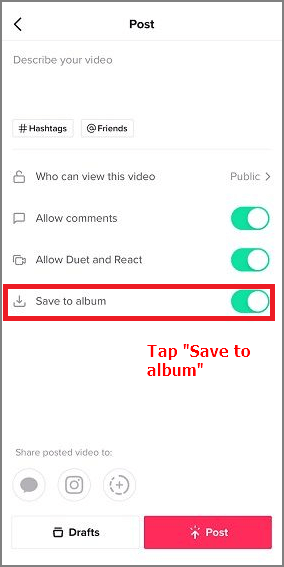
Check your album/device's gallery > TikTok folder.
This method has limitations, as you need to click "save to album" when creating the draft video for the below steps to be useful. Unfortunately, if you don't do so, your draft video cannot be recovered.
How to Recover Your Liked Videos on TikTok Videos
If you've accidentally deleted a TikTok video and want to get it back, there are three ways to recover it. You can try to recover the video using the app's built-in feature, use a third-party recovery app, or contact TikTok's customer support to see if they can help you retrieve it. The best approach will depend on your specific situation and needs.
To recover your liked videos on TikTok, you can follow a few simple steps. First, open the TikTok app and go to your profile page.
Step 1. Open Tiktok from your Phone interface.
Step 2. To access your TikTok profile, click the "Me" icon located in the bottom right corner of the screen.
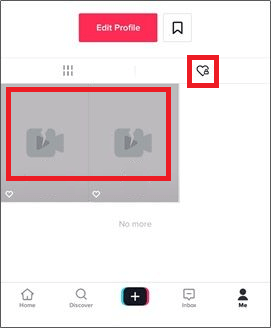
Step 3. To view your liked videos on TikTok, you can do so from the For You page. On the right side, you'll see a Heart icon. Clicking on this icon will open your liked video section, where you can see all the videos you've liked. Note that your liked videos must be publicly visible for this method to work. If not, you can explore other methods in the next part.
Step 4. On the Heart video screen, select the deleted video you want to recover.
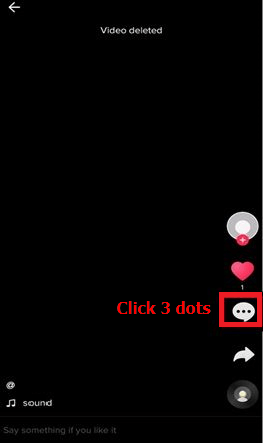
Step 5. From the video deleted screen, tap on the three dots on the right side.
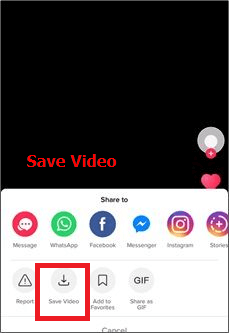
Step 6. To recover a deleted video on your album, tap the "Save Video" option from the available choices. This will restore the video to your album.
How to Recover Deleted TikTok Videos from Backup
You can set your phone to automatically backup your data, including TikTok videos, even if you don't regularly check it. This way, you can check the backup and restore any deleted videos. If you don't have a backup, you can move on to the next method.
How to Recover Deleted Tiktok Videos on Android from Google Photos
To check if your backup is available, follow these steps: if it is, you can restore deleted videos from the Google Photos app.
To check your backup on an Android phone, open the Google Photos app, tap your account profile at the top right of the screen, choose "Photos settings", and ensure that "Back up & sync" is turned on.
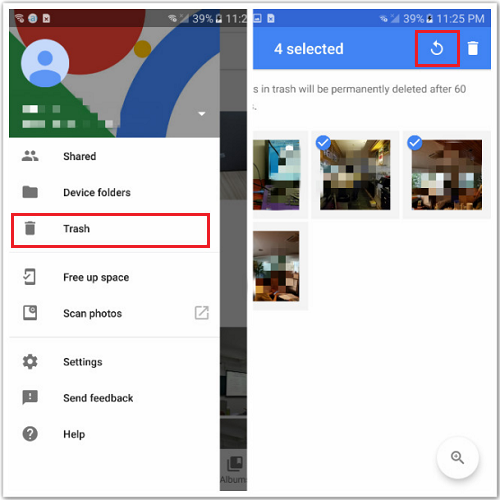
To restore deleted TikTok videos on Android from Google Photos, follow these steps:
Step 1. Open your Google Photos app.
Step 2. At the top left of the screen, tap "Menu".
Step 3. Select "Trash".
Step 4. Choose the TikTok videos you want to recover.
Step 5. Tap the "Restore" icon.
How to Recover Deleted Tiktok Videos on iPhone from Photos App
The common backup service in iPhone or other iOS devices is iCloud, and we recommend checking that the iCloud backup setting is turned on.
To check your iCloud backup setting, go to your iPhone's Settings, tap on your name at the top, then select "iCloud", followed by "iCloud Backup", and ensure that the toggle is turned on.
Steps to restore deleted TikTok videos back on iPhone:
Step 1. Access to iCloud.com, sign in to your account.
Step 2. choose "Settings".
Step 3. In the "Advanced" section, click "Recover Files".
Step 4. Select files you want to recover.
Step 5. Tap "Restore".
Recover TikTok Deleted Videos with Free Video Recovery Software
If you deleted TikTok videos that were saved on an SD card or computer, you can recover them using professional video data recovery software like Deep Data Recovery. This software can recover hundreds of files, including photos, videos, audio files, documents, emails, and more. The sooner you use the software, the higher the chances of recovering your deleted videos.
Deep Data Recovery
- Recover lost or recover permanently deleted files efficiently
- You can restore data from emptied recycle bin, memory cards, USB flash drives, digital cameras, and camcorders, among other devices.
- Data recovery services support the retrieval of lost data due to accidental deletion, hard drive formatting, corruption, virus attacks, and system crashes, helping users recover valuable information.
To recover deleted TikTok videos, download a video recovery software to your computer.
Follow 4 quick steps to recover deleted TikTok video:
Step 1. Run Deep Data Recovery and select file types and click "Fast Scan" to start the scan.

Note: You can choose different search modes based on where and why the data was lost.
Step 2. Run Deep Data Recovery, select the location or device where you lost/deleted videos, and click "Scan" to find the missing videos.

Step 3. After scanning, select "Videos" in the left panel, then go to "Lost" or "All" to find the desired videos, and finally click "Preview" to select the found videos.

Step 4. Select the video files you want to restore, then click the "Recover" button to save them to a safe location on your PC or external storage device.
TikTok Video Recovery Summary
You can recover a deleted TikTok video using one of three methods, depending on your preference. If you had liked the video before deleting it, you can retrieve it from your liked videos. Alternatively, if you had enabled backups, you can access your deleted video from there. For those who didn't take these precautions, a video recovery tool can help you get back your deleted TikTok video.
To recover deleted or lost videos, it's essential to back up your files in advance. If you've lost data without a backup, consider using professional data recovery software to quickly retrieve your important files.
Related Articles
- [Solved] Cannot Connect to Camera Please Make Sure to Close Other Apps
- Deep Data Recovery Technician 2.6 Crack + License Code
- Recover Files and Data Deleted by CCleaner [Updated]
- Download Deep Data Recovery Professional 2.6 Full Version with Torrent
- Samsung Disk Clone Software - 2 Ways to Clone Samsung Disk
How to perform Samsung hard drive clone? Go through the guide to learn two different ways to clone Samsung disk without much hassle. - Best PC/Computer Backup Software
Here is the best computer backup software for 2020. You can make full use of any of them to back up your PC.
Products
Articles & Tutorials
- Data Recovery
- Data Backup
- File Recovery
- File Backup
- System Backup and Restore
- Disk and Partition Clone
- Technical articles
- Mobile articles
- Disk Master Help
- Windows Data Recovery Tutorials
- Windows Secure Delete Tutorials
- Windows Partition Management Tutorials
- Windows File Backup and Restore Tutorials
- Windows System Backup and Restore Tutorials
- Windows Disk Backup and Restore Tutorials
- Windows Clone Tutorials