Safe File Recovery Software vs Crack: Recover Files Without Risk
When important files are deleted or a drive becomes inaccessible, a cracked recovery tool may look tempting. In reality, cracked software can include malware, unstable code, fake license prompts, or unsafe installers that create more risk for your files.
A safer choice is to use legitimate file recovery software that can scan and preview recoverable files before you save them to another drive.
Why You Should Avoid Cracked Recovery Software
- It may include viruses, spyware, or unwanted programs.
- It may damage the file system or overwrite recoverable data.
- It may fail during recovery and leave files incomplete.
- It may expose private files during installation or activation.
Use Qiling File Recovery Software Safely
Qiling Data Recovery helps scan hard drives, USB drives, memory cards, and other storage devices for lost files. You can preview found files before recovery and save recovered data to another safe location.
Step 1. Stop using the drive where files were lost. Do not install a crack, save new files, or run repair tools on that drive before recovery.
Step 2. Download Qiling Data Recovery from the official site and install it on another drive if possible, especially when recovering files from the system disk.

Step 3. Use file filters to find the files faster.
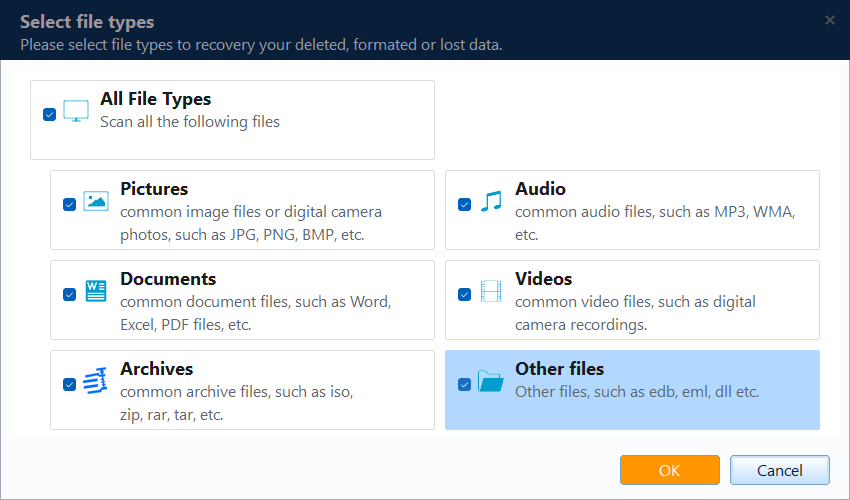
Step 4. Select the affected location, such as a deleted-file folder, Recycle Bin location, formatted partition, RAW drive, USB drive, or memory card.

Step 5. Start the scan and wait for the result list. Preview the found files when preview is available, select the files you need, and click Recover.

Step 6. Save recovered files to another disk or external drive. After confirming the files open correctly, create a backup so the same data is easier to restore next time.

When Recovery Software Helps
Recovery software is useful for deleted files, emptied Recycle Bin recovery, formatted partitions, RAW drives, and missing files after system errors. If the device is physically damaged, professional data recovery service may be safer.
For a related tool comparison, see Recover My Files alternative.
Conclusion
Do not trade file safety for a risky crack. Use a trusted recovery tool, preview files before saving them, and recover data to a separate drive.
Related Articles
- Recover My Files Alternative
- Empty Recycle Bin Windows 10 Recovery
- Recover Lost Files After Windows 11 25H2 Update
Products
Articles & Tutorials
- Data Recovery
- Data Backup
- File Recovery
- File Backup
- System Backup and Restore
- Disk and Partition Clone
- Technical articles
- Mobile articles
- Disk Master Help
- Windows Data Recovery Tutorials
- Windows Secure Delete Tutorials
- Windows Partition Management Tutorials
- Windows File Backup and Restore Tutorials
- Windows System Backup and Restore Tutorials
- Windows Disk Backup and Restore Tutorials
- Windows Clone Tutorials