How to Find VMware License Key: View Reliable Ways to Locate VMware Workstation
Where to Find VMware License Key
"I have windows work station 7 and would like to upgrade to 12 but cannot find my license key. Can the license key be located somewhere in one of the application files? Is there another way of providing proof to qualify for the upgrade pricing?"
VMware Station will ask for a license key when installing software on a brand new computer or re-installing it after a crash, accidental deletion, or other unknown reasons. However, finding the product key can be challenging, requiring the use of additional programs to locate it. This article will guide you through the simple steps to find your VMware license key.
Quick Navigation (5 Ways):
- 1 - Find VMware License Key via Third-party Product Key Finder
- 2 - How to Find VMware License Key Registry
- 3 - Check VMware License Key by My VMware
- 4 - How to Get VMware Workstation License Key via Customer Connect
- 5 - Check Order Email (If Possible)
1 - Find VMware License Key via Third-party Product Key Finder
To easily get a VMware workstation product key, we recommend using a 1-click product key finder like Qiling Key Finder. This software allows you to find VMware license keys in just two steps, and also extracts keys for Windows, Office, and Adobe software, which can be easily copied and saved for future reference.
Download this product key finder and start to extract number:
Step 1. Click "Application" tab under "Registry Key".
Step 2. Qiling Key Finder displays all installed software registry keys, allowing users to copy, print, or save the targeted serial numbers.
2 - How to Find VMware License Key Registry
To locate the VMware license key, one common method is to use the Registry Editor, which stores recorded information about the computer. The Registry can also be used to find the serial number. To do this, focus on the correct path and avoid modifying other data, as making changes can lead to a computer crash.
Step 1. Press the Windows + R keys to open the Run dialog box, type "regedit" and press Enter to open the Registry Editor.
Step 2. When the Registry Editor pops up, navigate to the following path:
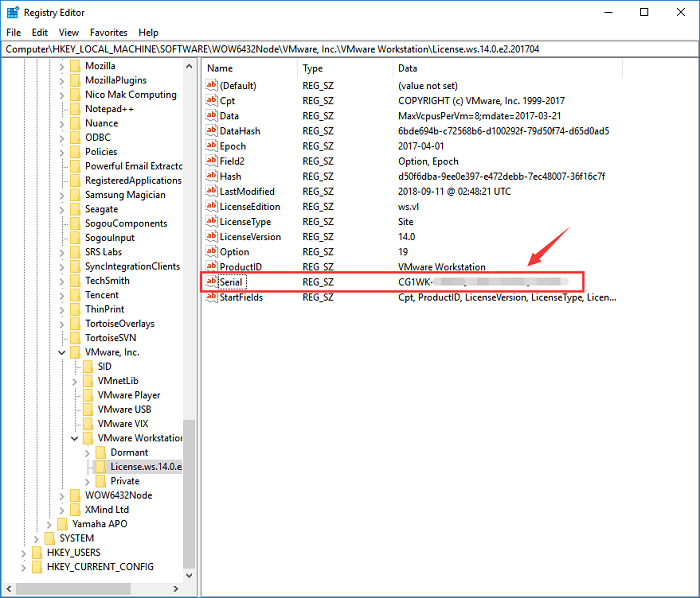
Computer\HKEY_LOCAL_MACHINE\SOFTWARE\WOW6432Node\VMware, Inc.\VMware Workstation\License.ws.x
(X stands the version of VMware software.)
Step 3. On the right panel, you can see the Serial tab where the license key of VMware workstation is displayed. Double-click Serial and copy the serial number that appears.
However, this method may not work all the time, as some users on the VMware forum have reported being unable to locate the license key in the registry. In such cases, using the proven solution may still not provide certainty. If you're experiencing this issue on your device, try the alternative solution in the next section.
3 - Check VMware License Key by My VMware
To find the VMware product key, you can use the Product Key Finder tool or Registry Editor on your computer. Alternatively, you can log in to your My VMware account online and follow the provided tutorial to retrieve the serial number, especially if you've purchased VMware through your account.
Step 1. Log into My VMware.
Step 2. Go to Quick Links and click License Keys.
Step 3. You can see some license key folders, checking folders with license key.
4 - How to Get VMware Workstation License Key via Customer Connect
This method also requires you to log in to My VMware.
Step 1. Login into VMware Custom Connect.
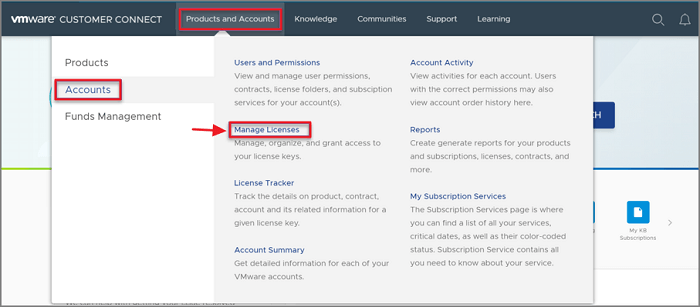
Step 2. To manage licenses, hover your mouse over the "Products and Accounts" tab, select "Accounts", and then click on "Manage Licenses".
Step 3. Choose the right account for finding license keys.
Step 4. To search for a product, go to the search bar, select "Search by" as Product Name, and enter the product name you're looking for.
Step 5. Select the VMware license key to check the info.
You can skip the last option if you don't have enough time to prove it.
5 - Check Order Email (If Possible)
You can find your license keys by checking your order email from VMware. If you still have this email, you can use it to determine your license number. This method may work best for users who have recently purchased the software and haven't deleted their order confirmation emails.
Concluding Thoughts
To find VMware license keys, you can consider five options. Using the Product Key function of Qiling Key Finder is recommended for its simplicity. Alternatively, you can try the manual methods, with Registry Editor being a reliable choice among them.
Related Articles
- How to Find CCleaner Product Key on Windows 11 (2 Easy Ways)
- Zoom Product Key Finder Free Download, Find Missing Zoom Product Key
- How to Recover Forgotten Gmail Password? [Step-by-Step]
- Top 7 Best Product Key Extractor for Windows 11/10
- 9 Ways to Fix "The Remote Computer Requires Network Level Authentication"
Are you seeing the error 'The remote computer requires network level authentication'? This is an easy to solve error. Keep reading this article as we discuss different methods that you can use to resolve this issue. - This Device Cannot Start Code 10 - 12 Methods Included
Fix This device cannot start Code 10 in Windows. Try driver updates, device checks, hardware troubleshooting, and system repairs.
Products
Articles & Tutorials
- Data Recovery
- Data Backup
- File Recovery
- File Backup
- System Backup and Restore
- Disk and Partition Clone
- Technical articles
- Mobile articles
- Disk Master Help
- Windows Data Recovery Tutorials
- Windows Secure Delete Tutorials
- Windows Partition Management Tutorials
- Windows File Backup and Restore Tutorials
- Windows System Backup and Restore Tutorials
- Windows Disk Backup and Restore Tutorials
- Windows Clone Tutorials