JPG VS JPEG: What's the Difference
When working with photos, JPG and JPEG are two common extensions that can be easily confused with each other due to their similarity. Despite their similarity, both formats are widely used on the internet, making it likely that most downloaded images are in JPG or JPEG format.
The terms JPG and JPEG are often used interchangeably, but they refer to the same image format. This post will guide you through the distinctions between the two formats and provide a step-by-step guide on how to convert JPEG to JPG.
Differences Between JPG and JPEG
JPG and JPEG are the same thing, a widely used digital picture format, established by the Joint Photographic Experts Group.
The main difference between JPG and JPEG is that JPG is a shortened form of JPEG, with JPG being a 3-letter extension and JPEG a 4-letter extension. This difference arose due to a technical limitation in early Windows versions, which required 3-letter extensions, leading to the use of JPG instead of JPEG, while UNIX and MAC users continued to use the full .jpeg extension.
Both .jpeg and .jpg file formats are ideal for digital photography due to their raster picture nature, which differs from vector graphics. Additionally, both file types degrade in quality when compressed, and it's worth noting that JPEG and JPG are actually acronyms for the same ISO sub-committee.
Can I Convert JPEG to JPG
You can convert your JPEG file to JPG using a converter like IrfanView, a full-featured image editor with a clean and straightforward user interface that hides a practical and helpful program behind it.
To convert JPEG to JPG using IrfanView, follow these steps:
Step 1: Download and install IrfanView, then launch it. Next, click on "File" and select "Open" to open your JPEG file.
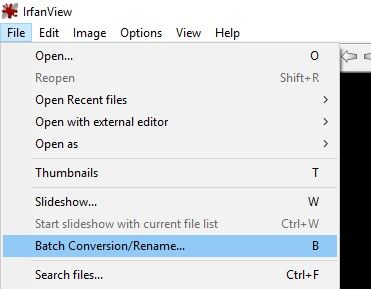
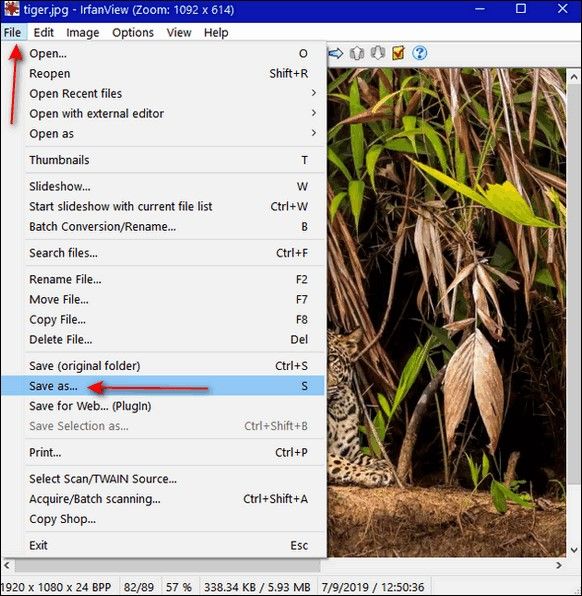
Step 2: To save the image, click on File and then select Save from the dropdown menu.
Step 3: Now, select the output format as JPG to convert the file. You can also change the filename. After that, click on the "Save" button.
Mac users can use Preview to convert JPEG to JPG images.
Conclusion
JPG and JPEG are the most commonly used file extensions for storing and saving digital photos, ideal for website owners who want to present visually appealing graphics and provide a great user experience.
There is no difference between JPG and JPEG, as they are the same image file extension. So, whether you prefer JPG or JPEG, you're using the same format.
As you read this, you may be interested in some topics. Fortunately, we have introductions to more related issues that we hope will be helpful to you.
Also read:
How Do I Convert iPhone Photos to JPEG
Related Articles
- RAM vs. ROM: 8 Differences between RAM and ROM
- Detailed Information About What Is NAS Backup
- What Is DISM Command? How to Repair Windows Image with It?
- What Is The Root Directory and What Are The Folders in The Root Directory Used for
- How to Factory Reset ASUS Laptop from BIOS🔥
There are cases like technical issues or passwords forgotten, and you can't log in to your laptop. You may need to factory reset the ASUS laptop from BIOS. In this article, we'll show you how to restore your ASUS laptop. Read on to find out more. - 4 Ways to Factory Reset ASUS Laptop Without Password
Are you looking to learn how to factory reset an ASUS laptop without a password? This comprehensive guide outlines four effective methods to reset your laptop.
Products
Articles & Tutorials
- Data Recovery
- Data Backup
- File Recovery
- File Backup
- System Backup and Restore
- Disk and Partition Clone
- Technical articles
- Mobile articles
- Disk Master Help
- Windows Data Recovery Tutorials
- Windows Secure Delete Tutorials
- Windows Partition Management Tutorials
- Windows File Backup and Restore Tutorials
- Windows System Backup and Restore Tutorials
- Windows Disk Backup and Restore Tutorials
- Windows Clone Tutorials