A Mini USB - Things You Need to Know
USB is a familiar technology, but mini USB is a smaller version of the standard USB, commonly found in everyday life, particularly in phone charging and data transfer between mobile devices and computers. This post aims to provide more information about mini USB, its features, and its uses.
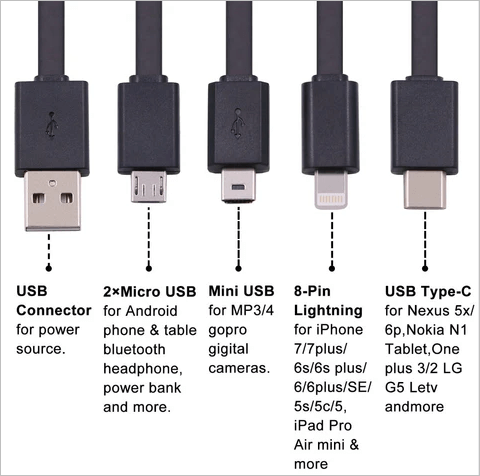
The Definition of Mini USB
The mini USB, short for Mini Universal Serial Bus, is a smaller version of the USB technology. USB, which stands for Universal Serial Bus, is a method of transferring data and files between computers and electronic devices. The mini USB is a smaller socket that can be found on various gadgets, and it serves the same purpose as the standard USB, but in a more compact form.
Mini USB was a pioneering technology developed in the early 2000s, initially designed to connect compact digital devices like mobile phones and other small gadgets. It was a groundbreaking idea at the time, offering an efficient way to transfer data between devices in a small, portable format.
With the decline of mini USB devices, finding mini USB cables in stores is becoming increasingly difficult, making online purchases a viable option for those still in need of them.
Main Features of Mini USB
Mini USB has something different from the traditional USB. Here this part tells you several features of mini USB. They are listed below:
- Portability: Mini USB is very compact, measuring about 3 x 7 mm, making it easy to carry in a pocket or even a wallet.
- Durability: A reliable and robust design can ensure a stable connection, even after thousands of insertions, providing a long-lasting and dependable solution.
- Effectiveness: The integration of power and data transportation in one connector can indeed provide cost savings, as it eliminates the need for separate connectors for power and data, reducing the overall number of connectors required and associated costs.
What Is Mini USB Used For
Mini USB connectors come in two types: USB mini A and USB mini B, which enable both charging and data transfer between devices and a computer. They were initially used in electronics such as digital cameras and MP3 players, but have since been adapted for use in portable devices like mobile phones, USB hubs, and other modified gadgets.

The mini USB cable is primarily used for charging portable electronics, but it can also be used to transfer data between computers with at least one USB port.
Some mini USB cables are designed specifically for certain mobile device manufacturers, limiting data or power transfer when used with those devices. These cables may also have extra internal pins for carrying additional voltages.
A mini USB can be used as a detachable storage device and also to connect devices like modern mobile phones to computers, as well as other portable devices such as MP3 players, digital cameras, and gaming consoles.
Have you been aware of USB types? PC Mag provides you with a clearer classification of USB drives.
Wrap Up
A mini USB is a more portable version of a traditional USB, designed for convenience. Its name "universal" reflects its ability to connect and transfer data between various digital devices, making everyday tasks easier with the added benefit of charging capabilities.
Related Articles
- Rollback from Windows 11 to Windows 10 - 2 Methods
- What is Windows Image Boot (WIMBoot)?
- Windows 11 Is Not Activated: How to Activate Windows 11 OS for Free
- How to Install Google Drive for Desktop on PC ☁️
You can easily install Google Drive on your system, whether you're using Windows or Mac, and take advantage of its cloud-based storage space to store and share files. - Learn How to Install on ReFS Partition Today | Windows 11 Installation Made Simple
Have you ever thought about installing your Windows 11 on ReFS partition? This article is going to give you a full guide on how to install Windows 11 on ReFS partition with a full tutorial.
Products
Articles & Tutorials
- Data Recovery
- Data Backup
- File Recovery
- File Backup
- System Backup and Restore
- Disk and Partition Clone
- Technical articles
- Mobile articles
- Disk Master Help
- Windows Data Recovery Tutorials
- Windows Secure Delete Tutorials
- Windows Partition Management Tutorials
- Windows File Backup and Restore Tutorials
- Windows System Backup and Restore Tutorials
- Windows Disk Backup and Restore Tutorials
- Windows Clone Tutorials