4 Choices of Portable Windows Product Key Finder for Your PC
| Workable Solutions | Step-by-step Troubleshooting |
|---|---|
| 1. Qiling Key Finder | Step 1. Click "Windows" tab under the Registry Key; Step 2. Check Windows product key on the right side...Full steps |
| 2. ProduKey | Step 1. You do not need to install this software to recover your product keys. Download the portable...Full steps |
| 3. Magical Jelly Bean Keyfinder | Step 1. Download its portable version from this link; Step 2. Launch the .exe file; Step 3. The software will...Full steps |
| 4. SterJo Key Finder | Step 1. Download the portable version of Sterjo Key Finder from the official website; Step 2. Launch the tool...Full steps |
Product key finders have been widely used to find serial keys across various operating system versions, including Windows. A portable product key finder offers advantages, as it doesn't require installation on any device to find your product key. This allows you to carry it with you and use it to quickly locate product keys using one of the top 4 methods.
4 Great Options of Portable Windows Product Key Finder
We will check the easy and reliable methods for the best portable Windows product key finders without much ado, each with its own advantages and features, but all share a common factor: they come with a completely portable design.
1. Use Qiling Key Finder to Remember Windows Product Key
Qiling Key Finder is a useful tool for accessing and restoring Windows and Windows server product keys, even in situations where a system or hard drive crash has occurred.
Step 1. Click "Windows" tab under the Registry Key.
Step 2. You can check the Windows product key on the right side of the screen, click "Copy" to paste it, or select one of the other two options.
"Save" - Save to local as a PDF file.
"Print" - Click to print key file.
Some of the features offered by the key finder would include
- It can find the product key for over 10,000 different software tools and programs.
- This software works with multiple versions of Windows, including Windows 11, 10, 8, and 7. It can also find the product keys for Microsoft server and SQL Server.
- The software can recover saved passwords from various web browsers, including Internet Explorer, Mozilla Firefox, Google Chrome, and Edge, even if they have been saved.
- Help you recover WiFi passwords.
We would consider it prime and exceptional software that you would find outstanding in every way possible, and it would be the top of its class.
2. Use ProduKey to Remember Windows Product Key
ProduKey is another key finder that instantly provides access to recovering Windows product keys. This small utility is known to get access to find Windows product keys, offering support for various services and software tools.
A freeware software is available for all Windows versions, including 32-bit and 64-bit systems, and supports Windows 2000/XP/2003/2008/Vista/7/8. It also works with various software tools such as Adobe, Symantec, Autodesk, and Microsoft Office.
How to recover the product keys using ProduKey?
Step 1. You don't need to install this software to recover your product keys. You can download the portable version by clicking on this link.
Step 2. Extract the files to any folder you prefer.
Step 3. Double click the productkey.exe file to run the tool.
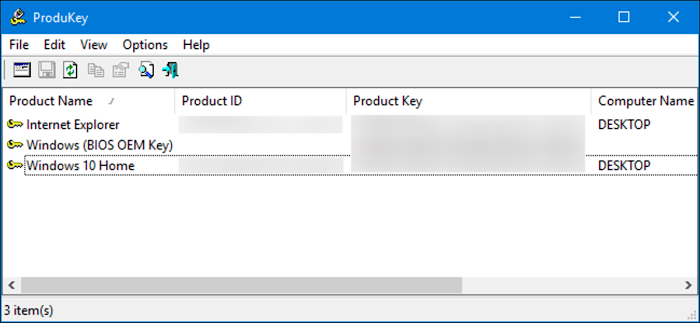
Step 4. The tool should allow you to obtain your product key immediately.
That does it, and you will be able to get your product keys right away. The simple steps should make it a genuinely formidable choice.
3. Use Magical Jelly Bean Keyfinder to Remember Windows Product Key
The Magical Bean key finder is a popular and widely used portable key finder that has gained prominence. It's a freeware utility that's suitable for most needs, helping to recover essential product keys and serial keys.
The tool can recover Windows serial keys from your registry and works as a community-driven configuration, making it a formidable choice. It can help recover product keys from various applications and even recover serial keys from unbootable Windows systems. Additionally, it provides access to the Command line, offering a range of recovery options.
How to recover the product key using Magical Jelly Bean Keyfinder?
The portable version of the Magical Jelly Bean Keyfinder can be used directly from a portable storage device without the need for installation. This allows for easy use on any computer without modifying the local system.
Step 1. Download its portable version from this link.
Step 2. Launch the .exe file.
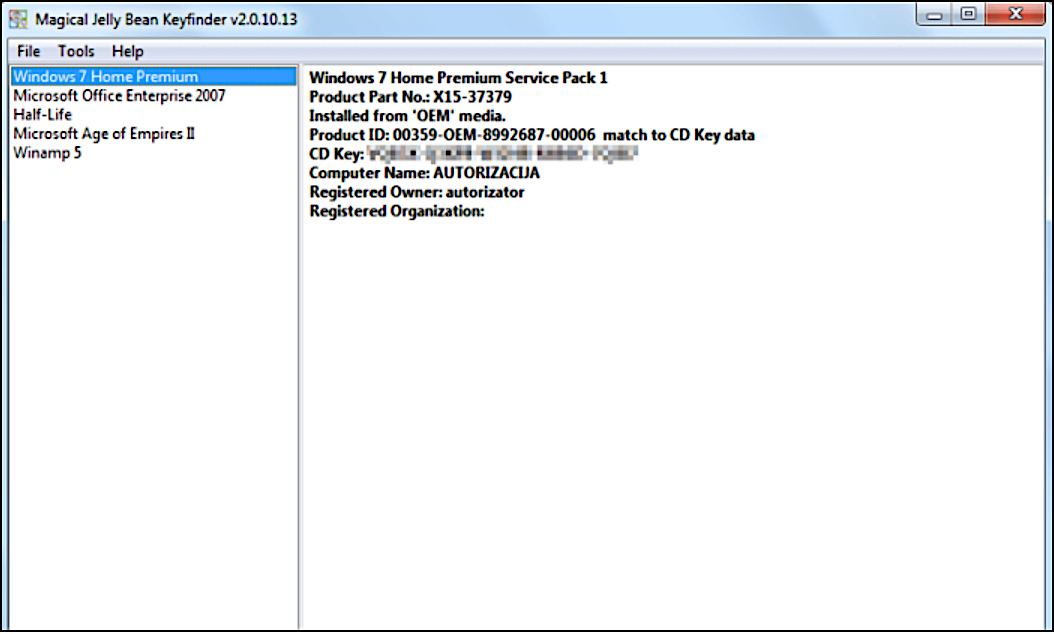
Step 3. The software will display the product keys of all supported software and operating systems installed on your system.
Step 4. To access the product key for Windows or any other software, click on the software from the left-side panel of the tool. This will display the product key and other relevant information in the right-side panel.
We can handle product key retrieval with advanced capabilities, ensuring that you get the help you need in a timely manner.
4. Use SterJo Key Finder to Remember Windows Product Key
If you're looking to find the Windows product key or Microsoft Office product key, SterJo Key Finder is a useful alternative. This small application offers efficient service quality, providing positive results in achieving your goal.
This software supports finding product keys from various services, including Windows 7, 8, 10, and 11, and can also recover keys even on unbootable Windows systems, making it a reliable way to recover product keys efficiently.
How to recover the product keys using SterJo Key Finder?
Most portable Windows product key finders, including this one, offer access to an installation-free key finder, allowing you to easily locate your product key.
Step 1. Download the portable version of Sterjo Key Finder from the official website.
Step 2. Launch the tool and run it.
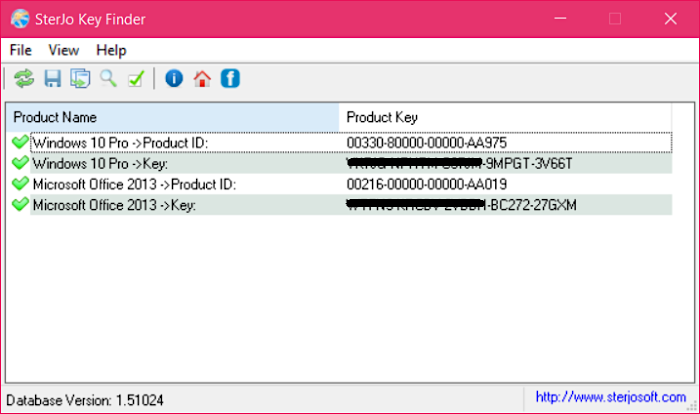
Step 3. All tasks will be completed automatically, allowing you to simply run the application without worrying about anything else.
Step 4. The software allows you to access your product key immediately.
The Concluding Thoughts
Finding the product key can be a challenging task, but using the right tool can make it easier. Look for a tool that offers installation-free performance, allowing you to focus on recovering your product key without any hassle.
The Qiling Key Finder is a brilliant choice for providing unique and powerful options, with a simple interface and functionality that makes it a standout product key finder, especially considering its portability on Windows.
Related Articles
- Zoom Product Key Finder Free Download, Find Missing Zoom Product Key
- How to Find WiFi Code/Password on Windows & Mac [5 Methods]
- 5 Best 2022 Office Key Finder Free Download with Full Guide - Qiling
- SanDisk Unveils 4TB Extreme Portable SSD V2 for Lightning-Fast On-The-Go Storage
If you would like to know about SanDisk 4TB Extreme Portable SSD V2 Review, this post will tell you all you need to know about SanDisk 4TB Extreme Portable SSD V2 with detailed information. - Samsung T5 VS T7: Which One to Choose?
Samsung T5 vs T7: which is better and which one to choose? If you have no idea, you have come to the right page. This article will tell you the difference between Samsung T5 SSD and Samsung T7 SSD. After reading this article, you can pick the right one. - Samsung T7 vs. T9: Which SSD to Choose?
A post comparing the Samsung T7 and T9 SSDs provides valuable insight into the performance and features of these drives, highlighting the pros and cons of each model to help users make an informed decision when choosing an external SSD.
Products
Articles & Tutorials
- Data Recovery
- Data Backup
- File Recovery
- File Backup
- System Backup and Restore
- Disk and Partition Clone
- Technical articles
- Mobile articles
- Disk Master Help
- Windows Data Recovery Tutorials
- Windows Secure Delete Tutorials
- Windows Partition Management Tutorials
- Windows File Backup and Restore Tutorials
- Windows System Backup and Restore Tutorials
- Windows Disk Backup and Restore Tutorials
- Windows Clone Tutorials