What is USB 4: All You Need to Know [ 2023 Complete Understanding]
The Universal Serial Bus (USB) connection has been a staple for various devices, but the specific port and cable used can vary greatly. Enter USB 4, which offers faster speeds, more features, and potentially greater standardization across the industry, making it the most advanced USB yet.
Introduction
With the advent of USB 4, a new era of connectivity has begun. This technology is poised to become the go-to connector for a wide range of applications, including rapid data transfers, outputting to ultra-high definition external monitors, connecting older USB devices, and charging devices, making it a versatile and essential tool for users over the next several years.
The curiosity about USB 4 has piqued the interest of many, and for those eager to learn more, this article is a perfect resource. It provides a comprehensive overview of the latest addition to the USB family, highlighting its enthralling features and what they mean for users. By the end of this article, readers will have a thorough understanding of what USB 4 is all about.
What is USB 4?
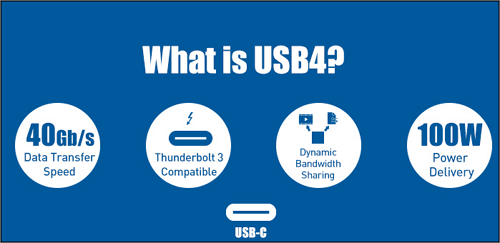
USB 4 is a USB system defined in the USB 4 standard, which was issued in version 1.0 by the USB Implementers Forum in 2019. It requires USB-C ports and USB PD capability for power supply, and unlike USB 3.2, it supports DisplayPort and PCI Express tunneling.
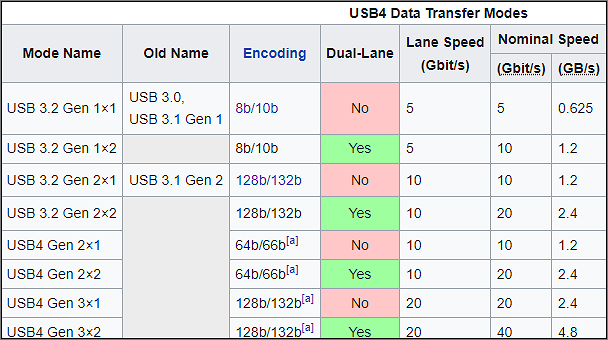
The design allows for dynamically sharing a single high-speed link with various end-device types, optimizing data transmission by type and application. USB 4 devices must provide 20 Gbit/s throughputs and can support 40 Gbit/s throughputs, potentially resulting in greater effective data rates than USB 3.2.
USB 4 Specifications
The USB 4 Specification doubles the maximum aggregate bandwidth of USB, allowing for concurrent data and display protocols, and is based on the Thunderbolt protocol definition provided by Intel Corporation.
The USB 4 design allows for a single high-speed link to be dynamically shared among multiple types of end devices, enabling efficient data transfer by type and application.
The USB 4 specification allows the host to scale display data flow allocations properly, taking advantage of the USB Type-C connection's ability to serve as an external display port for many host devices. This results in a connection that scales to the best capabilities of both connected devices, while also maintaining compatibility with current USB 3.2, USB 2.0, and Thunderbolt 3 hosts and devices.
The USB 4 Key features are given below:
- The technology supports up to 40 Gbps operation on 40 Gbps certified cables and can also utilize current USB Type-C cables for two-lane operation.
- The bus's maximum aggregate bandwidth can be shared with efficiency by utilizing various data and display methods. This involves optimizing the flow of data to ensure that the bus is utilized at its maximum capacity.
- Thunderbolt 3, USB 3.2, and USB 2.0 backward compatibility.
What Is A USB 4 Port Used for?
A new generation of USB 4-powered docks and peripherals is emerging, offering faster transfer rates, improved video bandwidth management, and optional Thunderbolt 3 compatibility.
USB 4 is expected to be adopted across the 2020s and beyond, powering next-generation docks, monitors, external storage, and high-performance peripherals.
- USB-C, USB-4, and Thunderbolt 4 are all technologies that use the USB-C connection to interface with computers and devices. USB-C is a physical connection type, USB-4 is a communication standard, and Thunderbolt 4 is a high-speed interface technology. They all share the same physical connection type, which is USB-C.
- To improve video without changing the interface, USB 4 devices can use protocol tunneling, which delivers DisplayPort, PCIe, and USB packets simultaneously, allocating bandwidth proportionately.
- DisplayPort 2.0 can transfer data at twice the speed of USB, reaching up to 80 Gbps, and can display 8K resolution at 60 frames per second with HDR10 color, making it ideal for high-resolution displays. Unlike USB, which can only transfer data in one direction, DisplayPort 2.0 can send data to the display in one go, using all eight data lanes at once, making it a more efficient and faster alternative.
Is USB 4 the Same as USB-C or Thunderbolt?
Now that you're familiar with the features and applications of USB 4, let's discuss how it differs from previous USB ports. USB 4 is a significant upgrade over its predecessors, offering faster speeds, higher resolutions, and improved data transfer rates.
USB 4 offers significant advancements over regular USB, with a minimum of 10Gbps transfer speeds and most devices supporting 20Gbps. This is a significant increase from previous versions like USB 3.0, 3.1, and 3.2, which only allowed for 5Gbps speeds. USB 4 is a major evolution of the USB standard.
USB 4 vs. USB-C, What's the Difference?
USB 4 and USB-C may look similar at first glance, but they refer to completely different technologies. A USB-C cable is a specific type of cable, while USB 4.0 is an advancement in USB cable technology, with no relation to the form factor. In fact, a USB-C cable can support both USB 4 and USB-C, and devices can be USB 3 or 4 without any visual indication, as some USB 3 connections still use the older USB-A design.
| Basis for Comparison | USB-Port | USB-C |
|---|---|---|
| Compatibility | Can work with older tech | Won't work with older USB technology |
| Year of Invention | 2019 | 2014 |
| Data Transfer Speed | Up to 40 Gbps | Up to 20 Gbps |
| Plug-in Reversibility | Not exist | Exist |
| Fast Charging | Highly fast charging | Fast charging |
| Power Capability | Higher | Normal |
USB 4 vs. Thunderbolt, Which Is Better?
USB 4 has some benefits, but it's not the only technology available, as Thunderbolt 4 also offers similar advantages, including a USB-C port with data transfer speeds of up to 40 Gbps.
You can now connect up to 5 Thunderbolt devices to a single PC. It can also handle two monitors at the same time and has a higher minimum power need (15W for Thunderbolt vs. 7.5 for USB 4) Here's a comparison chart between USB 4 and Thunderbolt 4.
| Features | USB 4 | Thunderbolt 4 |
|---|---|---|
| Universal 40Gbps cables up to meters in length | No | Yes |
| One computer port | No | Yes |
| Minimum speed requirements | 20Gbps | 40Gbps |
| Accessories with four Thunderbolt ports | No | Yes |
| Minimum PC video requirements | One display (No Minimum) | Two 4K displays |
| Required PC charging on at least one computer port | No | Yes |
| Minimum PC data requirements | USB 3.2 – 10Gbps | PCIe 16GbpsUSB 3.2 – 10Gbps |
| Required PC wake from sleep | No | Yes |
| Thunderbolt networking | No | Yes |
| Minimum PC port power for accessories | 7.5W | 15W |
| Mandatory certification | No | Yes |
| Cable testing and cable quality audit | No | Yes |
| Required Intel VT-d-based DMA protection | No | Yes |
Advantages of USB 4 Over Other USB Types Like USB 3.0
USB 4 is a significant upgrade to the USB port family, meeting modern standards with its specifications and features. It surpasses USB 3 in several key areas, as shown in this chart highlighting the critical differences between the two.
| USB 3.0 | USB 4 |
|---|---|
| The USB 3.0 and 3.1 specifications outline the number of connection types, including Type A and Micro-B. | Type C, often known as USB-C or Type-C, is used solely by USB 4. |
| The typical USB 3.0 specification allows for a maximum power output of 4.5 W (900 mA at 5 V). | USB 4 can handle up to 100 W of power, which is equivalent to 5 A at 20 V. |
| USB 3 specifies a maximum bandwidth of 5, 10, and 20 Gbps, respectively, across its three iterations.. | USB 4 has a maximum bandwidth of 40 Gbps. |
| The USB-C connector requires a 24-pin connection with 12 A pins on top and 12 B pins on the bottom. | USB 4 has two lanes of differential SuperSpeed couples with a maximum bandwidth of 20 Gbps per lane. |
| It isn't compatible with thunderbolt | USB 4 is based on Thunderbolt 3 itself, |
Can USB 4 Use Type-C Ports?
The modern USB-C connector is more powerful and user-friendly than its predecessors. It can quickly charge popular devices such as the MacBook Pro and Nintendo Switch, and is faster than any other USB type. USB 4, in particular, will only use Type C connectors, which is fitting given that only Type-C supports newer standards like USB Power Delivery.
The Bottom Line
USB 4 hosts and devices will be faster and have more functionality than their USB 3 counterparts, increasing the standard's capabilities and introducing new features to make it more compatible with current gadgets.
USB 4 aims to harmonize the USB standard by providing a fresh performance and features, making USB-C's connector more straightforward and reducing the number of cords and chargers needed.
USB 4 FAQS
Until now, you must have gotten an answer to the question of what USB 4 is, but some more questions need to be answered about USB 4. Here they are!
1. What Are the Differences Between USB 4 and USB-C?
The primary difference between USB 4.0 and USB-C is that USB-C is a type of cable, whereas USB 4.0 is a specific version of the USB standard.
USB 4.0 is the latest version of USB technology, but it is not the same as USB-C. While USB-C refers to the physical design of the connections and ports, USB 4.0 defines the functionality and speed of a USB-C cable. In other words, USB 4 is the protocol, while USB-C is the connector type.
The USB-C connector itself is not backward compatible, but the underlying USB specification is, meaning older USB devices can still be used with a USB-C port, but only through an adapter. The physical connector is what's not compatible, not the USB technology.
USB 4.0 allows backward compatibility with earlier generations, unlike USB-C which has restrictions on connecting to earlier, larger USB ports.
2. What USB 4 Devices Can You Buy?
Many products now support USB 4 technology, but it is essential to check the product name carefully as USB 4 is often included as a marketing cue. Examples of products that support USB 4 include external SSDs, storage enclosures, and high-speed cables.
USB 4 SSDs: The USB 4 SSD is one of the fastest drives ever introduced, offering the best solution for those seeking maximum performance from their SSD drive.
USB 4 Storage Enclosures: USB 4 storage enclosures offer enhanced performance, improved video management, and optional compatibility, making them a versatile solution for various storage needs.
USB 4 Cables: USB 4 technology provides access to high video quality and makes unused bandwidth available for power, data, and other uses through a single connection.
3. Which USB Type is the Best for You?
After learning about the differences between USB-C and USB 4, you'll see that you're not choosing between the two because USB 4 actually uses the same USB-C design, so if you buy a USB 4 device, it will have the same physical appearance as a USB-C device.
USB 4 and Thunderbolt 4 are both high-speed interfaces that offer similar performance and features, making them a good choice for users who want the best possible connectivity options.
USB 4 is the next generation of USB, offering broad compatibility and improved performance. It enables rapid charging, simultaneous support for multiple devices, and near-instant data transmission, all with fewer connections than previous USB versions. For those who appreciate the convenience and reliability of USB, sticking with it just makes sense.
Related Articles
- What Is MRT Process Mac: High CPU Usage [Updated 2023]
- What Is Immutable Backup? [All You Need to Know]
- All Information About the Disk Utility on Mac [Updated 2022]
- What Is Malware & Tips to Avoid Malware on Your Computer
- Recover Deleted NetFlix Profile & History
Your NetFlix profile disappeared or Netflix profile keeps getting deleted by itself? With Profile gone, so the NetFlix viewing history. This page collects some easy ways to help recover deleted NetFlix profile and history. - How to Recover Lost Adobe Product Key in 3 Ways
Have you forgotten and lost the Adobe Product Key? The guideline will help you retrieve your product key by various methods along with third-party utility.
Products
Articles & Tutorials
- Data Recovery
- Data Backup
- File Recovery
- File Backup
- System Backup and Restore
- Disk and Partition Clone
- Technical articles
- Mobile articles
- Disk Master Help
- Windows Data Recovery Tutorials
- Windows Secure Delete Tutorials
- Windows Partition Management Tutorials
- Windows File Backup and Restore Tutorials
- Windows System Backup and Restore Tutorials
- Windows Disk Backup and Restore Tutorials
- Windows Clone Tutorials