What Is SSD TBW and How to Check TBW on SSD
Introduction
SSDs are replacing hard discs due to their silence, speed, and reliability, but are more expensive for the same storage capacity.
Manufacturers grade their drives based on three main characteristics: TBW (terabytes written), drive writes per day (DWPD), and drive capacity. TBW reflects an SSD's durability level, and verifying it before purchase is recommended. However, if you're unfamiliar with SSD TBW, this article will provide an overview and guidance on how to check it.
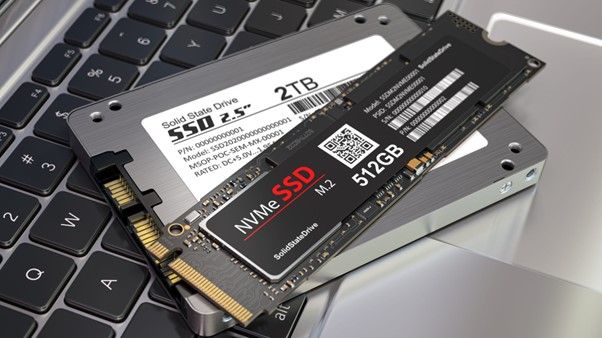
What Is SSD TBW
TBW stands for Terabytes Written, a measure that indicates the total amount of data that can be written to a storage device, such as a hard drive or solid-state drive, before it starts to deteriorate and potentially fail, usually within the warranty period.
An SSD's lifespan is measured in terabytes written (TBW), which indicates how much data can be written to it before it needs to be replaced. For example, if an SSD has 350 TBW, it can handle 350 terabytes of data before it reaches its capacity and needs to be replaced. This is because most SSDs have a capacity of 75 to 150 TBW.
At that time, it's recommended to replace the drive since the data on it is no longer as secure as it was. The drive's Total Bytes Written (TBW) is distributed throughout its lifetime, typically specified in multiple single-digit years, often 3 or 5. This means TBW numbers can vary from as low as 30TB to hundreds of terabytes on different drives.
The guarantee ensures that the product can handle transferring a certain amount of data over its lifespan, whether that's done in a short, intense period or spread out over time.
Why Is TBW Important
The TBW (Total Bytes Written) value is crucial for SSDs due to their limited lifespan. SSDs store data in flash memory cells, which degrade with each delete and write operation. Unlike reading, which doesn't affect the cells, writing and deleting data causes them to decay and eventually fail. TBW indicates how much data you can store before the memory cells reach failure.
When choosing a storage drive, consider the Total Bytes Written (TBW) metric, which is crucial in determining the drive's lifespan and overall performance. Manufacturers continually improve drive productivity and capacity while reducing costs, making TBW a vital factor in your purchasing decision. If two drives have similar read and write speeds, prioritize the one with higher TBW for a longer-lasting and more reliable storage solution.
Larger capacity devices have a higher TBW rating due to additional flash storage cells, allowing a 1TB SSD to have a 600 TBW, compared to a 500GB SSD's 300 TBW.
Purchasing a drive with a high Total Bytes Written (TBW) capacity ensures a longer lifespan, making it suitable for frequent and diverse backups, upgrades, and future-proofing before the warranty term expires, ultimately keeping your data secure and PC running smoothly for years to come.
How to Check TBW on SSD
Since you know what TBW is and why it's important, you might wonder how to check TBW on your SSD or while purchasing an SSD. Unfortunately, it's not possible to manually check the TBW, so you'll need a third-party tool, and CrystalDiskInfo is a great option for that.
CrystalDiskInfo is a utility tool that uses the S.M.A.R.T. method to inform you about the health and potential failure of your hard disk's hardware efficiency, providing detailed information about your SSDs.
This tool provides detailed information about the SSD's performance, including its current temperature, number of failed reads or writes, operating time, launch and halt frequency, and more. With it, you can easily check the TBW (Terabytes Written) of your SSD.
To check the SSD TBW using CrystalDiskInfo, follow these steps:
Step 1: Download and install CrystalDiskInfo on your computer, and launch it.
Step 2: Start the scan by clicking on the "Start" button and waiting for a few minutes. Select your SSD name from the list, such as local disk C:/, which is your SSD.
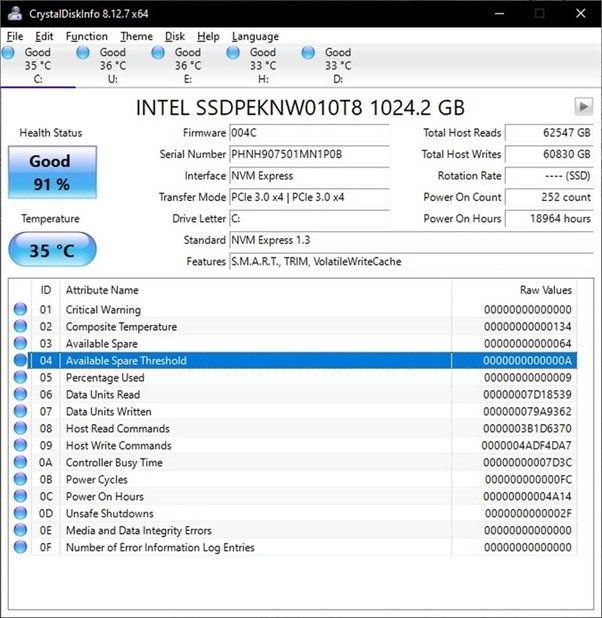
Step 3: The used TBW of your SSD is displayed next to the column "Total Host Writes".
Note: With CrystalDiskInfo, you can compare the used TBW to the manufacturer's written TBW, view drive health, temperature, and more.
How Many Gigabytes a Day Is Typical for A Hard Drive to Write
A typical office user writes around 10-35 GB daily, which would take over 5 years to reach the 70TB SSD write limit, even if increased to 40GB.
The average TBW statistic for a 250 GB SSD is between 60 and 150 terabytes written, indicating that to exceed a promised TBW of 70, a client must write 190 GB daily for a year.
What Will Happen If SSD Reached The TBW limit
Many people believe that their SSD will die once they reach the complete TBW limit, but this is not true. Once the TBW is filled, the SSD will still retain its data, allowing you to access it whenever you want. However, writing functionality will no longer be available, and the SSD's warranty will become void (if it hasn't already).
This metric measures the storage capacity of a drive before its memory cells deteriorate, indicating the point at which data loss or drive failure becomes a risk.
The Mean Time Between Failure (MTBF), Total Terabyte Write (TBW), and other similar metrics are approximations, suggesting that NAND cells have limited writing capabilities.
While most SSDs are designed to last for a certain number of write cycles (typically around 3,000 to 5,000), it's not uncommon for them to exceed these limits, especially for users who have been using their SSDs for an extended period. In fact, some people have been using their SSDs for 5 to 10 years without any issues, suggesting that the actual lifespan of an SSD can be significantly longer than its rated capacity.
Conclusion
SSDs significantly boost system performance, and their benefits are hard to fully appreciate until experienced firsthand. A key factor to consider when purchasing or understanding the lifespan of an SSD is its Total Bytes Written (TBW), which defines the write limit. The TBW can be checked using software like CrystalDiskInfo, an all-in-one platform that provides this and other essential information.
Related Articles
- Bitlocker Encryption: The Guard of Your Data [All You Need to Know]
- What Is Minimum Processor State? Everything You Need to Know
- 20 Useful Keyboard Shortcuts That Every Mac User Should Know
- What Is Unified Memory and How to Compare Unified with RAM? [Complete Information]
- How to Recover Deleted Zoom Recording/meeting | Zoom Video Recovery
Accidentally deleted a Zoom recording? Learn 3 proven methods to recover deleted Zoom meetings and recordings from Cloud, Zoom Trash, and local drive with our step-by-step guide. - How to Recover Files after Reinstalling Windows 11/10/8/7
If you've reinstalled Windows 10 and lost everything, you're not alone. There are three effective ways to recover files after a Windows reinstall, clean install, reset, or automatic update. Qiling data recovery is the easiest method to recover missing or deleted files after installing new Windows.
Products
Articles & Tutorials
- Data Recovery
- Data Backup
- File Recovery
- File Backup
- System Backup and Restore
- Disk and Partition Clone
- Technical articles
- Mobile articles
- Disk Master Help
- Windows Data Recovery Tutorials
- Windows Secure Delete Tutorials
- Windows Partition Management Tutorials
- Windows File Backup and Restore Tutorials
- Windows System Backup and Restore Tutorials
- Windows Disk Backup and Restore Tutorials
- Windows Clone Tutorials