What Is Unified Memory and How to Compare Unified with RAM? [Complete Information]
Unified memory is a virtual address space that can be shared between the operating system and applications, with the potential to become a new paradigm in data storage. Unlike traditional RAM, which is temporary, unified memory is persistent, allowing access to content across multiple applications simultaneously. This key difference sets unified memory apart from RAM, making it a more versatile and innovative storage solution.

What Is Unified Memory?
Unified memory is a feature in CUDA that allows for shared access to memory between the host and device, eliminating the need for manual memory management. This can be helpful for developers as it simplifies the process of writing and debugging code, reduces the risk of memory-related errors, and improves overall performance.
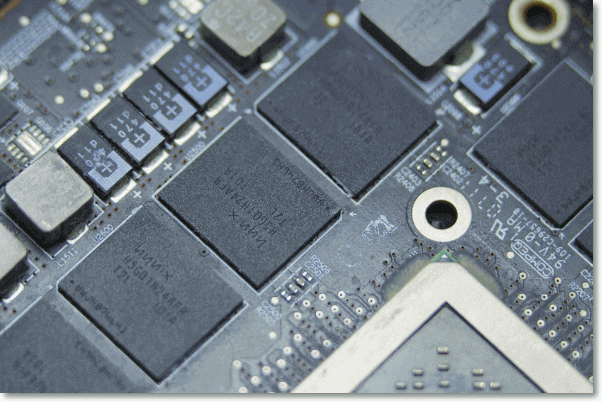
Definition: The unified memory is a type of memory that allows programs to access any data created or modified by any program while running, and is a standard feature in all operating systems, including Windows, Linux, and Macintosh.
Functions: Unified Memory allows for the simultaneous processing of various types of data, including audio, video, text, and photos, on a device with the same storage, processing power, and graphics capabilities.
With the advancement of technology, a smartphone user can now easily access a multitude of features with just one device, including opening pictures, recording audio, searching the web, and playing games, making it a reality that was once just a dream.
Features:
- With Unified Memory, your apps share a single memory space, eliminating the need for separate areas for code, graphics, and data. This allows for more efficient use of memory and improved performance.
- Memory in a smartphone is shared between apps, similar to how desktop computers work, making them often faster than laptops.
- Unified Memory allows for a more powerful device by reducing the bottleneck between the CPU and GPU, making it possible to have a more powerful device.
Unified Memory vs RAM: How to Compare?
Unified Memory vs. RAM:
The unified memory is similar to RAM but with only one memory location, eliminating the need to worry about separate locations. However, this concept is often confused with the total storage space of all RAMs being available in one location, which shares some similarities with RAMs but also has some differences.
Similarities:
- Now let's discover how Unified memory and RAM are similar:
- Both Stacks and Queues can keep multiple data structures active at the same time, allowing for efficient management of data.
- Unified memory can handle objects of any size, whereas RAM is limited to 4 KB of data.
- The performance of both is excellent.
Comparison By Features:
| Comparison | Features |
|---|---|
| Volatile or Not? | Unified memory isn't volatile, whereas the Ram is. |
| CPU/GPU Access or Not | Unified memory allows both the CPU and GPU to access the same memory space, whereas RAM typically serves only the CPU or GPU, depending on the system configuration. |
| Capacity | Ram is only short-term data, whereas unified memory can store long-term data. |
| Speed | Unified memory increases speed as compared to Ram. |
Conclusion
Unified memory is a type of computer memory that's faster and more cost-effective than traditional DRAM, but it's still more expensive than RAM for most home users.
FAQs
1. Is 8 GB of unified memory enough?
8 GB of unified memory may not be sufficient for a team, depending on the work being done.
2. Is there a big difference between 16 GB of RAM and 32GB?
Your computer's RAM (Random Access Memory) is like its storage space, where it holds programs and files. The amount of data it holds is not the same as the amount of RAM.
Upgrading your computer's RAM can significantly improve its performance, allowing you to run more programs simultaneously and switch between them quickly. If you're considering purchasing a new laptop or desktop, adding more RAM is often a worthwhile investment. However, if you already have a computer, upgrading the RAM can be a cost-effective way to breathe new life into an older machine, making it feel faster and more responsive.
3. Is it better to have more sticks of RAM or less?
For most users, a couple of hundred MB of RAM is sufficient, but those who rely heavily on resource-intensive programs like Photoshop or Maya may need more RAM to ensure smooth performance.
These applications can cause computer systems to use up RAM without our knowledge, making it essential to have a large amount available in case of system instability.
If you're a casual blogger, you probably don't need to worry about having 4 GB of RAM for your web browser.
Related Articles
- macOS Ventura: Preview, Features and Downloading
- What Is Werfault.exe and How to Fix Werfault.exe Error in Windows
- How to Build A PC? Follow A Complete Guide to Do It
- Windows File and Folder Permissions Guarantee Your File and Folder Security [You Must Know]
- How to Fix Apps Not Working on macOS Sonoma
If you're experiencing issues with apps not working on macOS Sonoma, this article provides the top reasons and 7 fixes to resolve the problem. However, be aware that trying these fixes may result in data loss, so it's recommended to install Deep Data Recovery for Mac Pro to protect your data. - How to Fix "the Archive Is Either in Unknown Format Or Damaged" [100% Working Solution]
If you're experiencing the Werfault.exe error on your computer screens, this article has got you covered with the best possible fixes to overcome this issue. Keep reading to learn more about the solutions to resolve this error.
Products
Articles & Tutorials
- Data Recovery
- Data Backup
- File Recovery
- File Backup
- System Backup and Restore
- Disk and Partition Clone
- Technical articles
- Mobile articles
- Disk Master Help
- Windows Data Recovery Tutorials
- Windows Secure Delete Tutorials
- Windows Partition Management Tutorials
- Windows File Backup and Restore Tutorials
- Windows System Backup and Restore Tutorials
- Windows Disk Backup and Restore Tutorials
- Windows Clone Tutorials