What Is Differential Backup? Definition and Comparison
What Is Differential Backup
Differential backup is a data backup method that can backup files, folders, and hard drives. It starts with a full backup and then copies all data and files that have changed since the last full backup, making it dependent on the full backup.
To understand the differences between differential, full, and incremental backups, watch this 3-minute video. It will help you grasp the nuances between these backup types and make informed decisions about your data protection strategy.
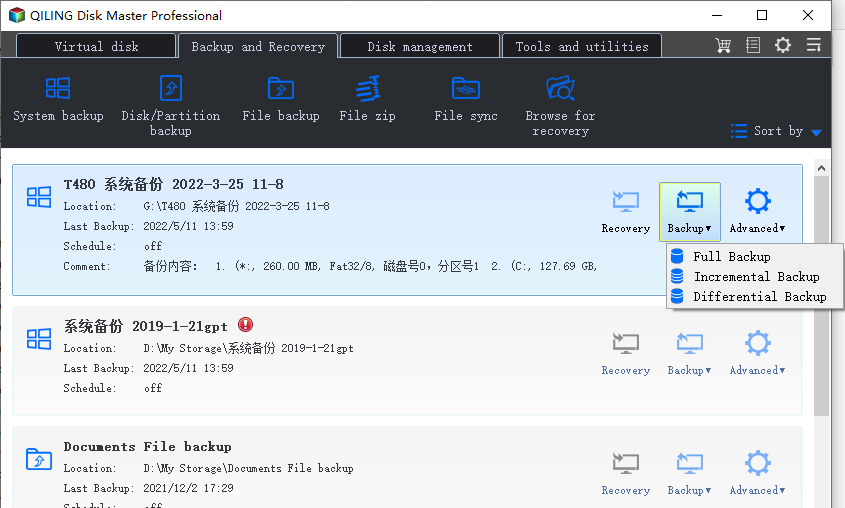
Why you choose differential backup
After a full backup, the data will change daily or weekly, and the disk space doesn't allow for daily full backups. To address this, differential backups are necessary. If daily full backups are impossible, it's likely that data doesn't change too much daily.
A differential backup can be a game-changer in data recovery. To restore data, simply use a full backup and the latest differential backup together, and you'll have your data back.
What does a differential backup do
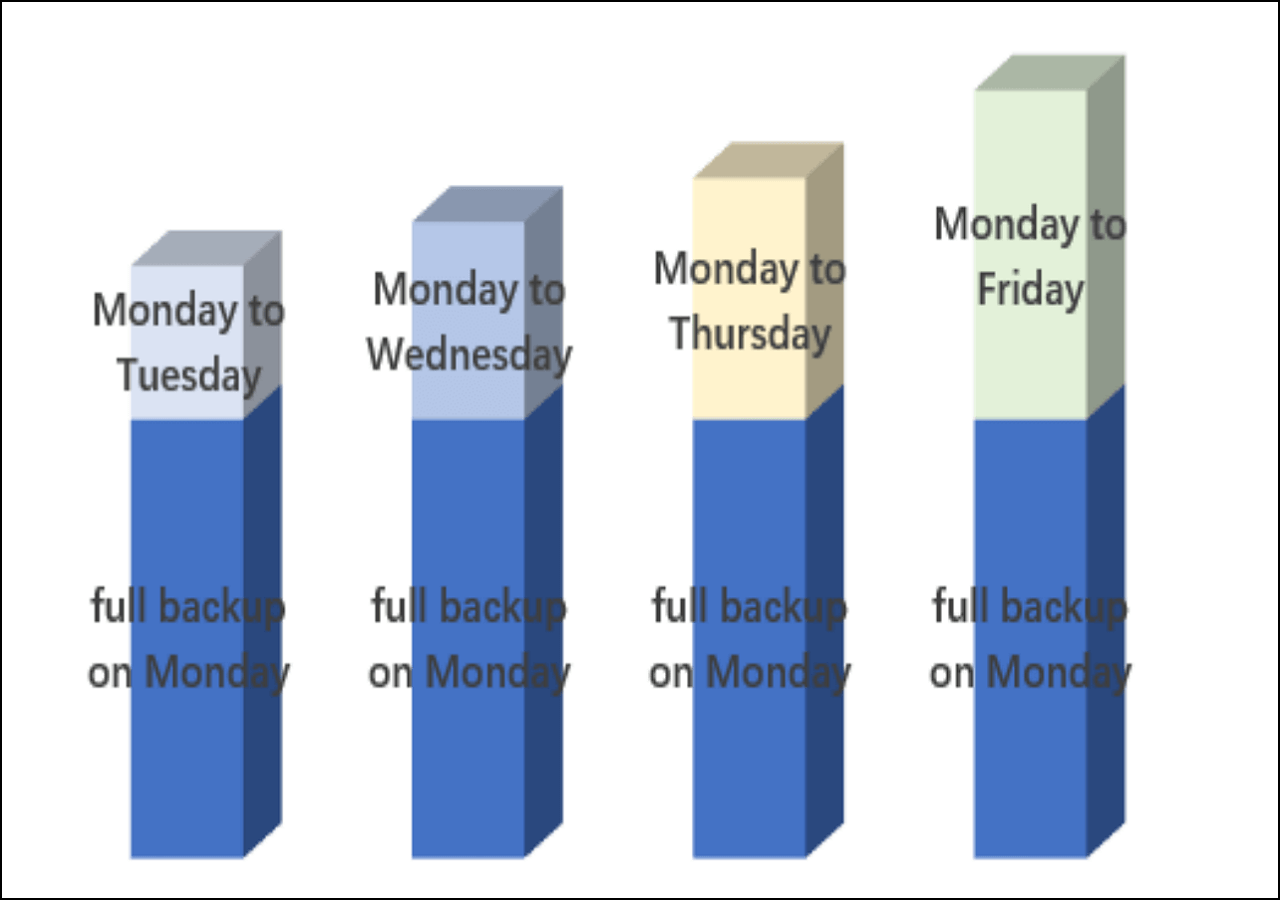
If you did a full backup on Monday, Tuesday's backup will only back up the files added since Monday's full backup. This means that Tuesday's backup will be smaller and quicker to complete compared to a full backup.
- Monday: A full backup is created. It contains ten files.
- On Tuesday, two new files were added and a differential backup was performed. As a result, two newly added image files were created.
- On Wednesday, you add three new files and perform a differential backup. This results in two image files from Tuesday and three newly added image files.
Full Backup VS Differential Backup
A full backup involves copying all data and files at once, making it a straightforward and widely understood backup solution.
We need more time to make a full backup file, which may take up more space on your computer, making it suitable for long-term situations like monthly backups.
Differential backup relies on a full backup, recording changes after the last full backup, and is more efficient than full backup, but gets closer to full backup as the backup cycle gets longer.
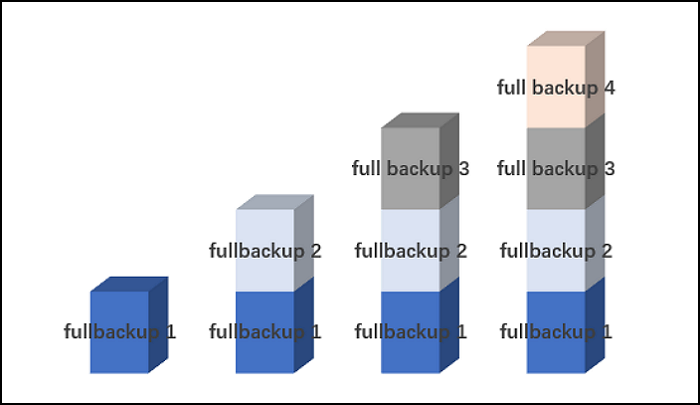
Incremental Backup VS Differential Backup
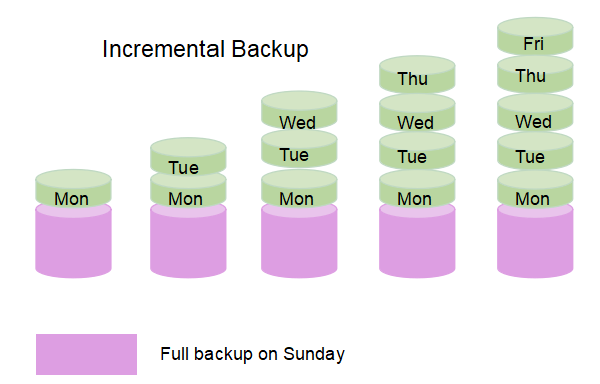
Incremental and differential backups are often confused, but they differ in how they copy changing data. Incremental backup copies data from the last backup, which can be a full, differential, or incremental backup, whereas differential backup copies data from the last full backup.
You need to back up a small amount of data once a time, which results in incremental backup files that take up little space and are quick to create. However, restoring the whole dataset with incremental backups can be complex and may fail if one file is damaged, making it difficult to recover all the data successfully.
A full backup on Sunday would be followed by an incremental backup on Monday, which only contains the changing data after Sunday. This process continues on Tuesday, where the backup file now contains the changing data after the previous incremental backup. Differential backup addresses some of the issues with incremental backup, reducing the risk of file corruption and making file restoration easier.
Advantages and Disadvantages of Differential Backup
Differential backup is a useful method for backing up changing data, but it has its limitations. On the one hand, it offers advantages such as being able to back up only the data that has changed since the last full backup, which can save time and storage space. However, it also has some disadvantages, including the need to store multiple versions of the backup, which can lead to complexity and increased storage requirements.
Advantages:
- A differential backup, like an incremental backup, doesn't require backing up a large amount of data or files like a full backup, saving storage space and time.
- A differential backup is a type of backup that only saves the changes made since the last full backup, making it a time-saving method that can be completed quickly.
- Differential backups are easy to restore, but they still require the previous full backup to function.
Disadvantages:
- Not completely safe.
- The file may be damaged while a differential backup process.
- Although a differential backup is faster than a full backup, it takes less time to restore a full backup than a differential backup, as a full backup is a complete backup of all data, whereas a differential backup only contains the changes made since the last full backup. This makes full backups quicker to restore from, as they don't require the additional step of applying the changes from the differential backup.
- The differential backup file will continue to grow over time, potentially becoming larger than the full backup itself, as it accumulates all the changes made since the last full backup was performed.
Conclusion
Different backup methods have varying features, making it challenging to determine which one is better, as each has its own usefulness in specific situations.
The advantages and disadvantages of differential backup make it a viable option for some users, but not others. While it offers several benefits, such as being able to restore files from a previous full backup and a differential backup, it also has some drawbacks, including the need for a full backup to be restored first. Enterprise users, in particular, may find that a single backup method is not sufficient to meet their needs, making differential backup a useful option to consider.
To ensure data safety, it's recommended to use a combination of differential, incremental, and full backups. A full backup captures all data at a specific point in time, providing a complete snapshot of the system.
Related Articles
- WD Backup vs. Windows Backup - Which One to Choose
- What Is Incremental Backup? Definition, Pros, and Cons
- USB Splitter vs. USB Hub - Which is Better[ A Thorough Guide]
- Top 10 Most Basic SQL Commands To Know
- Fix Page_Fault_In_Nonpaged_Area Error
Fix the Page_Fault_In_Nonpaged_Area error in Windows 10. Learn what causes this blue screen error and follow step-by-step solutions to resolve it. - Working With Thumb Drive& Get the Difference Between It and a Flash Drive
This article will give you a comprehensive introduction to the thumb drive. Later are contents about what a thumb drive is, how to use it, and the distinction between a thumb drive and a flash. Some caring tips are also attached at the end.
Products
Articles & Tutorials
- Data Recovery
- Data Backup
- File Recovery
- File Backup
- System Backup and Restore
- Disk and Partition Clone
- Technical articles
- Mobile articles
- Disk Master Help
- Windows Data Recovery Tutorials
- Windows Secure Delete Tutorials
- Windows Partition Management Tutorials
- Windows File Backup and Restore Tutorials
- Windows System Backup and Restore Tutorials
- Windows Disk Backup and Restore Tutorials
- Windows Clone Tutorials